分享一个自定义的View--SimpleClock
首先这是一个自定义的View,继承自android.view.View .这个是在安卓开发中十分最常用的。
上张效果图:
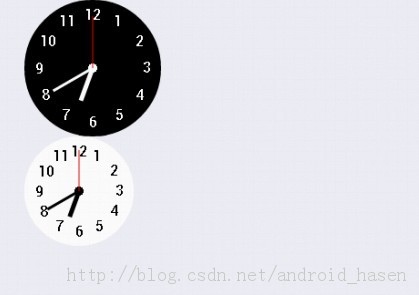
我们在使用安卓系统自带的View时,都是有规定好的属性,我们来赋值,今天简单介绍一下如何自己定义一些属性。
正如上图,SimpleClock有两种类型,我姑且把它分为before和after两种。
1.我们在values文件夹中创建一个attrs.xml文件。
在其中定义该属性。用以确定这两种类型。
<declare-styleable name="ProgressBar"> <!-- Defines the maximum value the progress can take. --> <attr name="max" format="integer" /> <!-- Defines the default progress value, between 0 and max. --> <attr name="progress" format="integer" /> <!-- Defines the secondary progress value, between 0 and max. This progress is drawn between the primary progress and the background. It can be ideal for media scenarios such as showing the buffering progress while the default progress shows the play progress. --> <attr name="secondaryProgress" format="integer" /> <!-- Allows to enable the indeterminate mode. In this mode the progress bar plays an infinite looping animation. --> <attr name="indeterminate" format="boolean" /> <!-- Restricts to ONLY indeterminate mode (state-keeping progress mode will not work). --> <attr name="indeterminateOnly" format="boolean" /> <!-- Drawable used for the indeterminate mode. --> <attr name="indeterminateDrawable" format="reference" /> <!-- Drawable used for the progress mode. --> <attr name="progressDrawable" format="reference" /> <!-- Duration of the indeterminate animation. --> <attr name="indeterminateDuration" format="integer" min="1" /> <!-- Defines how the indeterminate mode should behave when the progress reaches max. --> <attr name="indeterminateBehavior"> <!-- Progress starts over from 0. --> <enum name="repeat" value="1" /> <!-- Progress keeps the current value and goes back to 0. --> <enum name="cycle" value="2" /> </attr> <attr name="minWidth" format="dimension" /> <attr name="maxWidth" /> <attr name="minHeight" format="dimension" /> <attr name="maxHeight" /> <attr name="interpolator" format="reference" /> <!-- Timeout between frames of animation in milliseconds {@deprecated Not used by the framework.} --> <attr name="animationResolution" format="integer" /> </declare-styleable>dimension表示只一个尺寸值,如18dp,15sp等,另外还有color表示颜色值,string表示字符串。用的比较多的还有一个reference表示参考一个属性值,我们
经常见到@string/hello,@+id/text_one,诸如此类,都是参考类型的。如果可以是两种或以上格式,可以用“与”运算连接,如<attr name="textColor" format="color|reference" />
希望通过我的介绍,更多的人能够写出更好的属于自己创造的view,有好的也希望大家能够分享给我。
