基于Backbone.js的JavaScript MVC示例程序(5)
一.概述二.REST Server的实现2.1 REST API设计2.2 数据库设计2.3 用MyBatis实现的DAO层2.4 用Jersey实现的REST API2.5 用Spring AOP实现的日志功能三.前端的实现3.1 显示User列表3.2 显示User详细信息3.3 修改User信息3.4 增加User3.5 删除User3.6 添加validate3.2 显示User详细信息
界面如下,左边是User列表,点击列表中的链接会在右边显示User的详细信息:
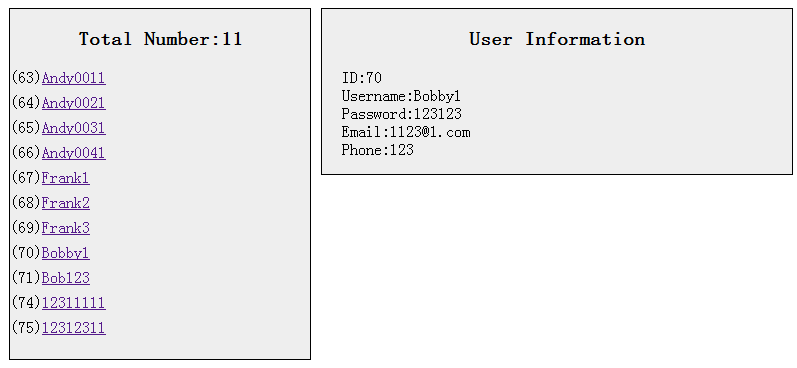
2.html,新增了一个User详细信息的HTML模板
1 <!-- 新增User详细信息的HTML模板 --> 2 <script type="text/template" id="user-info-template"> 3 <h3>User Information</h3> 4 <ul id="user-info"> 5 <li>ID:<span><%= id %></span></li> 6 <li>Username:<span><%= username %></span><input type="text" name="username" value="<%= username %>" /></li> 7 <li>Password:<span><%= password %></span><input type="password" name="password" value="<%= password %>" /></li> 8 <li>Email:<span><%= email %></span><input type="text" name="email" value="<%= email %>" /></li> 9 <li>Phone:<span><%= phone %></span><input type="text" name="phone" value="<%= phone %>" /></li>10 <button id="edit-submit">Submit</button>11 </ul>12 </script>
mvc2.js,UserItemView在初始化的时候会创建一个UserInfoView类型的成员变量infoView,并与之共享同一个User类型的model,每当点击UserItemView里面的<a>就会调用displayInfo函数,从而调用infoView的render函数来显示详细信息。
1 $(document).ready(function() { 2 3 var User = Backbone.Model.extend({ 4 }); 5 6 var UserList = Backbone.Collection.extend({ 7 ... //不变 8 }); 9 10 var UserItemView = Backbone.View.extend({11 tagName : "li",12 userItemTemplate : _.template($("#user-item-template").html()), 13 events : { //注释一14 "click a" : "displayInfo", //新增15 },16 initialize : function() { 17 this.infoView = new UserInfoView({model : this.model}); //新增18 },19 render : function() {20 this.$el.html(this.userItemTemplate(this.model.toJSON()));21 return this;22 },23 displayInfo : function() { //新增24 this.infoView.render();25 },26 });27 28 //新增UserInfoView,用来显示User详细信息29 var UserInfoView = Backbone.View.extend({30 el : $("#right"),31 userInfoTemplate : _.template($("#user-info-template").html()),32 render : function(){33 this.$el.html(this.userInfoTemplate(this.model.toJSON()));34 return this;35 },36 });37 38 var UserListView = Backbone.View.extend({39 ... //不变40 });41 42 var userListView = new UserListView();43 });注释一:
events 里面都是将方法绑定到页面的事件上,而上一节中的 bind() 方法都是将方法绑定到 Model/Collection 的事件上。
还有一点需要注意的是,这里所能绑定的事件必须包含在 el 中的页面元素。
例如:UserInfoView 指定了 el 是 $("#right") ,那么在它的events里面就不能将方法绑定到 $("#left") 的页面事件上。
