求助:jQuery关于checkbox里的checked全选/反选的问题
多次全选/反选之后,页面没有及时刷新,出现了代码为checked,而页面未被勾选的问题。
如果选中客户管理checkbox,则以下子checkbox都要选中,否则都不选中。只要有一个子checkbox被选中,客户管理checkbox就要被选中。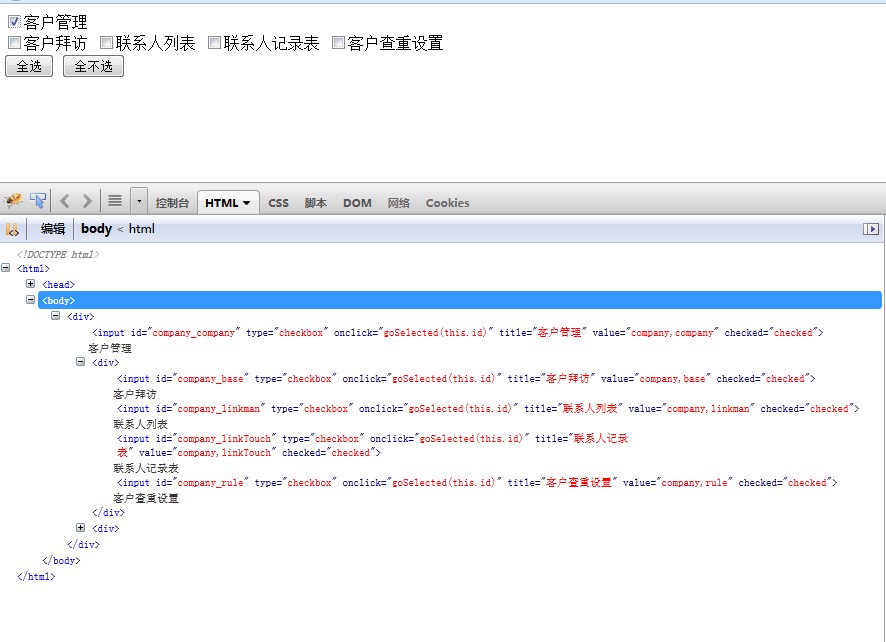
/**
 * Created with IntelliJ IDEA.
 * User: H.Kunping
 * Date: 13-9-13
 * Time: 下午10:50
 * To change this template use File | Settings | File Templates.
 */

function goSelected(id){

    var arrayValue = id.split("_");

    if(arrayValue[0]!=arrayValue[1]){
        var superid = arrayValue[0]+"_"+arrayValue[0];
        if ($("#"+id)[0].checked){
            $("#"+superid).attr("checked", "checked");
        } else {
            var flag = false;
            var $child = $("input[type=checkbox][id^="+arrayValue[0]+"]:not([id$="+arrayValue[0]+"])");
            $child.each(function(){
                if(this.checked) {
                    flag=true;
                    return;
                }
            });
            if(!flag){
                $("#"+superid).attr("checked", null);
            }
        }
    }

    if(arrayValue[0]==arrayValue[1]){
        if ($("#"+id)[0].checked){
            $("input[type=checkbox][id^="+arrayValue[0]+"]").attr("checked", "checked");
        } else {
            $("input[type=checkbox][id^="+arrayValue[0]+"]").attr("checked", null);
        }
    }
}

function allSelected(){
    $("input[type=checkbox]").attr("checked", "checked");
}
function unSelected(){
    $("input[type=checkbox]").attr("checked", null);
}

$(function(){
    $("#btn1").click(function(){
        $("input[type=checkbox]").attr("checked", "checked");
    });
    $("#btn2").click(function(){
        $("input[type=checkbox]").attr("checked", null);
    });
})
                   title="客户查重设置" onclick="goSelected(this.id)">客户查重设置
        </div>
        <div>
            <!--
            <input type="button" value="全选" id="btn1" onclick="allSelected()">
            <input type="button" value="全不选" id="btn2" onclick="unSelected()"> -->
            <input type="button" value="全选" id="btn1">
            <input type="button" value="全不选" id="btn2">
        </div>
</div>
</body>
</html>
