万年历问题
鼠标点击文本框之后弹出一个万年历可选择日期??求代码加注释,谢谢!!!
[解决办法]
import java.awt.BorderLayout;
import java.awt.Color;
import java.awt.GridLayout;
import java.awt.event.ActionEvent;
import java.awt.event.ActionListener;
import java.sql.Date;
import java.util.Calendar;
import javax.swing.JComboBox;
import javax.swing.JFrame;
import javax.swing.JLabel;
import javax.swing.JPanel;
class MainFrame extends JFrame {
private static final long serialVersionUID = 1L;
JPanel panel = new JPanel(new BorderLayout());
JPanel panel1 = new JPanel();
JPanel panel2 = new JPanel(new GridLayout(7, 7));
JLabel[] label = new JLabel[49];
JLabel y_label = new JLabel("年份");
JLabel m_label = new JLabel("月份");
JComboBox com1 = new JComboBox();
JComboBox com2 = new JComboBox();
int re_year, re_month;
int x_size, y_size;
String year_num;
Calendar now = Calendar.getInstance(); // 实例化Calendar
MainFrame() {
super("万年历");
setSize(500, 500);
this.setLocationRelativeTo(null);
panel1.add(y_label);
panel1.add(com1);
panel1.add(m_label);
panel1.add(com2);
for (int i = 0; i < 49; i++) {
label[i] = new JLabel("", JLabel.CENTER);// 将显示的字符设置为居中
panel2.add(label[i]);
}
panel.add(panel1, "North");
panel.add(panel2);
panel1.setBackground(Color.green);
panel2.setBackground(Color.pink);
Init();
com1.addActionListener(new MyListener());
com2.addActionListener(new MyListener());
this.add(panel);
this.setResizable(false);
this.setVisible(true);
}
class MyListener implements ActionListener {
public void actionPerformed(ActionEvent arg0) {
int c_year, c_month, c_week;
c_year = Integer.parseInt(com1.getSelectedItem().toString()); // 得到当前所选年份
c_month = Integer.parseInt(com2.getSelectedItem().toString()) - 1; // 得到当前月份,并减1,计算机中的月为0-11
c_week = use(c_year, c_month); // 调用函数use,得到星期几
Resetday(c_week, c_year, c_month); // 调用函数Resetday
}
}
public void Init() {
int year, month_num, first_day_num;
String log[] = { "日", "一", "二", "三", "四", "五", "六" };
for (int i = 0; i < 7; i++) {
label[i].setText(log[i]);
}
for (int i = 0; i < 49; i = i + 7) {
label[i].setForeground(Color.red); // 将星期日的日期设置为红色
}
for (int i = 6; i < 49; i = i + 7) {
label[i].setForeground(Color.red);// 将星期六的日期设置为绿色
}
for (int i = 1; i < 2600; i++) {
com1.addItem("" + i);
}
for (int i = 1; i < 13; i++) {
com2.addItem("" + i);
}
month_num = (int) (now.get(Calendar.MONTH)); // 得到当前时间的月份
year = (int) (now.get(Calendar.YEAR)); // 得到当前时间的年份
com1.setSelectedIndex(year - 1); // 设置下拉列表显示为当前年
com2.setSelectedIndex(month_num); // 设置下拉列表显示为当前月
first_day_num = use(year, month_num);
Resetday(first_day_num, year, month_num);
}
public int use(int reyear, int remonth) {
int week_num;
now.set(reyear, remonth, 1); // 设置时间为所要查询的年月的第一天
week_num = (int) (now.get(Calendar.DAY_OF_WEEK));// 得到第一天的星期
return week_num;
}
@SuppressWarnings("deprecation")
public void Resetday(int week_log, int year_log, int month_log) {
int month_day_score=0; // 存储月份的天数
int count=1;
Date date = new Date(year_log, month_log + 1, 1); // now
Calendar cal = Calendar.getInstance();
cal.setTime(date);
cal.add(Calendar.MONTH, -1); // 前个月
month_day_score = cal.getActualMaximum(Calendar.DAY_OF_MONTH);// 最后一天
for (int i = 7; i < 49; i++) { // 初始化标签
label[i].setText("");
}
week_log = week_log + 6; // 将星期数加6,使显示正确
for (int i = week_log; i < month_day_score+week_log; i++, count++) {
label[i].setText(count + "");
}
}
public static void main(String[] args) {
new MainFrame();
}
}
[解决办法]
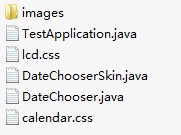

package datechooser;

import javafx.application.Application;
import javafx.event.EventHandler;
import javafx.scene.Scene;
import javafx.scene.layout.StackPane;
import javafx.stage.Stage;
import javafx.stage.WindowEvent;


public class TestApplication extends Application {

    /**
     @param args the command line arguments
     */
    public static void main(String[] args) {
        launch(args);
    }

    @Override
    public void start(final Stage primaryStage) {
        primaryStage.setTitle("Hello World!");
        StackPane root = new StackPane();
        final DateChooser dateChooser = new DateChooser();
        root.getChildren().add(dateChooser);
        Scene scene = new Scene(root, 300, 250);
        scene.getStylesheets().add(TestApplication.class.getResource("lcd.css").toExternalForm());
        primaryStage.setScene(scene);
        primaryStage.setOnHiding(new EventHandler<WindowEvent>() {

                    public void handle(WindowEvent event) {
                        System.out.println("date " + dateChooser.getDate());
                    }
                });
        primaryStage.show();
    }
}
package datechooser;

import java.util.Date;
import javafx.scene.control.Control;

public class DateChooser extends Control{

    private static final String DEFAULT_STYLE_CLASS = "date-chooser";
    private Date date;

    public DateChooser(Date preset) {
        getStyleClass().setAll(DEFAULT_STYLE_CLASS);
        this.date = preset;
    }

    public DateChooser() {
        this(new Date(System.currentTimeMillis()));
    }

    @Override
    protected String getUserAgentStylesheet() {
        return "datechooser/calendar.css";
    }

    public Date getDate() {
        return date;
    }
}
