求指教!淘宝购买数量的方法为什么不能用在所有的对象上面?
我的页面中需要多个数量增加对象,如图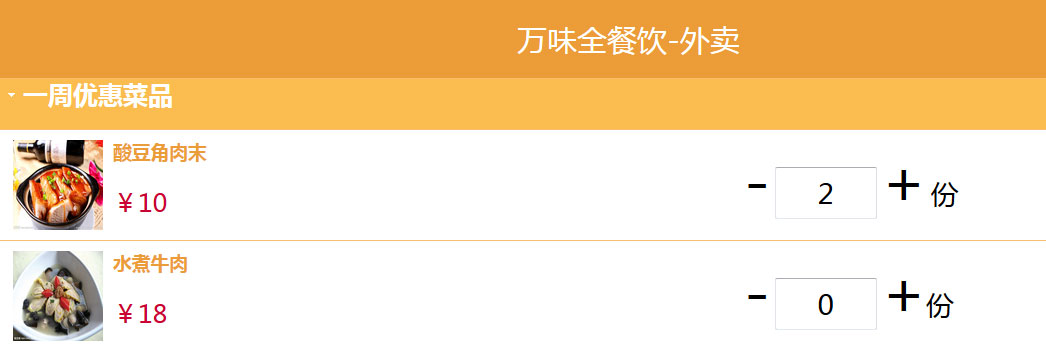
我写了如下的javascript方法,
<script type="text/javascript">
function addNum()
{
var num = document.getElementById("buyNum").value;
if(num==""){num = 0;}else num = parseInt(num);
document.getElementById("buyNum").value = num + 1;}
function reduceNum()
{
var num = document.getElementById("buyNum").value;
var able=document.getElementById("reduce").visible;
if(num=="0"){able.visible = false;}else num = parseInt(num);
document.getElementById("buyNum").value = num - 1;
}
</script>
问题是:这个方法只对第一个数量对象有效,不是对所有的对象有效???不能所有的数量对象都实现增加减少功能???求指教,急急急。。。。
[解决办法]
<!DOCTYPE html PUBLIC "-//W3C//DTD XHTML 1.0 Transitional//EN" "http://www.w3.org/TR/xhtml1/DTD/xhtml1-transitional.dtd">
<html xmlns="http://www.w3.org/1999/xhtml">
<head>
<meta http-equiv="Content-Type" content="text/html; charset=utf-8" />
<script type="text/javascript" src="http://ajax.googleapis.com/ajax/libs/jquery/1.10.1/jquery.min.js"></script>
<title>无标题文档</title>
<script type="text/javascript">
/*function addNum(){
var num = document.getElementById("buyNum").value;
if(num==""){
num = 0;
}else{
num = parseInt(num);
}
document.getElementById("buyNum").value = num + 1;
}
function reduceNum(){
var num = document.getElementById("buyNum").value;
var able=document.getElementById("reduce").visible;
if(num=="0"){
able.visible = false;
}else{
num = parseInt(num);
}
document.getElementById("buyNum").value = num - 1;
}*/
jQuery(function($){
$('span[rel=reduce]').click(function(){
//当前值
var currentInput=$(this).parents('div').find('input[rel=buyNum]');
if(currentInput.val() == "0"){
 $(this).attr('disabled','true');
}else{
currentInput.val(parseInt(currentInput.val()) -1);
}

});
$('span[rel=addNum]').click(function(){
//当前值
var currentInput=$(this).parents('div').find('input[rel=buyNum]');
var num=0;
if(currentInput.val() != ""){
 num=parseInt(currentInput.val());
}
currentInput.val(num +1);
});
});
</script>
</head>

<body>
<ul
id="accoradion01"
class="accoradion">
    <li>
        <a
        href="#">一周优惠菜品</a>
            <ul>
                <li>
                    <img
                    style="width:90px; height:90px; float:left; margin-right:10px;"
                    src="images/can/xin1.jpg"
                    alt="求赐教!淘宝购买数量的方法为什么不能用在所有的对象上面"
                    />
                    <div
                    style="width:500px; float:right; margin-left:90px;">
                        <span style="margin-left:-0px;">
                            <span style="cursor:pointer; font-size:60px;" rel="reduce">-</span>
                        </span>
                        <input style="width:100px; height:50px; text-align:center; font-size:28px;" rel="buyNum" value="0"/>
                                <span
                                style="margin-left:-0px;">
                                    <span
                                    style="cursor:pointer; font-size:60px;"
                                    rel="addNum">+</span>
                                        </span>
                                        <span><span>
<span style="margin-right:15px; font-size:28px;">份</span>
                                        </div>
                                        <h3><a href="" target="_blank">酸豆角肉末</a></h3>
                                        <p>¥10</p>

                </li>
                <li>
                    <img
                    style="width:90px; height:90px; float:left; margin-right:10px;"
                    src="images/can/xin2.jpg"
                    alt="求赐教!淘宝购买数量的方法为什么不能用在所有的对象上面"
                    />
                    <div
                    style="width:500px; float:right; margin-left:90px;">
                        <span
                        style="margin-left:-0px;">
                            <span
                            style="cursor:pointer; font-size:60px;"
                            rel="reduce">-</span>
                                </span>
                                <input
                                style="width:100px; height:50px; text-align:center; font-size:28px;"
                                rel="buyNum"
                                value="0"
                                />
                                <span
                                style="margin-left:-0px;">
                                    <span
                                    style="cursor:pointer; font-size:60px;"
                                   rel="addNum">+</span>
                                        </span><span><span><span style="margin-right:15px; font-size:28px;">份</span>
                                        </div>
                                        <h3><a href="" target="_blank">水煮牛肉</a></h3>
                                        <p>¥18</p>
                </li>
            </ul>
            </ul>
</body>
</html>
