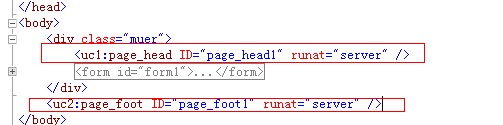
在IE6上正常,到了IE7,360急速、360兼容都出错
本帖最后由 pfworld 于 2013-06-07 18:32:03 编辑 在IE6上正常,到了IE7,360急速、360兼容都出错!底部bottom不显示到底部,中部内容center显示不全,要不就显示全,底部跑中间了,怎么调都不行,以前是做CS的,帮朋友做网页就是出错,寻求帮助!
@charset "utf-8";
/* CSS Document */


body {
margin: 0px;
padding: 0px;
font-size: 12px;
background-color: #FFF;
}
.side {
float: left;
width: 40px;
background-image: url(../images/Index_02.gif);
background-repeat: repeat-x;
height: 50px;
display: block;
}
#Main #content #top {
width: 908px;
background-color: #FFF;
height: 161px;
border-top-width: 0px;
border-right-width: 1px;
border-bottom-width: 0px;
border-left-width: 1px;
border-top-style: none;
border-right-style: solid;
border-bottom-style: none;
border-left-style: solid;
border-right-color: #cccccc;
border-left-color: #cccccc;
background-image: url(../images/Index_06.gif);
background-repeat: repeat-x;
}
#Main #content #top img {
float: left;
border-top-style: none;
border-right-style: none;
border-bottom-style: none;
border-left-style: none;
border-top-width: 0px;
border-right-width: 0px;
border-bottom-width: 0px;
border-left-width: 0px;
}
#Main #content #top #top_1 {
float: left;
width: 739px;
}

#Main #content #top #top_1 h2 {
float: left;
margin: 0px;
height: 75px;
background-image: url(../images/Index_09.gif);
background-position: left bottom;
width: 369px;
background-repeat: no-repeat;
text-indent: -9999px;
}
#Main #content #top #top_1 ul {
float: right;
margin-top: 17px;
margin-right: 0px;
margin-bottom: 0px;
margin-left: 8px;
}
#Main #content #top #top_1 ul li {
width: 70px;
float: left;
list-style-position: inside;
}

#Main #content #top #menu_1 {
float: left;
padding-top: 5px;
padding-right: 0px;
padding-bottom: 0px;
padding-left: 12px;
width: 727px;
border-top-width: 0px;
border-right-width: 0px;
border-bottom-width: 0px;
border-left-width: 1px;
border-top-style: none;
border-right-style: none;
border-bottom-style: none;
border-left-style: solid;
border-left-color: #cccccc;
height: 68px;
margin-top: 13px;
margin-right: 0px;
margin-bottom: 0px;
margin-left: 0px;
}
#Main #content #top #menu_1 ul {
list-style-type: none;
margin: 0px;
padding: 0px;
display: inline;
width: 500px;
overflow: hidden;
}
#Main #content #top #menu_1 ul li {
height: 39px;
float: left;
margin-top: 0px;
margin-right: 0px;
margin-bottom: 0px;
margin-left: 1px;
display: inline;
}
#Main #content #top #menu_1 ul li .menu {
display: block;
text-indent: -9999px;
height: 39px;
width: 71px;
}

#Main #content #top #menu_1 ul #menu_1_1 {
background-image: url(../images/menu_1.gif);
}
#Main #content #top #menu_1 ul #menu_1_2 {
background-image: url(../images/menu_2.gif);
}
#Main #content #top #menu_1 ul #menu_1_3 {
background-image: url(../images/menu_3.gif);
}
#Main #content #top #menu_1 ul #menu_1_4 {
background-image: url(../images/menu_4.gif);
}
#Main #content #top #menu_1 ul #menu_1_5 {
background-image: url(../images/menu_5.gif);
}
#Main #content #top #menu_1 ul #menu_1_6 {
background-image: url(../images/menu_6.gif);
}
#Main #content #top #menu_1 ul #menu_1_7 {
background-image: url(../images/menu_7.gif);
}
#Main #content #top #menu_1 ul #menu_1_8 {
background-image: url(../images/menu_8.gif);
}

#Main #content #top #menu_1 ul li ul {
margin: 0px;
padding: 0px;
display: none;
float: left;
position: absolute;
list-style-type: none;
white-space: nowrap;
overflow: hidden;
}

#Main #content #top #menu_1 ul li ul li {
float: left;
margin-top: 0px;
margin-right: 0px;
margin-bottom: 0px;
margin-left: 5px;
overflow: hidden;
display: inline;
line-height: 26px;
}
#Main #content #center
{
    position: relative;
    z-index: 1;
    border-top-width: 0px;
    border-right-width: 1px;
    border-bottom-width: 0px;
    border-left-width: 1px;
    border-top-style: none;
    border-right-style: solid;
    border-bottom-style: none;
    border-left-style: solid;
    border-right-color: #cccccc;
    border-left-color: #cccccc;
}
#Main #content #bottom
{
    z-index: 3;
    height: 132px;
    border-top-width: 0px;
    border-right-width: 1px;
    border-bottom-width: 0px;
    border-left-width: 1px;
    border-top-style: none;
    border-right-style: solid;
    border-bottom-style: none;
    border-left-style: solid;
    border-right-color: #cccccc;
    border-left-color: #cccccc;
    background-repeat: repeat-x;
    background-position: top;
}
#Main #content #bottom #bottom_1 {
width: 168px;
height: 95px;
background-image: url(../images/Index_57.gif);
background-repeat: repeat-x;
float: left;
display: inline;
border-top-width: 0px;
border-right-width: 1px;
border-bottom-width: 0px;
border-left-width: 0px;
border-top-style: none;
border-right-style: solid;
border-bottom-style: none;
border-left-style: none;
border-right-color: #cccccc;
overflow: hidden;
}
#Main #content #bottom #bottom_1 img {
padding: 0px;
margin-top: 0px;
margin-right: 0px;
margin-bottom: 0px;
margin-left: 52px;
}
#Main #content #bottom #bottom_3 {
float: right;
height: 132px;
width: 739px;
background-image: url(../images/Index_59.gif);
background-repeat: repeat-x;
}
#Main #content #bottom #bottom_3 ul {
padding: 0px;
list-style-type: none;
margin-top: 13px;
margin-right: 0px;
margin-bottom: 0px;
margin-left: 13px;
}
#Main #content #bottom #bottom_3 ul li {
display: inline;
margin-top: 0px;
margin-bottom: 0px;
margin-left: 5px;
}
#Main #content #bottom #bottom_3 p {
padding: 0px;
margin-top: 15px;
margin-right: 0px;
margin-bottom: 0px;
margin-left: 17px;
line-height: 10px;
}


#content {
float: left;
width: 910px;
overflow: hidden;
}


#Main {
margin-right: auto;
margin-left: auto;
width: 990px;
}

A:link {TEXT-DECORATION: none; color:#000}
A:visited {TEXT-DECORATION: none; color:#000}
A:hover {TEXT-DECORATION: underline; color:#000}
A:active {TEXT-DECORATION: none; color:#000}

<!--这是CSDN底部的样式 参考下-->
.pub_footerall {
clear: both;
width: auto;
overflow: hidden;
margin: 10px auto;
padding: 0;
border-top: 1px solid #ccc;
color: #333;
font: normal 12px/24px Helvetica, Tahoma, Arial, sans-serif;
text-align: center;
}