Emgu CV--基础知识
首先由于最近需要,要学习一下Emgu CV的相关知识。由于需要做的东西只是一些简单的东西,在这里先了解一下基础知识,与大家共同学习
一 Emgu CV与OpenCV的关系
Emgu CV is a cross platform .Net wrapper to the OpenCV image processing library. Allowing OpenCV functions to be called from .NET compatible languages such as C#, VB, VC++, IronPython etc. The wrapper can be compiled in Mono and run on Windows, Linux, Mac OS X, iPhone, iPad and Android devices
Emgu CV是在.NET库下对OpenCV的封装库,主要是为了在.NET平台下用C#、VB、vc++调用OpenCV.这个封装库在Mono编译后,可以运行在Windows,linux,Mac osx ,iphoe,ipad和Android上。
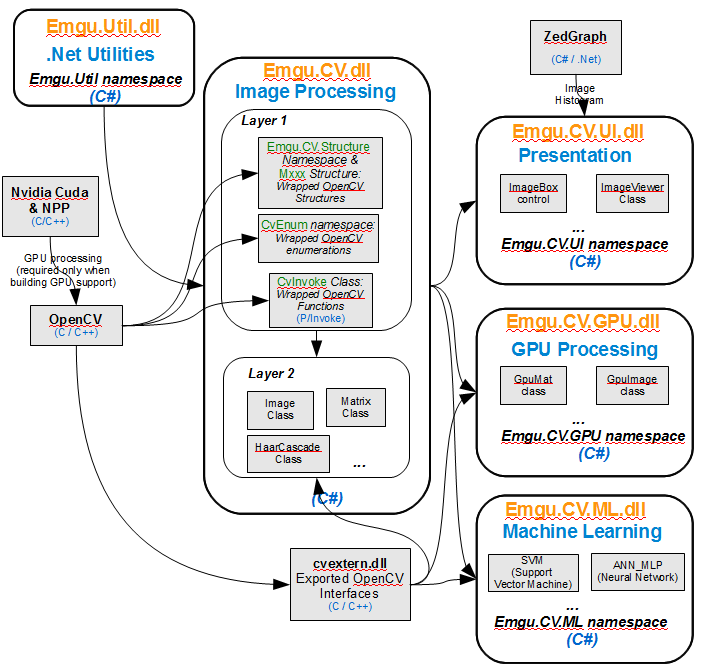
Emgu CV has two layers of wrapper as shown below
The basic layer (layer 1) contains function, structure and enumeration mappings which directly reflect those in OpenCV.The second layer (layer 2) contains classes that mix inadvantanges from the .NET world.Emgu CV 有两层封装,如下:
1.第一层是基本层,直接对应OpenCV.包括函数、结构和枚举类型
2.第二层是扩充层,包括与.NET库的一些混合类,适合.NET的优势。
下面的图是对Emgu CV的基本架构,我们在前面的配置过程中,也用到了下面的库文件,在这里我们可以看到他们的具体作用和架构。
Emgu.Util是模板库,算是基类吧(这样描述不正确,由于个人能力有限,只称述自己的观点,希望大家批评指正),它下面是Emgu CV ,也就是两层架构的实现
下面的就是Emgu CV 与OpenCV的关系,根据需要大家自己看吧。
二 Emgu CV中一些基本结构
2. 1.hello word
代码:
using System;using System.Collections.Generic;using System.Linq;using System.Text;//using Emgu.CV;using Emgu.CV.CvEnum;using Emgu.CV.Structure;using Emgu.CV.UI;using System.Drawing;using System.Windows.Forms;namespace hello_word{ class Program { static void Main(string[] args) { //窗口的名字 String win1 = "Test Window"; //创建窗口 CvInvoke.cvNamedWindow(win1); //创建一个400*200的蓝色图像 using (Image<Bgr, Byte> img = new Image<Bgr, byte>(400, 200, new Bgr(255, 0, 0))) { //创建字体,在我的程序里需要将CvEnum.FONT.CV_FONT_HERSHEY_COMPLEX的CvEnum去掉,原因不解 //MCvFont f = new MCvFont(CvEnum.FONT.CV_FONT_HERSHEY_COMPLEX, 1.0, 1.0); MCvFont f = new MCvFont(FONT.CV_FONT_HERSHEY_COMPLEX, 1.0, 1.0); //D将"Hello, world."画在图像上 img.Draw("Hello, world", ref f, new Point(10, 80), new Bgr(0, 255, 0)); /* 第一种方式 //Show the image CvInvoke.cvShowImage(win1, img.Ptr); //Wait for the key pressing event CvInvoke.cvWaitKey(0); //Destory the window CvInvoke.cvDestroyWindow(win1); * */ //第二种方式 ImageViewer.Show(img, "Test Window"); } } }}
这是一个hello word 程序,下面看一下具体的数据类型和函数
2.1.1 Image
// 摘要: // Create an empty Image protected Image(); // // 摘要: // Obtain the image from the specific Bitmap // // 参数: // bmp: // The bitmap which will be converted to the image public Image(Bitmap bmp); // // 摘要: // Create a multi-channel image from multiple gray scale images // // 参数: // channels: // The image channels to be merged into a single image public Image(Image<Gray, TDepth>[] channels); // // 摘要: // Create a blank Image of the specific size // // 参数: // size: // The size of the image public Image(Size size); // // 摘要: // Read image from a file // // 参数: // fileName: // the name of the file that contains the image public Image(string fileName); // // 摘要: // Create image from the specific multi-dimensional data, where the 1st dimesion // is # of rows (height), the 2nd dimension is # cols (width) and the 3rd dimension // is the channel // // 参数: // data: // The multi-dimensional data where the 1st dimension is # of rows (height), // the 2nd dimension is # cols (width) and the 3rd dimension is the channel public Image(TDepth[, ,] data); // // 摘要: // Create a blank Image of the specified width and height. // // 参数: // width: // The width of the image // // height: // The height of the image public Image(int width, int height); // // 摘要: // Constructor used to deserialize runtime serialized object // // 参数: // info: // The serialization info // // context: // The streaming context public Image(SerializationInfo info, StreamingContext context); // // 摘要: // Create a blank Image of the specified width, height and color. // // 参数: // width: // The width of the image // // height: // The height of the image // // value: // The initial color of the image public Image(int width, int height, TColor value); // // 摘要: // Create an Image from unmanaged data. // // 参数: // width: // The width of the image // // height: // The height of the image // // stride: // Size of aligned image row in bytes // // scan0: // Pointer to aligned image data, where each row should be 4-align // // 备注: // The caller is responsible for allocating and freeing the block of memory // specified by the scan0 parameter, however, the memory should not be released // until the related Image is released. public Image(int width, int height, int stride, IntPtr scan0);
以上是我跟踪的代码,可以看到Image有很多重载的构造函数,在这里我们只看代码中用到的,其余的根据参数代价可以自己测
Image<Bgr, Byte> img = new Image<Bgr, byte>(400, 200, new Bgr(255, 0, 0))程序中的这个构造函数采用的是上述代码中的导数第二个,
public Image(int width, int height, TColor value);
在这里面还用到了TColor,它是Bgr的父类,在代码中我们用了Create a BGR color using the specific values,即用BGR的三个数据创建Bgr,也就是三通道的彩色图像。
// 摘要: // Defines a Bgr (Blue Green Red) color [ColorInfo(ConversionCodename = "BGR")] public struct Bgr : IColor, IEquatable<Bgr> { // // 摘要: // Create a Bgr color using the System.Drawing.Color // // 参数: // winColor: // System.Drawing.Color public Bgr(Color winColor); // // 摘要: // Create a BGR color using the specific values // // 参数: // blue: // The blue value for this color // // green: // The green value for this color // // red: // The red value for this color public Bgr(double blue, double green, double red); // 摘要: // Get or set the intensity of the blue color channel [DisplayColor(255, 0, 0)] public double Blue { get; set; } // // 摘要: // Get the dimension of this color public int Dimension { get; } // // 摘要: // Get or set the intensity of the green color channel [DisplayColor(0, 255, 0)] public double Green { get; set; } // // 摘要: // Get or Set the equivalent MCvScalar value public MCvScalar MCvScalar { get; set; } // // 摘要: // Get or set the intensity of the red color channel [DisplayColor(0, 0, 255)] public double Red { get; set; } // 摘要: // Return true if the two color equals // // 参数: // other: // The other color to compare with // // 返回结果: // true if the two color equals public bool Equals(Bgr other); // // 摘要: // Represent this color as a String // // 返回结果: // The string representation of this color public override string ToString(); }因为在这我只关心Imga类,其它都可以类似查看,当然可以看API,比着方便多了,我因为上不去网站,所以只能用原始的方法做了。
// 摘要: // Defines a Bgr (Blue Green Red) color [ColorInfo(ConversionCodename = "BGR")] public struct Bgr : IColor, IEquatable<Bgr> { // // 摘要: // Create a Bgr color using the System.Drawing.Color // // 参数: // winColor: // System.Drawing.Color public Bgr(Color winColor); // // 摘要: // Create a BGR color using the specific values // // 参数: // blue: // The blue value for this color // // green: // The green value for this color // // red: // The red value for this color public Bgr(double blue, double green, double red); // 摘要: // Get or set the intensity of the blue color channel [DisplayColor(255, 0, 0)] public double Blue { get; set; } // // 摘要: // Get the dimension of this color public int Dimension { get; } // // 摘要: // Get or set the intensity of the green color channel [DisplayColor(0, 255, 0)] public double Green { get; set; } // // 摘要: // Get or Set the equivalent MCvScalar value public MCvScalar MCvScalar { get; set; } // // 摘要: // Get or set the intensity of the red color channel [DisplayColor(0, 0, 255)] public double Red { get; set; } // 摘要: // Return true if the two color equals // // 参数: // other: // The other color to compare with // // 返回结果: // true if the two color equals public bool Equals(Bgr other); // // 摘要: // Represent this color as a String // // 返回结果: // The string representation of this color public override string ToString(); }
Emgu CV的网站:http://www.emgu.com/wiki/index.php/Main_Page
人脸识别的例子http://www.cnblogs.com/zengqs/archive/2009/02/01/1382024.html
