poi hssf处理excel
通过POI生成的最终结果:
(单元格中的数据发生变化时,图表中的柱状、折线也会跟着变化)
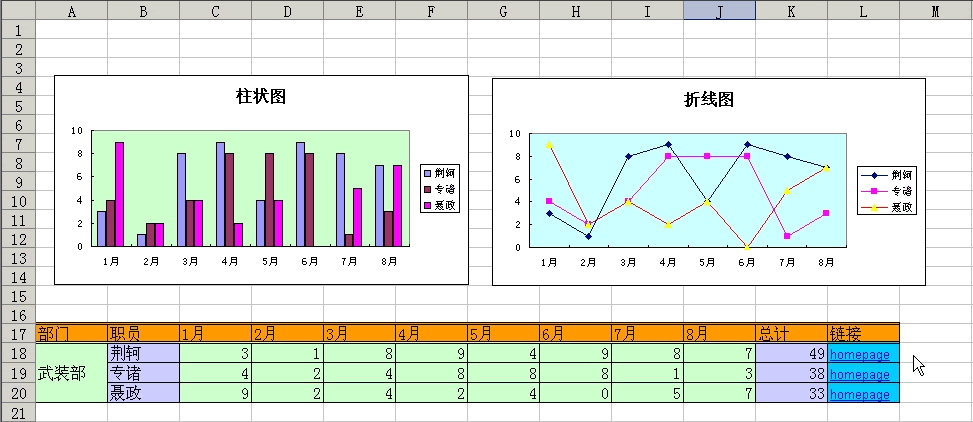
处理图表
目前POI版本为2.5.1,org.apache.poi.hssf.usermodel包里有一个HSSFChart类,里面只有一个空方法createBarChart(),表明POI还不直接支持EXCEL图表。
替代方法还是有的:因为EXCEL图表的源数据引用自EXCEL单元格。我们可以先新建一个EXCEL工作薄,作为模板,在里面创建图表,指定它引用工作表中的一些特定单元格。然后我们用POI来读取这个工作薄,把数据写入到那些特定单元格。
首先要在模板里创建可以动态引用单元格的“名称”,利用“名称”来创建图表中的“系列”。
一、打开模板PoiTest.xls,点击[插入]>[名称]>[定义],创建四个“名称”sx,s1y,s2y,s3y:
sx=OFFSET(Sheet1!$A$17,0,2,1,COUNTA(Sheet1!$17:$17)-4)
s1y=OFFSET(Sheet1!$A$18,0,2,1,COUNTA(Sheet1!$18:$18)-4)
s2y=OFFSET(Sheet1!$A$19,0,2,1,COUNTA(Sheet1!$19:$19)-3)
s3y=OFFSET(Sheet1!$A$20,0,2,1,COUNTA(Sheet1!$20:$20)-3)
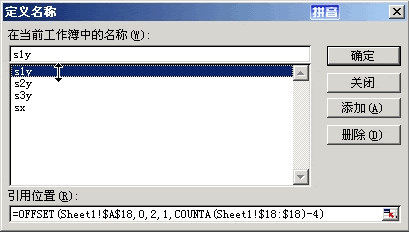
这里用到了两个EXCEL函数,OFFSET()和COUNTA()函数。
其中COUNTA()可以返回一行或一列的单元格总数:
比如COUNTA(Sheet1!$A:$A),计算工作表Sheet1的A列的单元格数目。
又比如COUNTA(Sheet1!$17:$17),计算的是Sheet1的第17行的单元格数目。
当我们没有在单元格里键入数据时,该单元格是不会被COUNTA()计算的。
OFFSET()函数用来引用一系列连续的单元格,它共有五个参数:
参数一,作为位置参照的单元格。
参数二,行的起始偏移量(以参数一为参照)。
参数三,列的起始偏移量(以参数一为参照)。
参数四,跨行数。
参数五,跨列数。
比如:
OFFSET(Sheet1!$A:$1,1,2,3,4),表示引用范围为:C2:F4。
二、在模板中创建图表,在图表上点右键,选择[源数据]>[系列],如图建立三个系列:
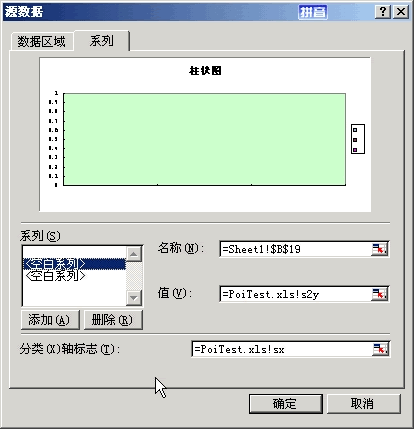
点[添加]创建新的系列:
[名称]表示系列名,可以直接输入字串,也可以引用EXCEL单元格。
在[值]中输入我们在上一步中创建的“名称”,格式为:模板名.xls!名称。
在[分类(X)轴标志(T)]中输入我们在上一步中创建的“名称”sx,格式为:模板名.xls!名称。它表示图表区域的X轴将要显示的内容。
三、用POI把数据写入到相应的单元格中,图表将会自动显示对应的信息。
注意:
上面这种方法适用数据集合行数固定而列数动态变化的情况。
对于行数也动态变化的情况,只能先在模板里预设尽可能多的“名称”和“系列”。
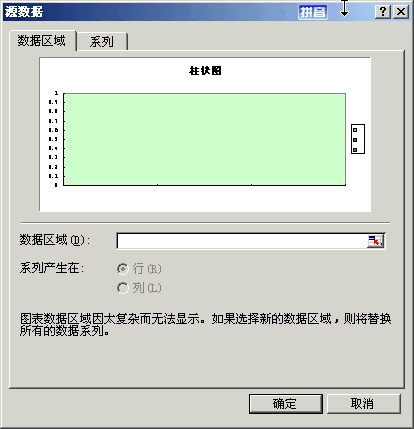
对于行数和列数都固定的情形,没必要这么复杂,只要在图表的[源数据]里设置[数据区域],使之引用EXCEL模板中的一定范围,如下图:
?
设置单元格样式
?
HSSFCellStyle类代表一种单元格样式。可以通过这个类来设置单元格的边框样式、背景颜色、字体、水平和垂直对齐方式等等。
HSSFCellStyle titleStyle = workbook.createCellStyle();注意:如果我们定义了一种样式,把它赋给一些单元格。然后基于新的需要,更改该样式中的某个属性,再赋给另一些单元格。那么之前单元格样式的该属性也会被同时更改。
比如我们定义了样式,设置单元格背景色为红色:
HSSFCellStyle cellStyle = workbook.createCellStyle();
cellStyle.setFillForegroundColor(HSSFColor.RED.index);
cellStyle.setFillPattern(HSSFCellStyle.SOLID_FOREGROUND);
然后把它赋给一个单元格:
HSSFCell cell1 = row.createCell((short)1);
cell1.setCellStyle(cellStyle);
然后更改样式中的背景色属性为蓝色:
cellStyle.setFillForegroundColor(HSSFColor.BLUE.index);然后赋给另一个单元格:
HSSFCell cell2 = row.createCell((short)2);
cell2.setCellStyle(cellStyle);
想当然,我们预计在最终结果中cell1的背景色为红色,cell2的背景色为蓝色。但是结果是:两个单元格的背景色都变成了蓝色。
遇到这种情况,要预先定义两种不同的单元格样式。
当一个EXCEL文件同时需要很多大同小异的单元格样式时,这样一一定义很麻烦。POI HSSF提供了一个HSSFCellUtil类(在org.apache.poi.hssf.usermodel.contrib包),里面有几个方法可以绕过HSSFCellStyle直接设定单元格的样式,但这几个方法会抛出NestableException异常,要处理这个异常,需要引用Apache的几个Common包:
commons-beanutils.jar
commons-beanutils-bean-collections.jar
commons-beanutils-core.jar
commons-lang.jar
commons-logging-api.jar
合并单元格
HSSFSheet.addMergedRegion(new Region())方法可以合并单元格,Region()中的一个构造函数含有四个参数,分别代表起始行、起始列、结束行、结束列:
sheet.addMergedRegion(new Region(initRow, (short)(initCol-2), initRow + lists.size() - 1, (short)(initCol-2)));处理公式
?
HSSFCell.setCellFormula()方法用来在EXCEL单元格中写入公式。
?? cell = row.createCell((short)(dataFlag));处理链接
?
在POI中往单元格中写链接,是用HYPERLINK函数搞定的。
HYPERLINK函数包含两个参数,第一个参数是指向的URL地址,第二个参数是显示字串。
?? cell = row.createCell((short)(dataFlag));为了使链接效果更好,我们可以给链接所在单元格定义一种样式,使链接显示为有下划线的蓝色字串:
? HSSFCellStyle linkStyle = workbook.createCellStyle();中文处理:
要在通过POI生成的EXCEL中正常显示中文,需要为单元格设置编码:
cell.setEncoding(HSSFCell.ENCODING_UTF_16);完整的PoiServlet类:
package org.eleaf.poi.servlets;
import java.io.IOException;
import java.io.PrintWriter;
import java.util.ArrayList;
import java.util.HashMap;
import java.util.Iterator;
import java.util.List;
import javax.servlet.ServletException;
import javax.servlet.ServletOutputStream;
import javax.servlet.http.HttpServlet;
import javax.servlet.http.HttpServletRequest;
import javax.servlet.http.HttpServletResponse;
import org.apache.poi.hssf.usermodel.HSSFCell;
import org.apache.poi.hssf.usermodel.HSSFCellStyle;
import org.apache.poi.hssf.util.HSSFColor;
import org.apache.poi.hssf.util.Region;
import org.apache.poi.hssf.usermodel.HSSFFont;
import org.apache.poi.hssf.usermodel.HSSFRow;
import org.apache.poi.hssf.usermodel.HSSFSheet;
import org.apache.poi.hssf.usermodel.HSSFWorkbook;
public class PoiServlet extends HttpServlet {
?public void doGet(HttpServletRequest request, HttpServletResponse response)
???throws ServletException, IOException {
??response.setContentType("application/vnd.ms-excel;charset=utf-8");
??????? response.setHeader("Content-Disposition", "attachment;filename=PoiTest.xls");
??????? ServletOutputStream sos = response.getOutputStream();
??????? HSSFWorkbook workbook = new HSSFWorkbook(getServletContext().getResourceAsStream("/PoiTest.xls"));
??????? HashMap map = getDatas();
??????? workbook = writeDatas(workbook, map);
??????? workbook.write(sos);
??????? sos.close();?
?}
?/**
? * 将数据写入到EXCEL中。
? * @param workbook
? * @param map 数据集合
? * @return
? */
?private HSSFWorkbook writeDatas(HSSFWorkbook workbook, HashMap map)
?{
??HSSFCellStyle titleStyle = workbook.createCellStyle();
??titleStyle.setBorderBottom(HSSFCellStyle.BORDER_DOUBLE);
??titleStyle.setBorderLeft((short)1);
??titleStyle.setBorderRight((short)1);
??titleStyle.setBorderTop(HSSFCellStyle.BORDER_DOUBLE);
??titleStyle.setFillForegroundColor(HSSFColor.LIGHT_ORANGE.index);
??titleStyle.setFillPattern(HSSFCellStyle.SOLID_FOREGROUND);
??HSSFCellStyle dataStyle = workbook.createCellStyle();
??dataStyle.setBorderBottom((short)1);
??dataStyle.setBorderLeft((short)1);
??dataStyle.setBorderRight((short)1);
??dataStyle.setBorderTop((short)1);
??dataStyle.setFillForegroundColor(HSSFColor.LIGHT_GREEN.index);
??dataStyle.setFillPattern(HSSFCellStyle.SOLID_FOREGROUND);
??dataStyle.setVerticalAlignment(HSSFCellStyle.VERTICAL_CENTER);
??HSSFCellStyle nameStyle = workbook.createCellStyle();
??nameStyle.setBorderBottom((short)1);
??nameStyle.setBorderLeft((short)1);
??nameStyle.setBorderRight((short)1);
??nameStyle.setBorderTop((short)1);
??nameStyle.setFillForegroundColor(HSSFColor.LIGHT_CORNFLOWER_BLUE.index);
??nameStyle.setFillPattern(HSSFCellStyle.SOLID_FOREGROUND);
??HSSFCellStyle linkStyle = workbook.createCellStyle();
??linkStyle.setBorderBottom((short)1);
??linkStyle.setBorderLeft((short)1);
??linkStyle.setBorderRight((short)1);
??linkStyle.setBorderTop((short)1);
??linkStyle.setFillForegroundColor(HSSFColor.SKY_BLUE.index);
??linkStyle.setFillPattern(HSSFCellStyle.SOLID_FOREGROUND);
??HSSFFont font = workbook.createFont();
??font.setFontName(HSSFFont.FONT_ARIAL);
??font.setUnderline((byte)1);
??font.setColor(HSSFColor.BLUE.index);
??linkStyle.setFont(font);
??
??HSSFSheet sheet = workbook.getSheetAt(0);
??final int initRow = 17;
??final int initCol = 2;
??HSSFRow rTitle = sheet.createRow(initRow - 1);
??List lists = (List) map.get("list");
??List titles = (List)map.get("title");
??int titleFlag = initCol;
??for (Iterator it = titles.iterator(); it.hasNext();)
??{
???String title = (String)it.next();
???HSSFCell cell = rTitle.createCell((short)titleFlag);
???cell.setCellStyle(titleStyle);
???cell.setEncoding(HSSFCell.ENCODING_UTF_16);
???cell.setCellType(HSSFCell.CELL_TYPE_STRING);
???cell.setCellValue(title);
???titleFlag++;
??}
??
??HSSFCell cell = rTitle.createCell((short)(titleFlag));
??cell.setCellStyle(titleStyle);
??cell.setCellType(HSSFCell.CELL_TYPE_STRING);
??cell.setEncoding(HSSFCell.ENCODING_UTF_16);
??cell.setCellValue("总计");
??titleFlag++;
??
??cell = rTitle.createCell((short)(titleFlag));
??cell.setCellStyle(titleStyle);
??cell.setCellType(HSSFCell.CELL_TYPE_STRING);
??cell.setEncoding(HSSFCell.ENCODING_UTF_16);
??cell.setCellValue("链接");
??
??cell = rTitle.createCell((short)(initCol-1));
??cell.setCellStyle(titleStyle);
??cell.setCellType(HSSFCell.CELL_TYPE_STRING);
??cell.setEncoding(HSSFCell.ENCODING_UTF_16);
??cell.setCellValue("职员");
??
??cell = rTitle.createCell((short)(initCol-2));
??cell.setCellStyle(titleStyle);
??cell.setCellType(HSSFCell.CELL_TYPE_STRING);
??cell.setEncoding(HSSFCell.ENCODING_UTF_16);
??cell.setCellValue("部门");
??int listFlag = initRow;
??for (Iterator it = lists.iterator(); it.hasNext();)
??{
???String name = (String)it.next();
???List datas = (List)map.get(name);
???HSSFRow row = sheet.createRow(listFlag);
???
???cell = row.createCell((short)(initCol-1));
???cell.setCellStyle(nameStyle);
???cell.setEncoding(HSSFCell.ENCODING_UTF_16);
???cell.setCellValue(name);
???
???cell = row.createCell((short)(initCol-2));
???cell.setEncoding(HSSFCell.ENCODING_UTF_16);
???cell.setCellStyle(dataStyle);
???int dataFlag = initCol;
???System.out.println("datas=" + datas);
???for (Iterator ite = datas.iterator(); ite.hasNext();)
???{
????int data = ((Integer)ite.next()).intValue();
????cell = row.createCell((short)dataFlag);
????cell.setCellStyle(dataStyle);
????cell.setCellType(HSSFCell.CELL_TYPE_NUMERIC);
????cell.setCellValue(data);
????dataFlag++;
???}
???cell = row.createCell((short)(dataFlag));
???cell.setCellType(HSSFCell.CELL_TYPE_FORMULA);
???cell.setCellFormula("SUM(" + getColLetter(initCol) + (listFlag+1) +
?????":" + getColLetter(dataFlag-1) + (listFlag+1) + ")");
???cell.setCellStyle(nameStyle);
???dataFlag++;
???
???cell = row.createCell((short)(dataFlag));
???cell.setCellType(HSSFCell.CELL_TYPE_FORMULA);
???cell.setCellFormula("HYPERLINK("http://www.xxxxx.com/xxx.jsp?id=1","homepage")");
???cell.setCellStyle(linkStyle);
???listFlag++;
??}
??sheet.getRow(initRow).getCell((short)(initCol-2)).setCellValue("武装部");
??
??sheet.addMergedRegion(new Region(initRow, (short)(initCol-2), initRow + lists.size() - 1, (short)(initCol-2)));
??return workbook;
?}
?/**
? * 将列的索引换算成ABCD字母,这个方法要在插入公式时用到。
? * @param colIndex 列索引。
? * @return ABCD字母。
? */
?private String getColLetter(int colIndex)
?{
??String ch = "";
???? if (colIndex? < 26)
???????? ch = "" + (char)((colIndex) + 65);
???? else
??????? ch = "" + (char)((colIndex) / 26 + 65 - 1) + (char)((colIndex) % 26 + 65);
???? return ch;
?}
?/**
? * 获得数据,组织为HashMap. 这里为了演示方便,简单生成了一些数据。在实际应用中,是从
? * 数据库中获取数据的。
? * @return 组织后的数据
? */
?private HashMap getDatas()
?{
??HashMap map = new HashMap();
??List lists = new ArrayList();
??List title = new ArrayList();
??List a = new ArrayList();
??List b = new ArrayList();
??List c = new ArrayList();
??for (int i = 1; i <= 8; i++)
??{
???title.add(i + "月");
???a.add(new Integer((int)(Math.random() * 10)));
???b.add(new Integer((int)(Math.random() * 10)));
???c.add(new Integer((int)(Math.random() * 10)));
??}
??map.put("荆轲", a);lists.add("荆轲");
??map.put("专诸", b); lists.add("专诸");
??map.put("聂政", c); lists.add("聂政");
??map.put("list", lists);
??map.put("title", title);
??System.out.println("map=" + map);
??return map;
?}
?public void doPost(HttpServletRequest request, HttpServletResponse response)
???throws ServletException, IOException {
??doGet(request, response);
?}
?
?
}
?
转自:http://www.cnblogs.com/tqsummer/archive/2010/07/29/1787913.html
