首页 诗词 字典 板报 句子 名言 友答 励志 学校 网站地图
当前位置: 首页 > 教程频道 > 开发语言 > 编程 >

【DevExpresss】三、LookUpEdit详解

2013-03-25 
【DevExpresss】3、LookUpEdit详解关于枚举类型SearchMode的定义:C# Code:// Summary: // Enumerates search

【DevExpresss】3、LookUpEdit详解


关于枚举类型SearchMode的定义:

C# Code:
// Summary:
// Enumerates search modes for a lookup edior.
public enum SearchMode
{
// Summary:
// The incremental search is enabled only when the dropdown window is open.
// If the window is closed, the user can modify the text in the edit box. However
// these changes are ignored.
// When the dropdown is open the incremental search is performed against the
// column whose index is specified by the DevExpress.XtraEditors.Repository.RepositoryItemLookUpEdit.AutoSearchColumnIndex
// property. The header of this column contains the search icon (binoculars).
// The user can click a specific column header to perform the search against
// this column.
// The following screenshot shows a sample lookup editor. The incremental search
// is performed against the second column.
OnlyInPopup = 0,
//
// Summary:
// Enables the automatic completion feature. In this mode, when the dropdown
// is closed, the text in the edit box is automatically completed if it matches
// a DevExpress.XtraEditors.Repository.RepositoryItemLookUpEditBase.DisplayMember
// field value of one of dropdown rows.
// When the dropdown is open, the automatic completion feature is disabled but
// the editor allows you to perform an incremental search in the same manner
// as when DevExpress.XtraEditors.Controls.SearchMode.OnlyInPopup mode is active.
AutoComplete = 1,
//
// Summary:
// Enables the incremental filtering feature. When you type within the edit
// box, the editor automatically opens the dropdown window and displays only
// records whose DevExpress.XtraEditors.Repository.RepositoryItemLookUpEditBase.DisplayMember
// field value starts with the characters typed. Other records are not displayed.
// If you enter a value that does not match any record, the dropdown window
// will not contain any rows.
// The following image shows a lookup editor when AutoFilter mode is enabled.
AutoFilter = 2,
}

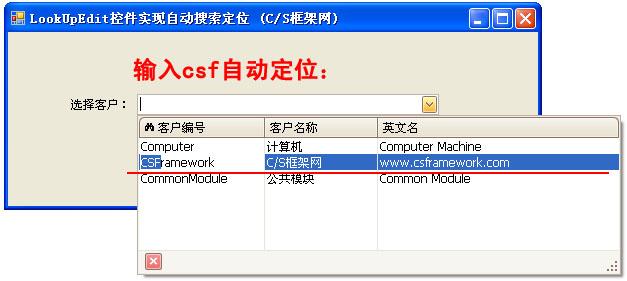
OnlyInPopup : 配合ImmediatePopup=True时使用,当用户在输入框按任一可见字符键时立即弹出下拉窗体,并跟据输入的字符从头部开始匹配AutoSearchColumnIndex属性指定栏位字段的值,第一个栏位为0.

特点:在下拉窗体能显示匹配结果(蓝底白字),但在输入框内不显示。
效果图如下:
【DevExpresss】三、LookUpEdit详解


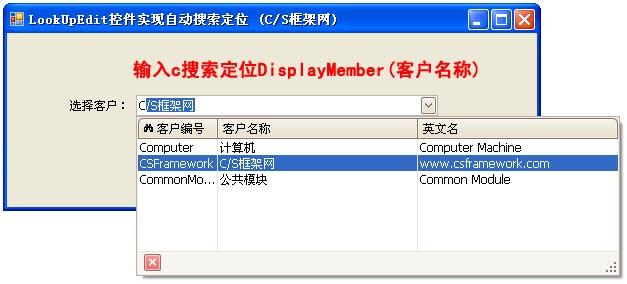
AutoComplete: 配合ImmediatePopup=True时使用,当用户在输入框按任一可见字符键时立即弹出下拉窗体,并在输入框自动完成您想要输入的数据,同时下拉窗体自动匹配最佳记录。AutoComplete模式仅匹配DisplayMember对应字段的值。
特点:能在输入框显示匹配的数据,并且下拉窗体显示匹配的记录。
效果图如下:
【DevExpresss】三、LookUpEdit详解

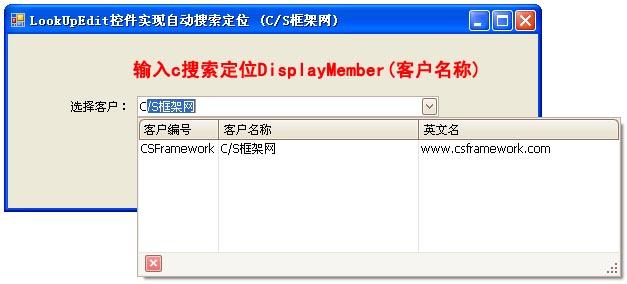
AutoFilter: 配合ImmediatePopup=True时使用,当用户在输入框按任一可见字符键时立即弹出下拉窗体,并在输入框自动完成您想要输入的数据,同时下拉窗体自动过滤掉不匹配的记录。
特点:能在输入框显示匹配的数据,并过滤过不想要的记录。
【DevExpresss】三、LookUpEdit详解

二、具体的使用:

看过了上面属性的介绍,一般的使用已经够了,但有的情况下,允许用户自由输入,即输入的值不一定是在绑定的数据源中,光用上面的属性就不行了,因为就算你输入的内容不在数据库中,控件也会帮你选中数据源中第一条数据,清空你输入的数据,恼火。。可以用下面的方法解决:

The LookUp editor allows a user to enter values which cannot be found in the lookup list. A programmer should handle this situation, otherwise a new value is lost. The LookUp editor provides a?ProcessNewValue?event for this.

First of all, you should set the?SearchMode?property to?OnlyInPopup?and?TextEditStyle?to?Standard?to enable free text entry.

There are two common approaches for handling the ProcessNewValue event:
1. Immediately insert the new record in the lookup table and generate a new ID for it.
2. Display a dialog, where a user can set values for a new data row.

【DevExpresss】三、LookUpEdit详解【DevExpresss】三、LookUpEdit详解示例代码2
        private void LookUpEdit1_ProcessNewValue(object sender, DevExpress.XtraEditors.Controls.ProcessNewValueEventArgs e)        {            DataRow Row;            RepositoryItemLookUpEdit Edit = ((LookUpEdit)sender).Properties;            if (e.DisplayValue == null || Edit.NullText.Equals(e.DisplayValue) || string.Empty.Equals(e.DisplayValue))                return;            using (Form2 f = new Form2())            {                f.ItemID = "(Auto Number)";                f.ItemName = e.DisplayValue.ToString();//ItemName是Form2中的一个属性,return Form2中一个文本框的值                if (f.ShowDialog(this) == System.Windows.Forms.DialogResult.OK)                {                    e.DisplayValue = f.ItemName;                    Row = LookupTable.NewRow();                    Row["Name"] = f.ItemName;                    LookupTable.Rows.Add(Row);                }            }            e.Handled = true;        }

上面的够一般使用了,以后有什么更高级的用法再添加了,暂时就这样子了。。。

参考网址:
https://www.devexpress.com/Support/Center/p/A238.aspx

http://www.cnblogs.com/liran/archive/2009/02/28/1400402.html

http://blog.sina.com.cn/s/blog_6d1c583c01011qiv.html

?

热点排行