怎么创建DataTable后再将其代码绑定到gridview中去
<html xmlns="http://www.w3.org/1999/xhtml">
<head runat="server">
<title></title>
</head>
<body>
<form id="form1" runat="server">
<div>
<table >
<tr>
<th>
类型周期:
</th>
<td>
<asp:CheckBoxList ID="ck" runat="server" AutoPostBack="true"
RepeatDirection="Horizontal" onselectedindexchanged="ck_SelectedIndexChanged" >
<asp:ListItem Value="0" >季</asp:ListItem>
<asp:ListItem Value="1">年</asp:ListItem>
<asp:ListItem Value="2">月</asp:ListItem>
<asp:ListItem Value="3">日</asp:ListItem>
</asp:CheckBoxList>
</td>
</tr>
</table>
<table>
<tr>
<td>
<asp:GridView ID="gvw" runat="server" header AutoGenerateColumns="False">
<Columns>
<asp:TemplateField HeaderText="序号">
<ItemTemplate >
<%#Container.DataItemIndex+1 %>
</ItemTemplate>
</asp:TemplateField>
<asp:TemplateField HeaderText="类型周期">
<ItemTemplate>
<asp:Label ID="typename" runat="server"></asp:Label>
</ItemTemplate>
</asp:TemplateField>
<asp:TemplateField HeaderText="对标值">
<ItemTemplate>
<asp:CheckBoxList ID="cklist" runat="server" RepeatDirection="Horizontal">
<asp:ListItem Value="0">一流线</asp:ListItem>
<asp:ListItem Value="1">二流线</asp:ListItem>
<asp:ListItem Value="2">三流线</asp:ListItem>
</asp:CheckBoxList>
</ItemTemplate>
</asp:TemplateField>
</Columns>
</asp:GridView>
</td>
</tr>
</table>
</div>
</form>
</body>
</html>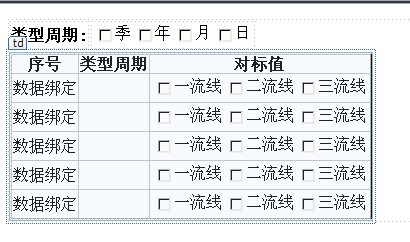
我想选择后期类型后自动加载相应的值到gridview中去,不知道具体怎么弄了,有哪位大侠知道,先做添加功能,然后当我修改的时候,在一列中有checklist的集合,我怎么去判断后显示出来; gridview?datatable?
[解决办法]
DataTable dt= new DataTable();
DataRow dr=dt.NewRow();
dr["typename"]= "值";
dt.Rows.Add(dr);
dt.AcceptChanges();
gvw.DataSource=dt;
gvw.DataBind();
