TextOut使用
一、TextOut()函数的基本用法
TextOut()函数既不处理回车符、TAB键等,也不自动回行,以指定的位置作基准点,在其附近显示,默认时基准点是这一行字的左上角。要知道当前文字的对齐方式,可以用GetTextAlign()函数,本章并不讲解这个函数,而讲解与之相对的SetTextAlign()函数。
LRESULT CALLBACK WndProc(HWND hWnd, UINT message, WPARAM wParam, LPARAM lParam){; PAINTSTRUCT ps; HDC hdc; TCHAR str1[64]="Wecome you to \nHttp://www.quanxue.cn/!"; //中间有回车“\n” TCHAR str2[64]="Wecome you to Http://www.quanxue.cn/!"; //中间有TAB键 switch (message)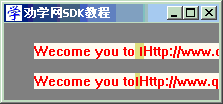 {
{ case WM_PAINT: hdc = BeginPaint(hWnd, &ps); SetTextColor(hdc, 0x0000FF); SetBkColor(hdc, 0xCDFAFF); TextOut(hdc,30,20,str1,(int)strlen(str1)); TextOut(hdc,30,50,str2,(int)strlen(str2)); EndPaint(hWnd, &ps); break; case WM_DESTROY: PostQuitMessage(0); break; default: return DefWindowProc(hWnd, message, wParam, lParam); } return 0;}SetTextAlign()函数用来设置文字的对齐方式。下面我们以窗口正中间作为基准点来了解这个函数基本内容。效果图中的红点是运行后截图时标出的,告诉你基准点的位置。
LRESULT CALLBACK WndProc(HWND hWnd, UINT message, WPARAM wParam, LPARAM lParam){ TCHAR strLeft[64] = "文字左对齐"; TCHAR strTop[64] = "文字上对齐"; TCHAR strRightBottom[64] = "文字右下对齐"; TCHAR strCenter[64] = "文字中对齐"; PAINTSTRUCT ps; HDC hdc; RECT rc;
intx,y;switch(message) {caseWM_PAINT: hdc = BeginPaint(hWnd, &ps); GetClientRect(hWnd, &rc); x = rc.right / 2, y = rc.bottom / 2; //这2句是在窗口中间画横竖二条线,后面章节有详细说明 MoveToEx(hdc,x,0,NULL), LineTo(hdc,x,rc.bottom); MoveToEx(hdc,0,y,NULL), LineTo(hdc,rc.right,y); SetTextAlign(hdc, TA_LEFT); TextOut(hdc,x, 10, strLeft,(int)strlen(strLeft)); SetTextAlign(hdc, TA_BOTTOM|TA_RIGHT); TextOut(hdc,x,rc.bottom - 10, strRightBottom,(int)strlen(strRightBottom)); SetTextAlign(hdc, TA_TOP); TextOut(hdc,10,y, strTop,(int)strlen(strTop)); SetTextAlign(hdc, TA_BOTTOM|TA_RIGHT); TextOut(hdc,rc.right - 10,y, strRightBottom,(int)strlen(strRightBottom)); SetTextAlign(hdc, VTA_CENTER); TextOut(hdc,x,y, strCenter,(int)strlen(strCenter)); EndPaint(hWnd, &ps);break;caseWM_DESTROY: PostQuitMessage(0);break;default:returnDefWindowProc(hWnd, message, wParam, lParam); }return0;}
设置文字的字间距用SetTextCharacterExtra()函数,看一下例子就基本明白了。
LRESULT CALLBACK WndProc(HWND hWnd, UINT message, WPARAM wParam, LPARAM lParam){ TCHAR strLeft[64] = "文字左对齐"; TCHAR strTop[64] = "文字上对齐"; TCHAR strRightBottom[64] = "文字右下对齐"; TCHAR strCenter[64] = "文字中对齐"; PAINTSTRUCT ps; HDC hdc; RECT rc;
intx,y,z;switch(message) {caseWM_PAINT: hdc = BeginPaint(hWnd, &ps); GetClientRect(hWnd, &rc); x = rc.right / 2, y = rc.bottom / 2; //这2句是在窗口中间画横竖二条线,后面章节有详细说明 MoveToEx(hdc,x,0,NULL), LineTo(hdc,x,rc.bottom); MoveToEx(hdc,0,y,NULL), LineTo(hdc,rc.right,y); z = SetTextCharacterExtra(hdc, 2); SetTextAlign(hdc, TA_LEFT); TextOut(hdc,x, 10, strLeft,(int)strlen(strLeft)); SetTextCharacterExtra(hdc, 4); SetTextAlign(hdc, TA_BOTTOM|TA_RIGHT); TextOut(hdc,x,rc.bottom - 10, strRightBottom,(int)strlen(strRightBottom)); SetTextCharacterExtra(hdc, 6); SetTextAlign(hdc, TA_TOP); TextOut(hdc,10,y, strTop,(int)strlen(strTop)); SetTextCharacterExtra(hdc, 8); SetTextAlign(hdc, TA_BOTTOM|TA_RIGHT); TextOut(hdc,rc.right - 10,y, strRightBottom,(int)strlen(strRightBottom)); SetTextCharacterExtra(hdc, -1); SetTextAlign(hdc, VTA_CENTER|VTA_BASELINE); TextOut(hdc,x,y, strCenter,(int)strlen(strCenter)); SetTextCharacterExtra(hdc, z); //恢复原来的字间距 EndPaint(hWnd, &ps);break;caseWM_DESTROY: PostQuitMessage(0);break;default:returnDefWindowProc(hWnd, message, wParam, lParam); }return0;}

 {
{  { TCHAR strLeft[64] = "文字左对齐"; TCHAR strTop[64] = "文字上对齐"; TCHAR strRightBottom[64] = "文字右下对齐"; TCHAR strCenter[64] = "文字中对齐"; PAINTSTRUCT ps; HDC hdc; RECT rc;
  { TCHAR strLeft[64] = "文字左对齐"; TCHAR strTop[64] = "文字上对齐"; TCHAR strRightBottom[64] = "文字右下对齐"; TCHAR strCenter[64] = "文字中对齐"; PAINTSTRUCT ps; HDC hdc; RECT rc;