(WCF) 二、一个简单的WCF例子
系列索引,请查看此。
这里简单写一个创建WCF用例的例子:
一、创建服务端创建服务端(Service)
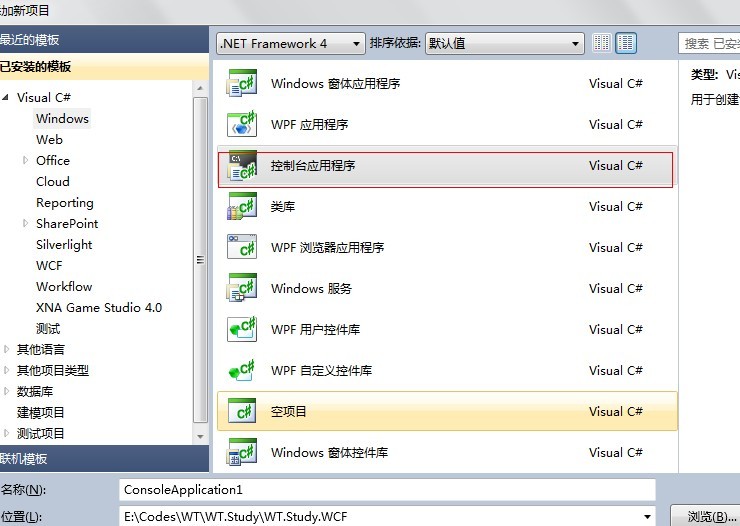
// Step 6: Define a service contract. [ServiceContract(Namespace = "http://Microsoft.ServiceModel.Samples")] public interface ICalculator { // Step7: Create the method declaration for the contract. [OperationContract] double Add(double n1, double n2); [OperationContract] double Subtract(double n1, double n2); [OperationContract] double Multiply(double n1, double n2); [OperationContract] double Divide(double n1, double n2); } 2. 实现服务端接口 // Step 1: Create service class that implements the service contract. public class CalculatorService : ICalculator { // Step 2: Implement functionality for the service operations. public double Add(double n1, double n2) { double result = n1 + n2; Console.WriteLine("Received Add({0},{1})", n1, n2); // Code added to write output to the console window. Console.WriteLine("Return: {0}", result); return result; } public double Subtract(double n1, double n2) { double result = n1 - n2; Console.WriteLine("Received Subtract({0},{1})", n1, n2); Console.WriteLine("Return: {0}", result); return result; } public double Multiply(double n1, double n2) { double result = n1 * n2; Console.WriteLine("Received Multiply({0},{1})", n1, n2); Console.WriteLine("Return: {0}", result); return result; } public double Divide(double n1, double n2) { double result = n1 / n2; Console.WriteLine("Received Divide({0},{1})", n1, n2); Console.WriteLine("Return: {0}. do good ! very good !!", result); return result; } }二、部署服务端
本项目选择直接用后台控制程序 承载 WCF服务,所以需要写点代码公布外面的访问路径;(也可以使用其他方式承载,如IIS)
1. 在服务端的运行入口写入
class Program { private static Uri baseAddress = new Uri("http://localhost:8000/ServiceModelSamples/Service"); static void Main(string[] args) { // Step 1 of the address configuration procedure: Create a URI to serve as the base address. Uri baseAddress = new Uri("http://localhost:8000/ServiceModelSamples/Service"); // Step 2 of the hosting procedure: Create ServiceHost ServiceHost selfHost = new ServiceHost(typeof(CalculatorService), baseAddress); try { // Step 3 of the hosting procedure: Add a service endpoint. selfHost.AddServiceEndpoint( typeof(ICalculator), new WSHttpBinding(), "CalculatorService"); // Step 4 of the hosting procedure: Enable metadata exchange. ServiceMetadataBehavior smb = new ServiceMetadataBehavior(); smb.HttpGetEnabled = true; selfHost.Description.Behaviors.Add(smb); // Step 5 of the hosting procedure: Start (and then stop) the service. selfHost.Open(); Console.WriteLine("The service is ready."); Console.WriteLine("Press <ENTER> to terminate service."); Console.WriteLine(); Console.ReadLine(); // Close the ServiceHostBase to shutdown the service. selfHost.Close(); } catch (CommunicationException ce) { Console.WriteLine("An exception occurred: {0}", ce.Message); selfHost.Abort(); } } }2. 生成服务端项目,运行服务端
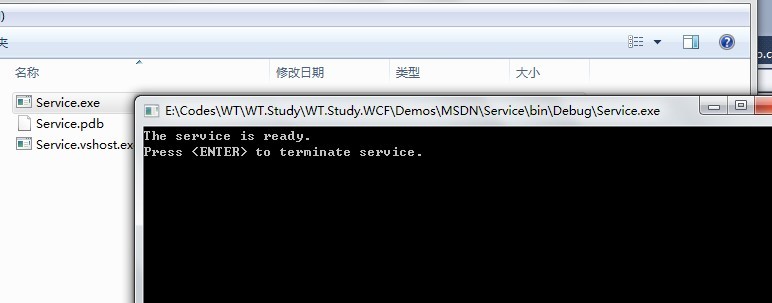
有两种方式,一般:
a. 通过命令生成客户端代理
b.直接引用服务端项目。
一般的场景,直接(b)种方式,很简单:
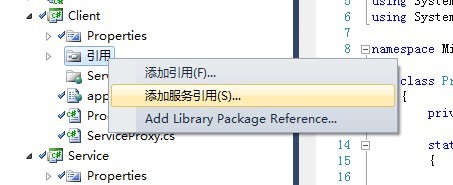
但是,我们不是IIS承载的服务,所以用(b)种方式,不能发现。此外,(a)种方式虽然麻烦,却是最有威力的,试想,假如是其他公司为你开的服务,并不让你直接引用,你怎么办?生成客户端代理吧!
在“开始”菜单上,单击“所有程序”,然后单击“Visual Studio 2010”。单击“Visual Studio 工具”,然后单击“Visual Studio 2010 命令提示”。
svcutil.exe /language:cs /out:generatedProxy.cs /config:app.config http://localhost:8000/ServiceModelSamples/service
3. 将生成的代理,移入客户项目
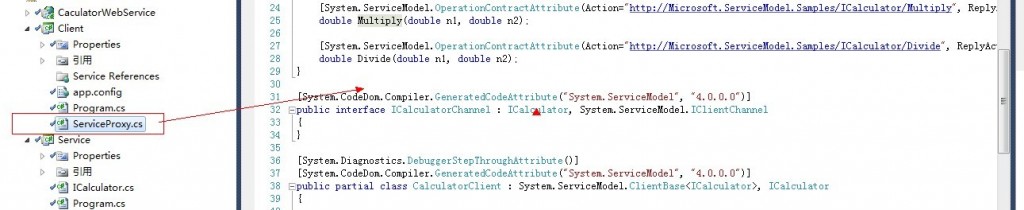
同时,将生成的配置文件,相关的配置也移入客户端app.config:
<?xml version="1.0" encoding="utf-8"?><configuration> <system.serviceModel> <bindings> <wsHttpBinding> <binding name="WSHttpBinding_ICalculator" closeTimeout="00:01:00" openTimeout="00:01:00" receiveTimeout="00:10:00" sendTimeout="00:01:00" bypassProxyOnLocal="false" transactionFlow="false" hostNameComparisonMode="StrongWildcard" maxBufferPoolSize="524288" maxReceivedMessageSize="65536" messageEncoding="Text" textEncoding="utf-8" useDefaultWebProxy="true" allowCookies="false"> <readerQuotas maxDepth="32" maxStringContentLength="8192" maxArrayLength="16384" maxBytesPerRead="4096" maxNameTableCharCount="16384" /> <reliableSession ordered="true" inactivityTimeout="00:10:00" enabled="false" /> <security mode="Message"> <transport clientCredentialType="Windows" proxyCredentialType="None" realm="" /> <message clientCredentialType="Windows" negotiateServiceCredential="true" algorithmSuite="Default" /> </security> </binding> </wsHttpBinding> </bindings> <client> <endpoint address="http://localhost:8000/ServiceModelSamples/Service/CalculatorService" binding="wsHttpBinding" bindingConfiguration="WSHttpBinding_ICalculator" contract="ICalculator" name="WSHttpBinding_ICalculator"> <identity> <userPrincipalName value="dengfuyong-PC\dengfuyong" /> </identity> </endpoint> </client> </system.serviceModel></configuration>
四、客户端调用
1. 编写调用方式:
CalculatorClient client = new CalculatorClient(); // Step 2: Call the service operations. // Call the Add service operation. double value1 = 100.00D; double value2 = 15.99D; double result = client.Add(value1, value2); Console.WriteLine("Add({0},{1}) = {2}", value1, value2, result); // Call the Subtract service operation. value1 = 145.00D; value2 = 76.54D; result = client.Subtract(value1, value2); Console.WriteLine("Subtract({0},{1}) = {2}", value1, value2, result); // Call the Multiply service operation. value1 = 9.00D; value2 = 81.25D; result = client.Multiply(value1, value2); Console.WriteLine("Multiply({0},{1}) = {2}", value1, value2, result); // Call the Divide service operation. value1 = 22.00D; value2 = 7.00D; result = client.Divide(value1, value2); Console.WriteLine("Divide({0},{1}) = {2}", value1, value2, result); //Step 3: Closing the client gracefully closes the connection and cleans up resources. client.Close(); Console.WriteLine(); Console.WriteLine("Press <ENTER> to terminate client."); Console.ReadLine();
2. 运行
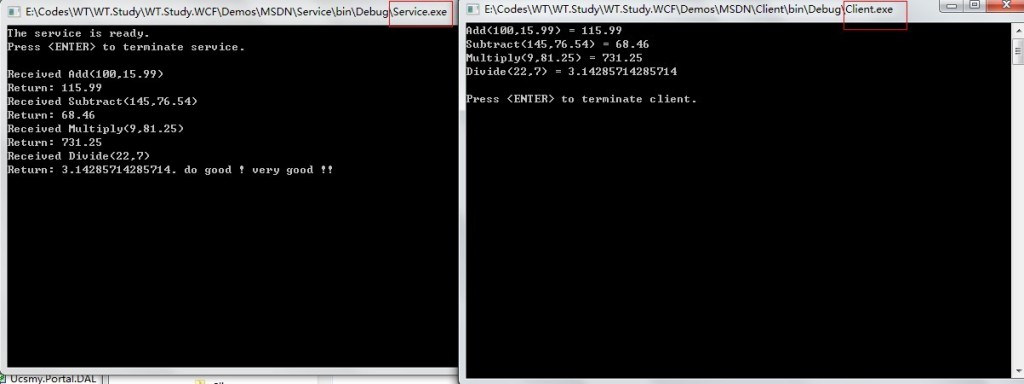
这里,我们发现:客户端有服务端可以双向通信。简单可以看出:WCF 至少具有WebService和Remoting的功能。
今天早上到此结束吧。
