求助:如何获得任意文件扩展名关联的图标
本人想根据任意文件扩展名得到关联的图标,比如:bmp、pdf、xls、doc、txt等等,网上也搜了相关内容,有得到“EXE、dll”文件的图标,也有用非VFP代码获得图标的程序,就是没有找到VFP的。
以下是excel论坛有人用VBA编的可以实现,有哪位高人能将他转换为VFP的代码,要么谁有其他现成的相关VFP代码分享一下,谢谢!
http://www.officefans.net/cdb/viewthread.php?tid=77504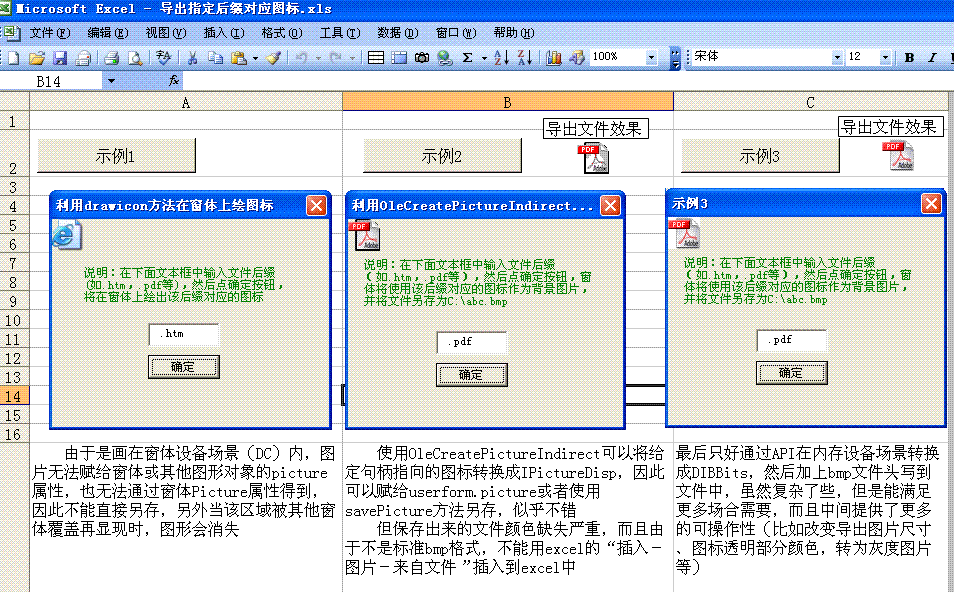
*----------------------------------
Option Explicit
Private Const MAX_PATH = 260
Private Type BITMAPINFOHEADER '40 bytes
biSize As Long
biWidth As Long
biHeight As Long
biPlanes As Integer
biBitCount As Integer
biCompression As Long
biSizeImage As Long
biXPelsPerMeter As Long
biYPelsPerMeter As Long
biClrUsed As Long
biClrImportant As Long
End Type
Private Type RGBQUAD
rgbBlue As Byte
rgbGreen As Byte
rgbRed As Byte
rgbReserved As Byte
End Type
Private Type BITMAPINFO
bmiHeader As BITMAPINFOHEADER
bmiColors As RGBQUAD
End Type
Private Type SHFILEINFO
hIcon As Long ' out: icon
iIcon As Long ' out: icon index
dwAttributes As Long ' out: SFGAO_ flags
szDisplayName As String * 260 ' out: display name (or path)
szTypeName As String * 80 ' out: type name
End Type
Private Type RECT
Left As Long
Top As Long
Right As Long
Bottom As Long
End Type
Private Declare Function CreateCompatibleDC Lib "gdi32" (ByVal hdc As Long) As Long
Private Declare Function CreateDIBSection Lib "gdi32" (ByVal hdc As Long, pBitmapInfo As BITMAPINFO, ByVal un As Long, ByVal lplpVoid As Long, ByVal handle As Long, ByVal dw As Long) As Long
Private Declare Function GetDIBits Lib "gdi32" (ByVal aHDC As Long, ByVal hBitmap As Long, ByVal nStartScan As Long, ByVal nNumScans As Long, lpBits As Any, lpBI As BITMAPINFO, ByVal wUsage As Long) As Long
Private Declare Function SelectObject Lib "gdi32" (ByVal hdc As Long, ByVal hObject As Long) As Long
Private Declare Function DeleteDC Lib "gdi32" (ByVal hdc As Long) As Long
Private Declare Function DeleteObject Lib "gdi32" (ByVal hObject As Long) As Long
'Private Declare Function GetDC Lib "user32" (ByVal Hwnd As Long) As Long
Private Declare Function DrawIcon Lib "user32" (ByVal hdc As Long, ByVal x As Long, ByVal y As Long, ByVal hIcon As Long) As Long
Private Declare Function SHGetFileInfo Lib "shell32.dll" Alias "SHGetFileInfoA" (ByVal pszPath As String, ByVal dwFileAttributes As Long, psfi As SHFILEINFO, ByVal cbFileInfo As Long, ByVal uFlags As Long) As Long
Private Declare Function CreateDC Lib "gdi32" Alias "CreateDCA" (ByVal lpDriverName As String, ByVal lpDeviceName As String, ByVal lpOutput As String, lpInitData As Long) As Long
Private Declare Function CreateSolidBrush Lib "gdi32" (ByVal crColor As Long) As Long
Private Declare Function FillRect Lib "user32" (ByVal hdc As Long, lpRect As RECT, ByVal hBrush As Long) As Long
Private Declare Function DrawIconEx Lib "user32" (ByVal hdc As Long, ByVal xLeft As Long, ByVal yTop As Long, ByVal hIcon As Long, ByVal cxWidth As Long, ByVal cyWidth As Long, ByVal istepIfAniCur As Long, ByVal hbrFlickerFreeDraw As Long, ByVal diFlags As Long) As Long
Private Const vbSrcCopy = &HCC0020
Private Const SHGFI_ICON = &H100
Private Const SHGFI_USEFILEATTRIBUTES = &H10
Private Const FILE_ATTRIBUTE_NORMAL = &H80
Private Const IMAGE_ICON = 1
Private Const FILE_ATTRIBUTE_ARCHIVE = &H20
Private Const FILE_ATTRIBUTE_COMPRESSED = &H800
Private Const FILE_ATTRIBUTE_DIRECTORY = &H10
Private Const FILE_ATTRIBUTE_HIDDEN = &H2
Private Const BI_RGB = 0&
Private Const DIB_RGB_COLORS = 0
Private Const LR_COPYFROMRESOURCE = &H4000
Private Const DI_MASK = &H1 ' 绘图时使用图标的MASK部分(如单独使用, 可获得图标的掩模)
Private Const DI_IMAGE = &H2 ' 绘图时使用图标的XOR部分(即图标没有透明区域)
Private Const DI_NORMAL = DI_MASK Or DI_IMAGE
Enum filetype
normalFile = FILE_ATTRIBUTE_NORMAL
folder = FILE_ATTRIBUTE_DIRECTORY
End Enum
Public Sub extractIcontoBMP(fileName As String, filetype As filetype, targetFile As String, Optional dimension As Long = 32)
Dim iBitmap As Long
Dim DC As Long
Dim iDC As Long
Dim sfi As SHFILEINFO
Dim bi24BitInfo As BITMAPINFO
Dim bBytes() As Byte
Dim hBrush As Long
Dim iconWidth As Integer
Dim iconHeight As Integer
iconWidth = dimension
iconHeight = dimension
With bi24BitInfo.bmiHeader
.biBitCount = 24
.biCompression = BI_RGB
.biPlanes = 1
.biSize = Len(bi24BitInfo.bmiHeader)
.biWidth = iconWidth
.biHeight = iconHeight
End With
'得到指定文件的SHFILEINFO信息,这里主要用的是hicon
SHGetFileInfo fileName, filetype, sfi, Len(sfi), SHGFI_USEFILEATTRIBUTES Or SHGFI_ICON
'在屏幕上创建一个设备场景(DC - Device Context)
DC = CreateDC("display", vbNullString, 0, 0)
'创建一个与特定设备场景(这里是上一句的DC)一致的内存设备场景
iDC = CreateCompatibleDC(DC)
'创建一个DIBSection
iBitmap = CreateDIBSection(iDC, bi24BitInfo, DIB_RGB_COLORS, ByVal 0&, ByVal 0&, ByVal 0&)
'将iBitmap对象选入iDC设备场景
SelectObject iDC, iBitmap
'创建一个白色(vbWhite)的刷子,用于填充背景,否则另存出的图片会是黑色背景,这里可选其他颜色(如vbred,&Hdddddd)达到其他效果
hBrush = CreateSolidBrush(vbWhite)
'将sfi.hicon指向的图标绘入iDC,iconWidth和iconHeight将是最终的bmp图像尺寸
DrawIconEx iDC, 0, 0, sfi.hIcon, iconWidth, iconHeight, ByVal 0, hBrush, DI_NORMAL
'重定义bBytes字节流的长度以容纳整个DIBBits,计算方式很简单:=每个像素3个字节*图像宽度*图像高度
ReDim bBytes(1 To bi24BitInfo.bmiHeader.biWidth * bi24BitInfo.bmiHeader.biHeight * 3) As Byte
'将iDC设备场景内的图片转换成二进制存到bBytes()数组中,在后面保存到文件
GetDIBits iDC, iBitmap, 0, bi24BitInfo.bmiHeader.biHeight, bBytes(1), bi24BitInfo, DIB_RGB_COLORS
'别忘了释放内存
DeleteDC DC
DeleteDC iDC
DeleteObject iBitmap
DeleteObject hBrush
'----这段代码可以把位图变为灰度显示,但实际每像素仍以24位表示,因此文件尺寸不会变小--------------------
'同样如果处理一种或几咱颜色亮度,可以改变图片色调、亮度等
' Dim i As Long
' For i = 1 To UBound(bBytes) Step 3
' bBytes(i) = bBytes(i) * 0.3 + bBytes(i + 1) * 0.59 + bBytes(i + 2) * 0.11
' bBytes(i + 1) = bBytes(i)
' bBytes(i + 2) = bBytes(i)
' Next
'---------------------------------------------------------
'为了简单起见,这里没有验证目标文件名-targetFile的有效性,在实际应用中,如果用户输入不可预料,应该加以判别
Open targetFile For Binary As #1
Put 1, , CByte(66) 'B
Put 1, , CByte(77) 'M
Put 1, , CLng(UBound(bBytes) + LenB(bi24BitInfo.bmiHeader) + 14) '文件大小
Put 1, , CInt(0) '保留字节
Put 1, , CInt(0) '保留字节
Put 1, , CLng(LenB(bi24BitInfo.bmiHeader) + 14) '偏移量
Put 1, , CLng(LenB(bi24BitInfo.bmiHeader)) '本结构所占字节数
Put 1, , CLng(iconWidth) '宽度
Put 1, , CLng(iconHeight) '高度
Put 1, , CInt(1) '目标设备级别,必须为1
Put 1, , CInt(24) '每像素的位数
Put 1, , CLng(0) '位图压缩类型
Put 1, , CLng(UBound(bBytes)) '位图大小
Put 1, , CLng(0) '每米水平像素数
Put 1, , CLng(0) '每米竖直像素数
Put 1, , CLng(0) '位图实际使用的颜色表中的颜色数
Put 1, , CLng(0) '位图显示过程中重要的颜色数
Put 1, , bBytes 'RGB位图数据
Close #1
End Sub
