基于GoogleAPI的翻译小程序的实现(二)
这几天复习期末考试,很是郁闷。实在不想看书的时候把这个小小的翻译软件优化了一下。在之前的基础上加了网络是否已连接的处理,写入word的处理,空内容无法翻译和保存的处理,等等。并用exe4j生成了exe文件。总之现在勉强可以算做软件了,之前纯粹一程序。代码我重新发一下,软件和jar包在附件里,共大家下载。漫漫java学习路,希望得到高人指点。
界面截图如下: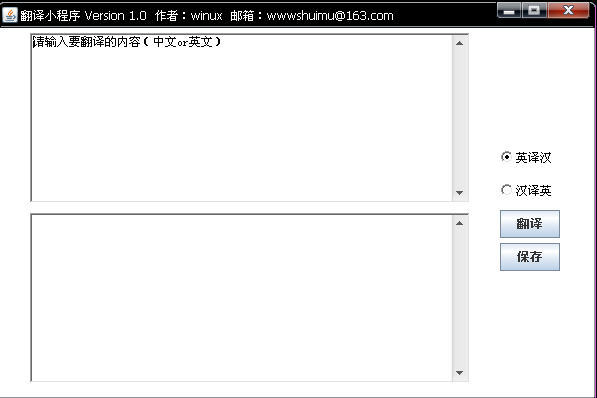
/* * 一个利用google翻译API实现的英汉双译小程序 * Author:winux * date:11,19,2010 * */import java.awt.*;import java.awt.event.*;import java.io.*;import java.net.InetAddress;import java.net.UnknownHostException;import javax.swing.*;import com.google.api.GoogleAPI;import com.google.api.translate.Language;import com.google.api.translate.Translate;import com.google.api.translate.Language.*;import com.google.api.translate.Translate.*;import com.google.api.detect.*;public class Translateor //extends Frame{//------------------------------弹出窗口------------------------------//-------------------------------final static JOptionPane jop = new JOptionPane();final static Frame fr= new Frame("翻译小程序 Version 1.0 作者:winux 邮箱:wwwshuimu@163.com");//-----------------检测语言-------此程序暂不需要故未实现------------------public Boolean languageDetect(String string) throws Exception{if(Detect.execute(string) != null){}return true;}//------------------------------------//---------------------判断网络是否已连接----------------------------------------private static Boolean testNet(){String host;InetAddress aa;try {aa = InetAddress.getLocalHost();host = aa.toString();if(host.equals("127.0.0.1"))/*{jop.showMessageDialog(fr, "网络未连接,请检查网络!","警告",JOptionPane.ERROR_MESSAGE);jop.setVisible(true);}*/return false;elsereturn true;} catch (UnknownHostException e3) {// TODO Auto-generated catch blocke3.printStackTrace();return false;}}//------------------------------------public static void main(String []args){GoogleAPI.setHttpReferrer("http://code.google.com/p/i18n-translator/");GridLayout g1 = new GridLayout(2,1);//设置文本框所在容器面板的布局方式g1.setVgap(10);//设置两个文本框的间距Panel panel1 = new Panel(g1);//定义文本框所在面板final TextArea text1 = new TextArea("请输入要翻译的内容(中文or英文)",10,60,TextArea.SCROLLBARS_VERTICAL_ONLY);final TextArea text2 = new TextArea(null,10,60,TextArea.SCROLLBARS_VERTICAL_ONLY);final JButton button = new JButton("翻译");final JButton button2 = new JButton("保存");//-------------------------定义单选框框选择语言-------------------------CheckboxGroup cbg = new CheckboxGroup();Panel p1 = new Panel();GridLayout grid = new GridLayout(4,1);grid.setVgap(5);p1.setLayout(grid);//setLayout(new GridLayout(2,1))final Checkbox cb1 = new Checkbox("英译汉",cbg,true);final Checkbox cb2 = new Checkbox("汉译英",cbg,false);p1.add(cb1);p1.add(cb2);p1.add(button);p1.add(button2);//--------------------------------FlowLayout fly = new FlowLayout(FlowLayout.LEFT,5,5);fly.setHgap(30);fr.setLayout(fly);panel1.add(text1);panel1.add(text2);panel1.setSize(550, 400);//panel1.setBounds(10,10, 10,10);//-------------------------------fr.add(panel1);fr.add(p1);//--------------------------------jop.setBounds(0, 0, 200, 251);jop.setLocation(100, 100);//--------------------------响应窗口关闭动作------------------------------fr.addWindowListener(new WindowAdapter(){public void windowClosing(WindowEvent e){System.exit(0);}});//------------------------------------//-------------------响应翻译按钮动作--------------------------------------ActionListener a1 = new ActionListener(){public void actionPerformed(ActionEvent e1){String str1,str2;str1=text1.getText();if(e1.getSource()==button){try {if(cb1.getState()==true){str2=Translate.execute(str1, Language.ENGLISH,Language.CHINESE_SIMPLIFIED );text2.setText(str2);}if(cb2.getState()==true){str2=Translate.execute(str1,Language.CHINESE_SIMPLIFIED,Language.ENGLISH );text2.setText(str2);} }catch(Exception e11){//e11.printStackTrace(e11);if(testNet()){jop.showMessageDialog(fr, "网络未连接,请检查网络!","警告",JOptionPane.ERROR_MESSAGE);jop.setVisible(true);}else{jop.showMessageDialog(fr, "请输入要翻译的内容","警告",JOptionPane.ERROR_MESSAGE);jop.setVisible(true);}}}}};//--------------------------------------------ActionListener a2 = new ActionListener(){public void actionPerformed(ActionEvent e2){//--------------------------------if(e2.getSource()==button2){if(!text2.getText().trim().equalsIgnoreCase("")){try { FileOutputStream fos;fos = new FileOutputStream("result.doc");BufferedOutputStream bos = new BufferedOutputStream(fos);OutputStreamWriter osw = new OutputStreamWriter(bos);osw.write(text2.getText());osw.flush();osw.close();jop.showMessageDialog(fr, "恭喜您,翻译结果已写入word文档","完成",JOptionPane.INFORMATION_MESSAGE); } catch (Exception e21) {// TODO Auto-generated catch block jop.showMessageDialog(fr, "写入word失败!请检查操作!","警告",JOptionPane.ERROR_MESSAGE); }}else{jop.showMessageDialog(fr, "没有结果可保存,请先翻译再保存!","警告",JOptionPane.ERROR_MESSAGE);}}}};//--------------------------------------------button.addActionListener(a1);button2.addActionListener(a2);fr.setSize(600,400);fr.setLocation(250, 250);fr.setResizable(false);fr.setVisible(true);}}
