在前端页面使用日历控件
网上各种Calendar、DatePicker令人眼花缭乱,但是成熟度相差很大,有的没有本地化、有的响应速度慢。
由于Magento默认基于Prototype,所以我们选择范围主要限制在protoype上建立的日历控件,感觉免费的prototype日历控件并不多好找。
如果进入Magento后台,大家会看到有很多地方使用了calendar控件: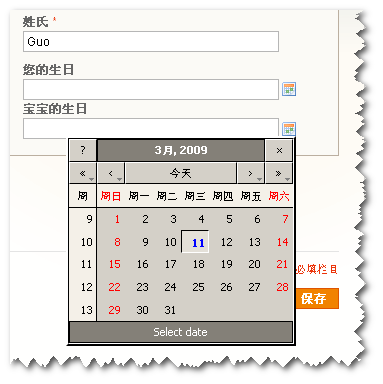
Magento选择的这个Calendar比较完善,使用的是开源项目:http://www.dynarch.com/projects/calendar/
前台如果想使用它需要载入如下js和css
<reference name="head"> <action method="addItem"><type>js_css</type><name>calendar/calendar-win2k-1.css</name><params/><!--<if/><condition>can_load_calendar_js</condition>--></action> <action method="addItem"><type>js</type><name>calendar/calendar.js</name><!--<params/><if/><condition>can_load_calendar_js</condition>--></action> <action method="addItem"><type>js</type><name>calendar/calendar-setup.js</name><!--<params/><if/><condition>can_load_calendar_js</condition>--></action></reference>
<reference name="content"> <block type="core/html_calendar" name="head.calendar" as="calendar" template="page/js/calendar.phtml"/></reference>
<input type="text" name="birthday" id="birthday" value="" /><img src="<?php echo $this->getSkinUrl('images/grid-cal.gif') ?>" id="birthday-trig" /><script type="text/javascript">//<![CDATA[Calendar.setup({ inputField: "birthday", ifFormat: "%Y-%m-%d", showsTime: false, button: "birthday-trig", align: "Bl", singleClick : true});//]]></script>