java实现文件监控java本身不能直接监听系统的文件操作事件,不过可以先编写C/C++调用操作系统的API监听文件
java实现文件监控
java本身不能直接监听系统的文件操作事件,不过可以先编写C/C++调用操作系统的API监听文件,再通过jni调用的方式实现。限于本人的C/C++水平有限,没有用C/C++实现该接口,而且已有开源组件JNotify实现了这个功能,本文例子使用JNotify。
public?class?MainFrame?extends?JFrame?{
????private?JPanel?contentPane;
????private?JTextField?textField;
????private?JTextArea?textArea;
????public?static?void?main(String[]?args)?{
????????EventQueue.invokeLater(new?Runnable()?{
????????????public?void?run()?{
????????????????try?{
????????????????????MainFrame?frame?=?new?MainFrame();
????????????????????frame.setVisible(true);
????????????????}?catch?(Exception?e)?{
????????????????????e.printStackTrace();
????????????????}
????????????}
????????});
????}
????public?MainFrame()?{
????????setDefaultCloseOperation(JFrame.EXIT_ON_CLOSE);
????????setBounds(100,?100,?543,?300);
????????contentPane?=?new?JPanel();
????????contentPane.setBorder(new?EmptyBorder(5,?5,?5,?5));
????????setContentPane(contentPane);
????????contentPane.setLayout(null);
????????JLabel?label?=?new?JLabel("监控路径:");
????????label.setBounds(33,?20,?65,?15);
????????contentPane.add(label);
????????textField?=?new?JTextField("D:/");
????????textField.setBounds(90,?16,?219,?21);
????????contentPane.add(textField);
????????textField.setColumns(10);
????????JButton?button?=?new?JButton("开始监控");
????????button.addActionListener(new?ActionListener()?{
????????????public?void?actionPerformed(ActionEvent?e)?{
????????????????try?{
????????????????????addWatch();
????????????????}?catch?(Exception?ex)?{
????????????????????ex.printStackTrace();
????????????????}
????????????}
????????});
????????button.setBounds(319,?16,?93,?23);
????????contentPane.add(button);
????????textArea?=?new?JTextArea();
????????JScrollPane?scrollPane?=?new?JScrollPane(textArea);
????????scrollPane.setBounds(33,?45,?480,?207);
????????contentPane.add(scrollPane);
????}
????public?void?addWatch()?throws?Exception?{
????????String?path?=?textField.getText();
????????int?mask?=?JNotify.FILE_CREATED?|?JNotify.FILE_DELETED
????????????????|?JNotify.FILE_MODIFIED?|?JNotify.FILE_RENAMED;
????????boolean?watchSubtree?=?true;
????????//添加文件监听
????????int?watchID?=?JNotify.addWatch(path,?mask,?watchSubtree,?new?Listener());
????}
????class?Listener?implements?JNotifyListener?{
????????public?void?fileRenamed(int?wd,?String?rootPath,?String?oldName,
????????????????String?newName)?{
????????????textArea.append("文件:"?+?rootPath?+?"?:?"?+?oldName?+?"?重命名为:?"
????????????????????+?newName?+?"\n");
????????}
????????public?void?fileModified(int?wd,?String?rootPath,?String?name)?{
????????????textArea.append("文件修改?"?+?rootPath?+?"?:?"?+?name?+?"\n");
????????}
????????public?void?fileDeleted(int?wd,?String?rootPath,?String?name)?{
????????????textArea.append("删除文件:?"?+?rootPath?+?"?:?"?+?name?+?"\n");
????????}
????????public?void?fileCreated(int?wd,?String?rootPath,?String?name)?{
????????????textArea.append("新建文件:?"?+?rootPath?+?"?:?"?+?name?+?"\n");
????????}
????}
}
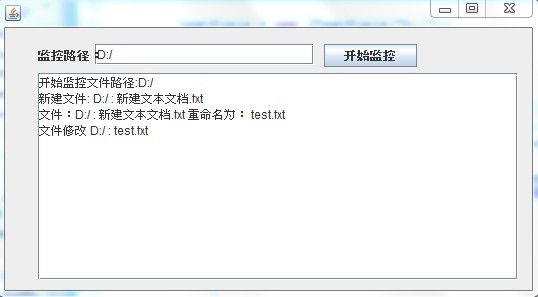
运行效果:
在D盘新建一个文件和修改文件名操作。