Canvas学习笔记(八)--样式
1、设置颜色
?
fillStyle = color;//设置填充颜色
strokeStyle = color;//设置边框颜色
?
color可以是表示 CSS 颜色值的字符串,渐变对象或者图案对象。默认为黑色(#000000)。
?
?
// 这些 fillStyle 的值均为 '红色' ctx.fillStyle = "red"; ctx.fillStyle = "#FF0000"; ctx.fillStyle = "rgb(255,0,0)"; ctx.fillStyle = "rgba(255,0,0,1)";
?
2、透明度
?
这个属性影响到 canvas 里所有图形的透明度,有效的值范围是 0.0 (完全透明)到 1.0(完全不透明),默认是 1.0。
注:此方法适用于需要绘制大量拥有相同透明度的图形时候。如果只绘制少数图形,使用rgba()方法更合适。rgba()方法的最后一个参数表示透明度,有效范围同上。
?
代码示例:
?
<!DOCTYPE html PUBLIC "-//W3C//DTD XHTML 1.0 Transitional//EN" "http://www.w3.org/TR/xhtml1/DTD/xhtml1-transitional.dtd"><html xmlns="http://www.w3.org/1999/xhtml"> <head> <style type="text/css">.wraper {position: relative;float: left;margin-left: 10px;margin-top: 10px;border: 1px solid orange;} </style><script type="text/javascript">function draw(){//设置颜色、透明度(实例一)使用了globalAlphavar canvas1 = document.getElementById('test1');if(canvas1.getContext){var context = canvas1.getContext('2d');context.fillStyle = 'red';context.fillRect(10,10,90,90);context.fillStyle = 'orange';context.fillRect(100,10,90,90);context.fillStyle = 'blue';context.fillRect(100,100,90,90);context.fillStyle = 'green';context.fillRect(10,100,90,90);context.fillStyle = '#FFFFFF';context.globalAlpha = 0.2;for(var i = 0; i < 8; i++){context.beginPath();context.arc(100,100,10+i*10,0,Math.PI*2,true);context.fill();}}//设置颜色、透明度(实例二)使用了rgba()var can2 = document.getElementById('test2');if(can2.getContext){var cxt2 = can2.getContext('2d');cxt2.fillStyle = 'red';cxt2.fillRect(10,10,180,40);cxt2.fillStyle = 'orange';cxt2.fillRect(10,55,180,40);cxt2.fillStyle = 'blue';cxt2.fillRect(10,100,180,40);cxt2.fillStyle = 'green';cxt2.fillRect(10,145,180,40);for(var i = 0; i < 4; i++){for(var j = 0; j < 9; j++){cxt2.fillStyle = 'rgba(255,255,255,'+ (j+1)*0.1+')';cxt2.fillRect(20+j*17,20+i*45,17,20);}}}}</script> </head> <body onload="draw();"><canvas id="test1" width="200px" height="200px" width="200px" height="200px" src="/img/2012/10/19/1816404909.png">?3、线型
?
lineWidth = value;//设置当前线条的粗细。必须为正值。默认为1.0。
lineCap = type;//设置线条断点的样子。butt、round、square。默认为butt。
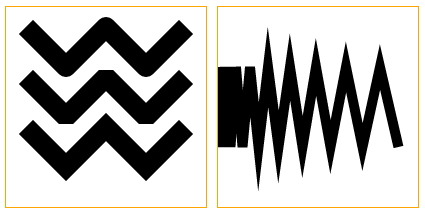
lineJoin = type;//设置线条连接时的样子。round、bevel、miter。默认为miter。
miterLimit = value;//设置线条连接时外延交点和连接点的最大距离。
?
?
代码实例:
?
?
<!DOCTYPE html PUBLIC "-//W3C//DTD XHTML 1.0 Transitional//EN" "http://www.w3.org/TR/xhtml1/DTD/xhtml1-transitional.dtd"><html xmlns="http://www.w3.org/1999/xhtml"> <head> <style type="text/css">.wraper {position: relative;float: left;margin-left: 10px;margin-top: 10px;border: 1px solid orange;} </style><script type="text/javascript">function draw(){//线条宽度var can3 = document.getElementById('test3');if(can3.getContext){var cxt3 = can3.getContext('2d');for(var i = 0; i < 10; i++){cxt3.beginPath();cxt3.lineWidth = i+1;cxt3.moveTo(10,10+15*i);cxt3.lineTo(190,10+15*i);cxt3.stroke();}}//线条端点样式var capArray = ['butt','round','square'];var can4 = document.getElementById('test4');if(can4.getContext){var cxt4 = can4.getContext('2d');cxt4.strokeStyle = 'rgba(0,0,255,1)';cxt4.beginPath();cxt4.moveTo(20,30);cxt4.lineTo(180,30);cxt4.moveTo(20,170);cxt4.lineTo(180,170);cxt4.stroke();cxt4.strokeStyle = 'rgba(0,0,0,1)';cxt4.lineWidth = 20;for(var i = 0; i < 3; i++){cxt4.lineCap = capArray[i];cxt4.beginPath();cxt4.moveTo(40+i*60,30);cxt4.lineTo(40+i*60,170);cxt4.stroke();}}//线条连接样式var joinArray = ['round','bevel','miter'];var can5 = document.getElementById('test5');if(can5.getContext){var cxt5 = can5.getContext('2d');cxt5.lineWidth = 20;for(var i = 0; i < 3; i++){cxt5.lineJoin = joinArray[i];cxt5.beginPath();cxt5.moveTo(20,20+i*50);cxt5.lineTo(60,60+i*50);cxt5.lineTo(100,20+i*50);cxt5.lineTo(140,60+i*50);cxt5.lineTo(180,20+i*50);cxt5.stroke();}}//miterLimit样式var can6 = document.getElementById('test6');if(can6.getContext){var cxt6 = can6.getContext('2d');cxt6.miterLimit = 10;cxt6.lineWidth = 10;cxt6.moveTo(0,100);for(var i = 0; i < 20; i++){var y = i%2 ? 140 : 60;cxt6.lineTo(Math.pow(i,2)*0.5,y);}cxt6.stroke();}}</script> </head> <body onload="draw();"><canvas id="test3" width="200px" height="200px" width="200px" height="200px" width="200px" height="200px" width="200px" height="200px" src="/img/2012/10/19/1816404910.png">
?
?
?
?

