详解使用spring中的mail发送邮件 (1)
1. Java Mail介绍
JavaEE框架为应用提供了JavaMail接口,通过JavaMail相关的接口可以读取邮件服务器的邮件,并且可以完成邮件的发送过程。JavaMail是JavaEE中的标准API,是对邮件服务器访问过程的封装。使用JavaMail API则不需要编写与邮件服务器交互的详细过程,只需要调用相关接口即可。
Java API 主要包括四个部分: Session, Message, Transport 和 InternetAddress。
1.1 Session
Session定义了全局的和每个用户的与邮件相关的属性。这些属性说明了客户机和服务器如何交流信息。
mail.store.protocol:检索邮件使用的协议
mail.transport.protocol:发送邮件使用的协议
mail.host:服务器主机名
mail.user:检索邮件或者发送邮件的用户名
mail.protocol.host:发送邮件服务器或者接受邮件服务器
mail.protocol.user:登陆特定邮件服务器使用的用户名
mail.from:指定默认的回复地址
1.2 Message
一个抽象类,表示单个邮件信息,其属性包括消息类型。地址消息和锁定义的目录结构。一般我们使用其MimeMessage子类。
Message类的主要方法有两部分,一是在发送邮件时候使用,用于设置邮件的相关信息,包括发送者,接受者,主题等信息。
如:
setFrom(Address address); //注意这里的参数为javax.mail.Address类型 setRecipients(); setSentDate();
Flags getFlags(); //获取与邮件相关的标记属性 Folder getFolder(); //获取邮件所在的文件夹
public static void send(Message msg); //发送邮件public static void send(Message msg, Address[] addresses); //第一参数是要发送邮件的本身,第二个参数是邮件发送的目的地,它会忽略邮件中设置的接受者。
public InternetAddress(String address);//把字符串构造成InternetAddress
public class CommonsEmail {public static void main(String[] args) throws Exception {Email email = new SimpleEmail();email.setHostName("smtp.qq.com");email.setSmtpPort(25);email.setAuthenticator(new DefaultAuthenticator("465553115@qq.com", "your password"));email.setFrom("465553115@qq.com"); //注意,这里的发送地址一定要和上面的验证地址一致email.setSubject("commons email");email.setMsg("a mail sent used by commons email");email.addTo("technoboy@yeah.net");email.send();System.out.println("over");}}void send(SimpleMailMessage simpleMessage);void send(SimpleMailMessage[] simpleMessages);
public class SimpleMailMessage implements MailMessage, Serializable {private String from;private String replyTo;private String[] to;private String[] cc;private String[] bcc;private Date sentDate;private String subject;private String text;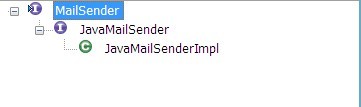
public class JavaMailSenderImpl implements JavaMailSender {/** The default protocol: 'smtp' */public static final String DEFAULT_PROTOCOL = "smtp";/** The default port: -1 */public static final int DEFAULT_PORT = -1;private static final String HEADER_MESSAGE_ID = "Message-ID";private Properties javaMailProperties = new Properties();private Session session;private String protocol = DEFAULT_PROTOCOL;private String host;private int port = DEFAULT_PORT;private String username;private String password;private String defaultEncoding;private FileTypeMap defaultFileTypeMap;<?xml version="1.0" encoding="UTF-8"?><beans xmlns="http://www.springframework.org/schema/beans"xmlns:xsi="http://www.w3.org/2001/XMLSchema-instance"xsi:schemaLocation="http://www.springframework.org/schema/beans http://www.springframework.org/schema/beans/spring-beans-3.0.xsd"><bean id = "mailSender" class = "org.springframework.mail.javamail.JavaMailSenderImpl"><property name="host" value = "smtp.qq.com"></property><property name="protocol" value = "smtp"></property><property name="username" value = "465553115@qq.com"></property><property name="password" value = "your password"></property><property name="port" value = "25"></property><!-- 这里设置验证 --><property name="javaMailProperties"><props><prop key="mail.smtp.auth">true</prop></props></property></bean><bean id ="mailMessage" class = "org.springframework.mail.SimpleMailMessage"> <!-- from的地址需要和上面username地址一致 --><property name="from" value = "465553115@qq.com"></property><property name="subject" value = "spring mail test"></property><property name="to" value = "technoboy@yeah.net"></property><property name="text" value = "a mail sent used by spring mail"></property></bean><bean id ="DummySpringMail" class = "org.com.mail.DummySpringMail"><property name="mailSender" ref = "mailSender"/><property name="mailMessage" ref = "mailMessage"/></bean></beans>
public class DummySpringMail {//private MailSender mailSender;private SimpleMailMessage mailMessage;public void setMailMessage(SimpleMailMessage mailMessage) {this.mailMessage = mailMessage;}public void setMailSender(MailSender mailSender) {this.mailSender = mailSender;}//public void sendMsg(){SimpleMailMessage smm = new SimpleMailMessage(this.mailMessage);this.mailSender.send(smm);}public static void main(String[] args) {ApplicationContext context = new ClassPathXmlApplicationContext("spring_mail.xml");DummySpringMail som = (DummySpringMail)context.getBean("DummySpringMail");som.sendMsg();System.out.println("over");}}