vim+xxd强大的十六进制编辑器--转,集?[oracle@logserver tmp]$ echo -n ABCDEFGHIJKLMNOPQRSTUVWXYZ abc
vim+xxd=强大的十六进制编辑器--转,集
?
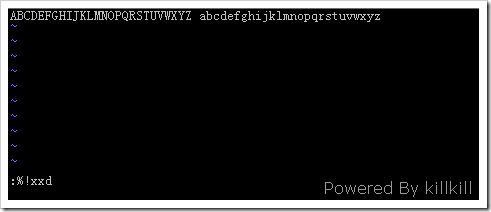
[oracle@logserver tmp]$ echo -n "ABCDEFGHIJKLMNOPQRSTUVWXYZ abcdefghijklmnopqrstuvwxyz" > test.bin[oracle@logserver tmp]$ cat test.bin ABCDEFGHIJKLMNOPQRSTUVWXYZ abcdefghijklmnopqrstuvwxyz[oracle@logserver tmp]$[oracle@logserver tmp]$ vim -b test.bin??vim 的 -b 选项是告诉 vim 打开的是一个二进制文件,不指定的话,会在后面加上 0x0a ,即一个换行符。
在命令模式下键入:
:%!xxd
??
?
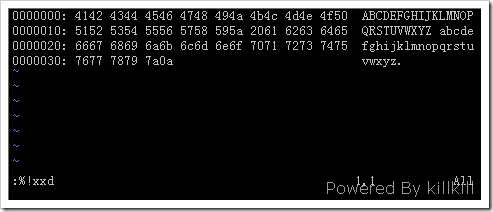
如果 vim 后面没有加 -b 选项就会出现可恶的 0x0a:
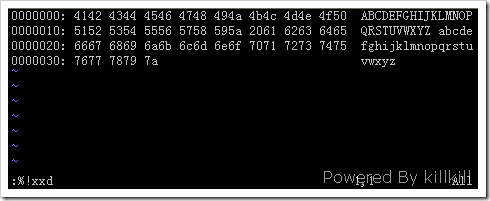
如果有 -b 选项就不会有这种情况:
然后进入编辑模式改,改就是了,我将A、B对应的41、42改成61、62,将a、b对应的61、62改成41、42。
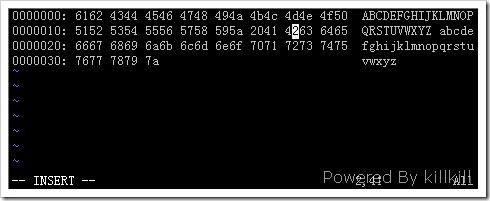
回到命令模式输入:
:%!xxd -r
??
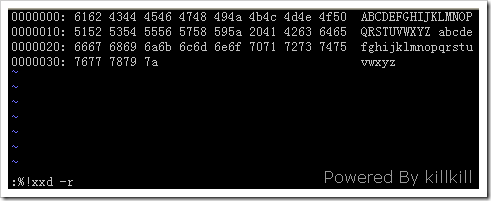
此时可以发现AB和ab的位置互换了。
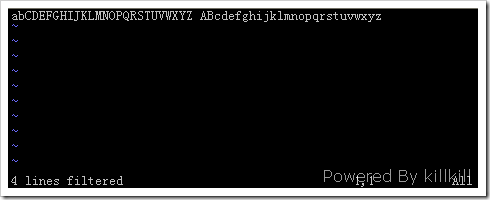
最后在命令模式中输入 :wq 保存退出即可。
-----------------------------------------------------------------------
'+' makes a difference if the input source is stdin, and if stdin's file position is not at
the start of the file by the time xxd is started and given its input. The following
examples may help to clarify (or further confuse!)...
Rewind stdin before reading; needed because the `cat' has already read to the end of stdin.
% sh -c 'cat > plain_copy; xxd -s 0 > hex_copy' < file
Hexdump from file position 0x480 (=1024+128) onwards. The `+' sign means "relative to the
current position", thus the `128' adds to the 1k where dd left off.
% sh -c 'dd of=plain_snippet bs=1k count=1; xxd -s +128 > hex_snippet' < file
Hexdump from file position 0x100 ( = 1024-768) on.
% sh -c 'dd of=plain_snippet bs=1k count=1; xxd -s +-768 > hex_snippet' < file
However, this is a rare situation and the use of `+' is rarely needed. the author prefers
to monitor the effect of xxd with strace(1) or truss(1), whenever -s is used.
★ xxd使用举例
.. 从偏移0x10开始显示,也就是缺省情况下的第一行不显示
xxd -s 0x10 scz.sh
.. 显示倒数0x30个字节(缺省情况下倒数3行)
xxd -s -0x30 -g 1 scz.sh
.. 显示120字节,连续显示,每行20字节
xxd -l 120 -p -c 20 scz.sh
.. 显示120字节,每行12字节
xxd -l 120 -c 12 -g 1 scz.sh
.. 显示0x6c偏移开始的12个字节
xxd -l 12 -c 12 -g 1 -s 0x6c scz.sh
.. 创建一个65537字节大小的文件,除了最后一个字节是'A',其余都是0x00
echo 10000: 41 | xxd -r > scz.txt
od -A x -t x1 scz.txt
000000 00 00 00 00 00 00 00 00 00 00 00 00 00 00 00 00
*
010000 41
010001
.. 使用autoskip选项
xxd -a scz.txt
0000000: 0000 0000 0000 0000 0000 0000 0000 0000 ................
*
0010000: 41 A
注意,缺省情况下autoskip功能是关闭的,但od看样子缺省就是打开的。
.. 创建只包含一个'A'字节的文件
echo '010000: 41' | xxd -r -s -0x10000 > scz_1
注意对比这些效果
echo '010: 41 42 43 44 45 46' | xxd -r -s 0 > scz_1
echo '010: 41 42 43 44 45 46' | xxd -r -s -0x10 > scz_1
等价于
echo '0: 41 42 43 44 45 46' | xxd -r -s 0 > scz_1
echo '010: 41 42 43 44 45 46' | xxd -r -s -0x12 > scz_1
执行的时候报错,xxd: sorry, cannot seek backwards.
echo '010: 41 42 43 44 45 46' | xxd -r -s 0x10 > scz_1
等价于
echo '020: 41 42 43 44 45 46' | xxd -r -s 0 > scz_1
.. 复制输入文件到输出文件,且给输出文件前部增加100字节的0x00
xxd scz_1 | xxd -r -s 100 > scz_2
od -A x -t x1 scz_2
000000 00 00 00 00 00 00 00 00 00 00 00 00 00 00 00 00
*
000060 00 00 00 00 41
000065
.. 二进制文件打补丁
echo '0: 41 42 43 44 45 46' | xxd -r -s 0 > scz_1
od -A x -t x1 scz_1
echo '4: 47 48' | xxd -r - scz_1
od -A x -t x1 scz_1
.. Use xxd as a filter within an editor such as vim(1) to hexdump a region
marked between `a' and `z'.
:'a,'z!xxd
.. Use xxd as a filter within an editor such as vim(1) to recover a
binary hexdump marked between `a' and `z'.
:'a,'z!xxd -r
.. Use xxd as a filter within an editor such as vim(1) to recover one line
of a hexdump. Move the cursor over the line and type:
!!xxd -r
.. Read single characters from a serial line
xxd -c1 < /dev/term/b &
stty < /dev/term/b -echo -opost -isig -icanon min 1
echo -n foo > /dev/term/b
 如果有 -b 选项就不会有这种情况:
 然后进入编辑模式改,改就是了,我将A、B对应的41、42改成61、62,将a、b对应的61、62改成41、42。
 回到命令模式输入:
 此时可以发现AB和ab的位置互换了。
 最后在命令模式中输入 :wq 保存退出即可。