android ProgressBar 示例二
关于ProgressBar的示例一请见这里http://byandby.iteye.com/blog/816494
这也是一个小例子比较简单 下边是官方文档对xml文件属性的一些简单描述
Attribute Description
android:indeterminate Allows to enable the indeterminate mode.
android:indeterminateBehavior Defines how the indeterminate mode should behave when the progress reaches max.
android:indeterminateDrawable Drawable used for the indeterminate mode.
android:indeterminateDuration Duration of the indeterminate animation.
android:indeterminateOnly Restricts to ONLY indeterminate mode (state-keeping progress mode will not work).
android:interpolator
android:max Defines the maximum value the progress can take.
android:maxHeight An optional argument to supply a maximum height for this view.
android:maxWidth An optional argument to supply a maximum width for this view.
android:minHeight
android:minWidth
android:progress Defines the default progress value, between 0 and max.
android:progressDrawable Drawable used for the progress mode.
android:secondaryProgress Defines the secondary progress value, between 0 and max.
我们先看一下运行效果吧。 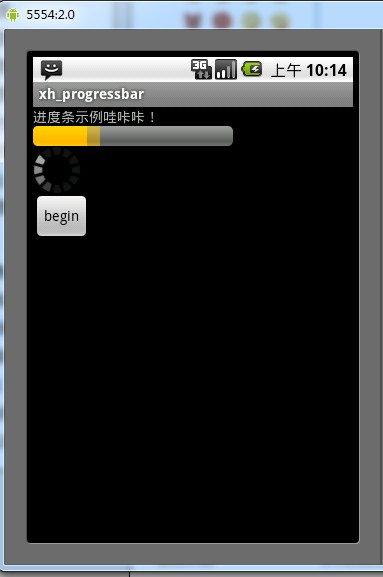
示例布局文件
<?xml version="1.0" encoding="utf-8"?>
<LinearLayout xmlns:android="http://schemas.android.com/apk/res/android"
android:orientation="vertical"
android:layout_width="fill_parent"
android:layout_height="fill_parent"
>
<TextView
android:layout_width="fill_parent"
android:layout_height="wrap_content"
android:text="@string/hello"
/>
<ProgressBar
android:id="@+id/firstBar"
style="?android:attr/progressBarStyleHorizontal"
android:layout_width="200dp"
android:layout_height="wrap_content"
android:visibility="gone"
/>
<ProgressBar
android:id="@+id/secondBar"
style="?android:attr/progressBarStyle"
android:layout_width="wrap_content"
android:layout_height="wrap_content"
android:visibility="gone"
/>
<Button
android:id="@+id/myButton"
android:layout_width="wrap_content"
android:layout_height="wrap_content"
android:text="begin"/>
</LinearLayout>
Activity 类
package xiaohang.zhimeng;import android.app.Activity;import android.os.Bundle;import android.view.View;import android.view.View.OnClickListener;import android.widget.Button;import android.widget.ProgressBar;public class Activity01 extends Activity {//声明变量private ProgressBar firstBar = null;private ProgressBar secondBar = null;private Button myButton;private int i = 0; @Override public void onCreate(Bundle savedInstanceState) { super.onCreate(savedInstanceState); setContentView(R.layout.main); //根据控件的ID取得代表控件的对象 firstBar = (ProgressBar)findViewById(R.id.firstBar); secondBar = (ProgressBar)findViewById(R.id.secondBar); myButton = (Button)findViewById(R.id.myButton); myButton.setOnClickListener(new ButtonListener()); } class ButtonListener implements OnClickListener{@Overridepublic void onClick(View v) {if (i == 0 || i == 10) {//设置进度条处于可见的状态firstBar.setVisibility(View.VISIBLE);firstBar.setMax(150);secondBar.setVisibility(View.VISIBLE);}else if ( i< firstBar.getMax() ) {//设置主进度条的当前值firstBar.setProgress(i);//设置第二进度条的当前值firstBar.setSecondaryProgress(i + 10);}else {//设置主进度为0firstBar.setProgress(0);//设置第二进度为0firstBar.setSecondaryProgress(0);//把i的值 设置为0i = 0;firstBar.setVisibility(View.GONE);secondBar.setVisibility(View.GONE);}i = i + 10;} }}