文章9:Nginx模块开发详细介绍--以HelloWorld模块为例文章内容:一结构体介绍1.结构体ngx_command_t 模块的
文章9:Nginx模块开发详细介绍--以HelloWorld模块为例
文章内容:
一结构体介绍
1.结构体ngx_command_t 模块的指令 1.1结构体原型 1.2结构体成员变量说明 1.3 实例2.ngx_conf_t模块的配置结构体 2.1结构体原型3.ngx_http_module_t结构体 模块上下文 3.1结构体原型 3.2结构体作用: 3.3实例4.ngx_module_t结构体 模块定义 4.1结构体原型: 4.2结构体作用: 4.3实例二.处理模块、过滤模块和负载均衡模块
2.1. 剖析处理模块(非代理) 2.1.1获得位置配置结构体 2.1.2产生回复 2.1.3发送HTTP头部 2.1.4 发送HTTP主体 2.1.5最后附上hello_world模块的完整代码2.2剖析配置文件config
2.2.1.内容2.2.2.作用2.2.3.对应
三、综上所述,如何安装HelloWorld模块呢?
一、结构体介绍1、ngx_command_t模块的指令1.1结构体原型struct ngx_command_s { ngx_str_t name; ngx_uint_t type;
char *(* set)(ngx_conf_t *cf, ngx_command_t *cmd,
void *conf); ngx_uint_t conf; ngx_uint_t offset;
void * post;};
1.2结构体成员变量说明:name:是指令的字符串(也就是包含指令名称),不包含空格(有空格的话,就是命令的参数),
type:标识的集合。表明这个指令是在哪里出现是合法的、指令的参数个数。
标识一般是下面多个值的位或。
一、NGX_HTTP_MAIN_CONF:指令出现在全局配置部分是合法的
NGX_HTTP_SRV_CONF
NGX_HTTP_LOC_CONF
NGX_HTTP_UPS_CONF
二、NGX_CONF_NOARGS:指令没有参数
NGX_CONF_TAKE1:指令读入一个参数
....
NGX_CONF_TAKE7:指令读入7个参数
三、NGX_CONF_FLAG:指令读入一个布尔型数据
NGX_CONF_1MORE:指令至少读入1个参数
NGX_CONF_2MORE:指令至少读入2个参数
set:
char *(* set )(ngx_conf_t *cf, ngx_command_t *cmd,
void *conf);
结构体成员set是一个函数指针,用来设定模块的配置;典型地,这个函数会转化读入指令传进来的参数,然后将合适的值保存到配置结构体。这个设定函数有三个参数:
1)指向ngx_conf_t结构体的指针,包含从配置文件中指令传过来的参数
2)指向当前ngx_command_t结构体的指针
3)指向自定义模块配置结构体的指针
void *conf
这个设定函数set在指令被遇到的时候就会调用。
后三个参数: 在自定义的配置结构体
void *conf中,Nginx提供了多个函数用来保存特定类型的数据,这些函数包含有:
ngx_conf_set_flag_slot::将on或off转化为
ngx_conf_set_str_slot:将字符串保存为ngx_str_t类型
ngx_conf_set_num_slot:解析一个数字并保存为int类型
ngx_conf_set_size_slot:解析一个数据大小并保存为size_t类型
那这些内嵌函数怎么知道要把值保存在哪里呢? ngx_command_t接下来的两个成员 conf和 offset正好可用。 conf告诉 Nginx把这个值是放在全局配置部分、主机配置部分还是位置配置部分(NGX_HTTP_MAIN_CONF_OFFSET,NGX_HTTP_SRV_CONF_OFFSET或NGX_HTTP_LOC_CONF_OFFSET)。然后offset确定到底是保存在结构体的哪个位置。最后,post指向模块在读配置的时候需要的一些零碎变量。一般它是NULL。 这个ngx_command_t数组在读入ngx_null_command后停止
1.3实例:
static ngx_command_t ngx_http_hello_world_commands[]={ { ngx_string( "hello_world"), NGX_HTTP_LOC_CONF|NGX_CONF_NOARGS, ngx_http_hello_world, 0, 0, NULL }, ngx_null_command};
2.ngx_conf_t模块的配置结构体2.1结构体原型struct ngx_conf_s {
char * name; ngx_array_t * args;
ngx_cycle_t * cycle; ngx_pool_t * pool; ngx_pool_t * temp_pool; ngx_conf_file_t * conf_file; ngx_log_t * log;
void * ctx; ngx_uint_t module_type; ngx_uint_t cmd_type;
ngx_conf_handler_pt handler;
char * handler_conf;};
3.ngx_http_module_t结构体 模块上下文3.1结构体原型typedef struct { ngx_int_t (* preconfiguration)(ngx_conf_t *cf);//在读入配置文件前调用 ngx_int_t (* postconfiguration)(ngx_conf_t *cf);//在读入配置文件后调用
void *(* create_main_conf)(ngx_conf_t *cf);//在创建全局部分配置时调用(比如,用来分配空间和设置默认值)
char *(* init_main_conf)(ngx_conf_t *cf,
void *conf);//在初始化全局部分的配置时调用(比如,把原来的默认值用nginx.conf 读到的值来覆盖)
void *(* create_srv_conf)(ngx_conf_t *cf);//在创建主机部分的配置时调用
char *(* merge_srv_conf)(ngx_conf_t *cf,
void *prev,
void *conf);//与全局部分配置合并时调用
void *(* create_loc_conf)(ngx_conf_t *cf);//创建位置部分的配置时掉用
char *(* merge_loc_conf )(ngx_conf_t *cf,
void *prev,
void *conf);//与主机部分配置合并时调用} ngx_http_module_t;
3.2结构体作用:
静态的ngx_http_module_t结构体,包含一大把函数引用。用来创建三个部分的配置和合并配置。一般结构体命名为ngx_http_<module_name>_module_ctx。大多数处理模块只使用最后两个:一个函数用来为特定的位置部分的配置结构体分配内存(称为
ngx_http_<module name>_create_loc_conf),另外一个函数用来设定默认值和与继承过来的配置合并(称为
ngx_http_<module name>_merge_loc_conf)。这个合并函数负责检验读入的数值是否有效,并设定一些默认值
3.3实例:
static ngx_http_module_t ngx_http_hello_world_module_ctx={ NULL, NULL, NULL, NULL, NULL, NULL, NULL, NULL};
4.ngx_module_t结构体 模块定义4.1结构体原型struct ngx_module_s { ngx_uint_t ctx_index; ngx_uint_t index;
ngx_uint_t spare0; ngx_uint_t spare1; ngx_uint_t spare2; ngx_uint_t spare3;
ngx_uint_t version;
void * ctx;/* module context */ ngx_command_t * commands;/* module directives */ ngx_uint_t type;/* module type */
ngx_int_t (* init_master)(ngx_log_t *log);/* init master */
ngx_int_t (* init_module)(ngx_cycle_t *cycle);/* init module */
ngx_int_t (* init_process)(ngx_cycle_t *cycle);/* init process */ ngx_int_t (* init_thread)(ngx_cycle_t *cycle);/* init thread */
void (* exit_thread)(ngx_cycle_t *cycle);/* exit thread */
void (* exit_process)(ngx_cycle_t *cycle);/* exit process */
void (* exit_master)(ngx_cycle_t *cycle);/* exit master */
uintptr_t spare_hook0; uintptr_t spare_hook1; uintptr_t spare_hook2; uintptr_t spare_hook3; uintptr_t spare_hook4; uintptr_t spare_hook5; uintptr_t spare_hook6; uintptr_t spare_hook7;};
4.2结构体作用: 这个结构体变量名为为ngx_http_<module_name>_module。
它包含模块的主要内容和指令的执行部分,也有一些回调函数(退出线程,推退出进程等等)。
这些函数的定义是把数据处理关联到特定模块的关键。
在进程/线程退出的时候,模块可以添加一些回调函数来运行,但大多数模块用不到。
4.3实例:ngx_module_t ngx_http_hello_world_module={ NGX_MODULE_V1, &ngx_http_hello_world_module_ctx, ngx_http_hello_world_commands, NGX_HTTP_MODULE, NULL,
NULL, NULL, NULL, NULL, NULL, NULL, NGX_MODULE_V1_PADDING};
二.处理模块、过滤模块和负载均衡模块2.1. 剖析处理模块(非代理) 处理模块一般做四样东西:
获得位置配置结构体,
产生合适的回复,
发送HTTP头部和
发送HTTP主体。它
只有一个变量--请求结构体。这个结构体有很多关于客户端请求的有用信息,比如请求方法(request method),URI和请求头部。我们会一步一步分析整个过程。
2.1.1获得位置配置结构体 这部分很简单,所有你需要做的事根据当前的请求结构体和模块定义,调用ngx_http_get_module_loc_conf,获得当前的配置结构体。实例:
static char *
ngx_http_hello_world (ngx_conf_t *cf,ngx_command_t *cmd,
void *conf){ ngx_http_core_loc_conf_t *clcf; clcf=ngx_http_conf_get_module_loc_conf(cf, ngx_http_core_module); clcf-> handler=ngx_http_hello_world_handler;
return NGX_CONF_OK;}
2.1.2产生回复1.结构体ngx_http_request_t
struct ngx_http_request_s { uint32_t signature; /* "HTTP" */
ngx_connection_t * connection;
void ** ctx;
void ** main_conf;
void ** srv_conf;
void ** loc_conf;
ngx_http_event_handler_pt read_event_handler; ngx_http_event_handler_pt write_event_handler;
#if (NGX_HTTP_CACHE) ngx_http_cache_t * cache;
#endif ngx_http_upstream_t * upstream; ngx_array_t * upstream_states; /* of ngx_http_upstream_state_t */
ngx_pool_t *pool; ngx_buf_t * header_in;
ngx_http_headers_in_t headers_in; ngx_http_headers_out_t headers_out;
ngx_http_request_body_t * request_body;
time_t lingering_time; time_t start_sec; ngx_msec_t start_msec;
ngx_uint_t method; ngx_uint_t http_version;
ngx_str_t request_line; ngx_str_t uri; ngx_str_t args; ngx_str_t exten; ngx_str_t unparsed_uri;
ngx_str_t method_name; ngx_str_t http_protocol;
ngx_chain_t * out; ngx_http_request_t * main; ngx_http_request_t * parent; ngx_http_postponed_request_t * postponed; ngx_http_post_subrequest_t * post_subrequest; ngx_http_posted_request_t * posted_requests;
ngx_http_virtual_names_t * virtual_names;
ngx_int_t phase_handler; ngx_http_handler_pt content_handler; ngx_uint_t access_code;
ngx_http_variable_value_t * variables;
#if (NGX_PCRE) ngx_uint_t ncaptures;
int * captures; u_char * captures_data;
#endif size_t limit_rate;
/* used to learn the
Apache compatible response length without a header */ size_t header_size;
off_t request_length;
ngx_uint_t err_status;
ngx_http_connection_t * http_connection;
ngx_http_log_handler_pt log_handler;
ngx_http_cleanup_t * cleanup;
unsigned subrequests:8;
unsigned count:8;
unsigned blocked:8;
unsigned aio:1;
unsigned http_state:4;
/* URI with "/." and on Win32 with "//" */
unsigned complex_uri:1;
/* URI with "%" */
unsigned quoted_uri:1;
/* URI with "+" */
unsigned plus_in_uri:1;
/* URI with " " */
unsigned space_in_uri:1;
unsigned invalid_header:1;
unsigned add_uri_to_alias:1;
unsigned valid_location:1;
unsigned valid_unparsed_uri:1;
unsigned uri_changed:1;
unsigned uri_changes:4;
unsigned request_body_in_single_buf:1;
unsigned request_body_in_file_only:1;
unsigned request_body_in_persistent_file:1;
unsigned request_body_in_clean_file:1;
unsigned request_body_file_group_access:1;
unsigned request_body_file_log_level:3;
unsigned subrequest_in_memory:1;
unsigned waited:1;
#if (NGX_HTTP_CACHE)
unsigned cached:1;
#endif#if (NGX_HTTP_GZIP)
unsigned gzip_tested:1;
unsigned gzip_ok:1;
unsigned gzip_vary:1;
#endif unsigned proxy:1;
unsigned bypass_cache:1;
unsigned no_cache:1;
/* * instead of using the request context data in * ngx_http_limit_conn_module and ngx_http_limit_req_module * we use the single bits in the request structure */
unsigned limit_conn_set:1;
unsigned limit_req_set:1;
#if 0
unsigned cacheable:1;
#endif unsigned pipeline:1;
unsigned plain_http:1;
unsigned chunked:1;
unsigned header_only:1;
unsigned keepalive:1;
unsigned lingering_close:1;
unsigned discard_body:1;
unsigned internal:1;
unsigned error_page:1;
unsigned ignore_content_encoding:1;
unsigned filter_finalize:1;
unsigned post_action:1;
unsigned request_complete:1;
unsigned request_output:1;
unsigned header_sent:1;
unsigned expect_tested:1;
unsigned root_tested:1;
unsigned done:1;
unsigned logged:1;
unsigned buffered:4;
unsigned main_filter_need_in_memory:1;
unsigned filter_need_in_memory:1;
unsigned filter_need_temporary:1;
unsigned allow_ranges:1;
#if (NGX_STAT_STUB)
unsigned stat_reading:1;
unsigned stat_writing:1;
#endif /* used to parse HTTP headers */
ngx_uint_t state;
ngx_uint_t header_hash; ngx_uint_t lowcase_index; u_char lowcase_header[NGX_HTTP_LC_HEADER_LEN];
u_char * header_name_start; u_char * header_name_end; u_char * header_start; u_char * header_end;
/* * a memory that can be reused after parsing a request line * via ngx_http_ephemeral_t */
u_char * uri_start; u_char * uri_end; u_char * uri_ext; u_char * args_start; u_char * request_start; u_char * request_end; u_char * method_end; u_char * schema_start; u_char * schema_end; u_char * host_start; u_char * host_end; u_char * port_start; u_char * port_end;
unsigned http_minor:16;
unsigned http_major:16;};结构体成员变量说明:
1)uri:请求路径,比如:“/query.cgi”
2) args:是在问号之后请求的参数,比如:“name=john”
3)headers_in有很多有用的东西,如cookie和浏览器信息。
2.1.3发送HTTP头部 回复头部存在于被称为headers_out的结构体中。它包含在请求结构体中。这个处理函数生成头部变量,然后调用ngx_http_send_header(r)函数 ngx_http_headers_out_t结构体 加粗为有用部分
typedef struct { ngx_list_t headers;
ngx_uint_t status; ngx_str_t status_line;
ngx_table_elt_t * server; ngx_table_elt_t * date; ngx_table_elt_t * content_length; ngx_table_elt_t *content_encoding; ngx_table_elt_t * location; ngx_table_elt_t * refresh; ngx_table_elt_t * last_modified; ngx_table_elt_t * content_range; ngx_table_elt_t * accept_ranges; ngx_table_elt_t * www_authenticate; ngx_table_elt_t * expires; ngx_table_elt_t * etag;
ngx_str_t * override_charset;
size_t content_type_len; ngx_str_t content_type; ngx_str_t charset; u_char * content_type_lowcase; ngx_uint_t content_type_hash;
ngx_array_t cache_control;
off_t content_length_n; time_t date_time; time_t last_modified_time;} ngx_http_headers_out_t;
举个例子,如果一个模块把Content-Type需要设定为“image/gif”,Content-Length为100,然后返回200 OK的回复,代码将是这样的:r->headers_out.status = NGX_HTTP_OK;r->headers_out.content_length_n = 100;r->headers_out.content_type.len = sizeof("image/gif") - 1;r->headers_out.content_type.data = (u_char *) "image/gif";ngx_http_send_header(r);
上面的设定方式针对大多数参数都是有效的。但一些头部的变量设定要比上面的例子要麻烦;比如,content_encoding含有类型(ngx_table_elt_t*),这时模块必须为它分配内存。可以用一个叫ngx_list_push的函数来做。它需要传入一个ngx_list_t变量(与数组类似),然后返回一个list中的新成员(类型是ngx_table_elt_t)。下面的代码把Content-Encoding设定为“deflate”,然后把头部发出。r->headers_out.content_encoding = ngx_list_push(&r->headers_out.headers);if (r->headers_out.content_encoding == NULL) {return NGX_ERROR;}r->headers_out.content_encoding->hash = 1;r->headers_out.content_encoding->key.len = sizeof("Content-Encoding") - 1;r->headers_out.content_encoding->key.data = (u_char *) "Content-Encoding";r->headers_out.content_encoding->value.len = sizeof("deflate") -1;r->headers_out.content_encoding->value.data = (u_char *)"deflate";ngx_http_send_header(r);
当头部有多个值的时候,这个机制会经常用到;它(理论上讲)使得过滤模块添加、删除某个值而保留其他值的时候更加容易,在操纵字符串的时候,不需要把字符串重新排序。
2.1.4 发送HTTP主体 现在模块已经产生了一个回复,把它放到内存中。需要为回复分配一块特别的buffer,并把这个buffer连接到一个链表,然后调用“send body”函数发送。
这些链表有什么用?在Nginx中,
处理模块和过滤模块在处理完成后产生的回复都
包含在缓冲中,每次产生一个buffer;每个链表成员保存指向下一个成员的指针,如果是最后的buffer,就置为NULL。这里我们简单地假定只有一个buffer成员。 首先,模块声明一块buffer和一条链表:ngx_buf_t *b;ngx_chain_t out; 第二步是分配缓冲,然后指向我们的回复数据:b = ngx_pcalloc(r->pool, sizeof(ngx_buf_t));if (b == NULL) {ngx_log_error(NGX_LOG_ERR, r->connection->log, 0,"Failed to allocate response buffer.");return NGX_HTTP_INTERNAL_SERVER_ERROR;}b->pos = some_bytes; /* first position in memory of the data */b->last = some_bytes + some_bytes_length; /* last position */b->memory = 1; /* content is in read-only memory *//* (i.e., filters should copy it rather than rewrite in place) */b->last_buf = 1; /* there will be no more buffers in the request*/ 第三步现在模块buffer添加到了链表上:out.buf = b;out.next = NULL; 第四步,,我们把主体发送出去,返回值是output_filter函数对整个链表的返回状态。return ngx_http_output_filter(r, &out);完整版代码
static ngx_int_t
ngx_http_hello_world_handler( ngx_http_request_t *r){ ngx_buf_t *b; ngx_chain_t out;
r-> headers_out.content_type .len =
sizeof("text/plain" )-1; r-> headers_out.content_type .data=( u_char *) "text/plain" ;
b=ngx_pcalloc(r-> pool,
sizeof (ngx_buf_t));
out. buf=b; out. next=NULL;
b-> pos=ngx_hello_world; b-> last=ngx_hello_world+
sizeof(ngx_hello_world); b-> memory=1; b-> last_buf=1; r-> headers_out.status =NGX_HTTP_OK; r-> headers_out.content_length_n =
sizeof(ngx_hello_world); ngx_http_send_header(r);
return ngx_http_output_filter(r,&out);}
缓冲链表是一个典型的Nginx IO模型,你必须清楚它们是如何工作的。
问题:为什么会有变量last_buf,什么时候我们才能说这条链表结束了,并把next设为NULL?
回答:链表可能不完全的,比如,有多个buffer的时候,但是不是所有的buffer都在这个请求或者回复中。所以一些buffer是链表的结尾,而不是请求的结尾。这意味着模块判断是否是请求的结尾,并设置相应的值。
2.1.5最后附上hello_world模块的完整代码#include <ngx_config.h>
#include <ngx_core.h>
#include <ngx_http.h>
#include <ngx_buf.h>
static char *
ngx_http_hello_world(ngx_conf_t *cf , ngx_command_t *cmd,
void *conf);
static ngx_command_t ngx_http_hello_world_commands []={ { ngx_string( "hello_world"), NGX_HTTP_LOC_CONF|NGX_CONF_NOARGS, ngx_http_hello_world, 0, 0, NULL }, ngx_null_command};
static u_char ngx_hello_world[]="hello world";
static ngx_http_module_t ngx_http_hello_world_module_ctx={ NULL, NULL, NULL, NULL, NULL, NULL, NULL, NULL};ngx_module_t ngx_http_hello_world_module={ NGX_MODULE_V1, &ngx_http_hello_world_module_ctx, ngx_http_hello_world_commands, NGX_HTTP_MODULE, NULL, NULL, NULL, NULL, NULL, NULL, NULL, NGX_MODULE_V1_PADDING};
static ngx_int_t
ngx_http_hello_world_handler( ngx_http_request_t *r){ ngx_buf_t *b; ngx_chain_t out;
r-> headers_out.content_type .len =
sizeof("text/plain" )-1; r-> headers_out.content_type .data=( u_char *) "text/plain" ;
b=ngx_pcalloc(r-> pool,
sizeof (ngx_buf_t));
out. buf=b; out. next=NULL;
b-> pos=ngx_hello_world; b-> last=ngx_hello_world+
sizeof(ngx_hello_world); b-> memory=1; b-> last_buf=1; r-> headers_out.status =NGX_HTTP_OK; r-> headers_out.content_length_n =
sizeof(ngx_hello_world); ngx_http_send_header(r);
return ngx_http_output_filter(r,&out);}
static char *
ngx_http_hello_world (ngx_conf_t *cf,ngx_command_t *cmd,
void *conf){ ngx_http_core_loc_conf_t *clcf; clcf=ngx_http_conf_get_module_loc_conf(cf,ngx_http_core_module); clcf-> handler=ngx_http_hello_world_handler;
return NGX_CONF_OK;}
2.2剖析配置文件config2.2.1.内容ngx_addon_name=ngx_http_hello_world_moduleHTTP_MODULES="$HTTP_MODULES ngx_http_hello_world_module"NGX_ADDON_SRCS="$NGX_ADDON_SRCS $ngx_addon_dirx_http_hello_world_module.c"CORE_LIBS="$CORE_LIBS -lpcre"
2.2.2.作用通过NGX_ADDON_SRCS找到源码文件,通过HTTP_MODULES找到模块,就可以找到ctx和command(ngx_init_cycle函数中进行),并可以对HTTP请求进行处理。
2.2.3.对应关系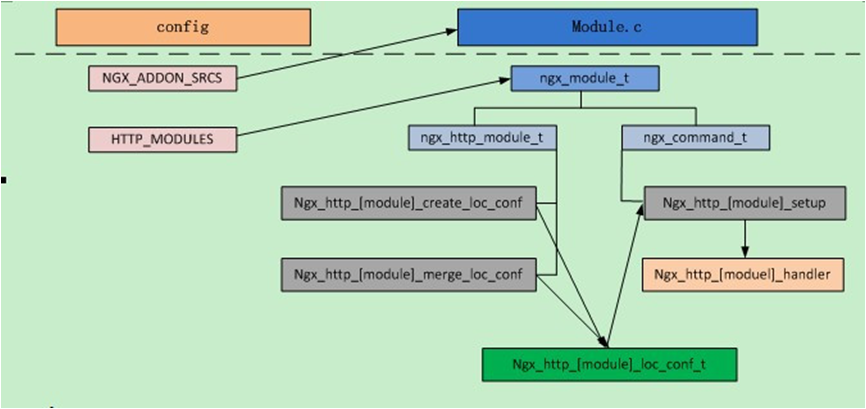 三、综上所述,如何安装HelloWorld模块呢?
简要概括如下:除了第四步以外,其余都参考http://blog.csdn.net/yankai0219/article/details/8001973 中相关内容
1.下载Nginx最新代码2.建立模块目录与代码3.创建Makefile文件4.直接$make && make install就可以安装带有HelloWorld模块的Nginx了5.修改nginx.conf的内容5.启动Nginx,在命令行输入$ curl http://localhost/hello输出hello,world就表示成功。
