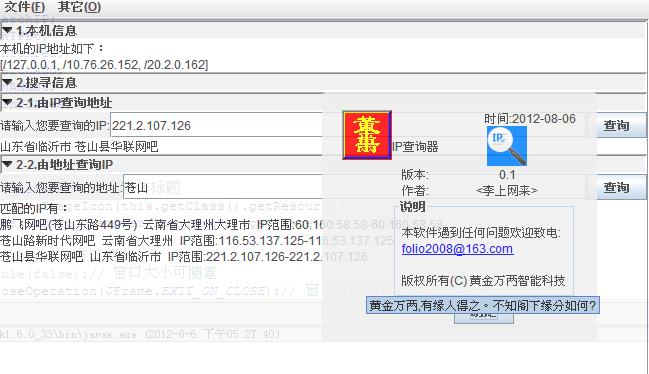
可以伸缩的面板
先看看代码:
package lfl.swing.comp;import java.awt.BorderLayout;import java.awt.Color;import java.awt.Component;import java.awt.Container;import java.awt.Graphics2D;import java.awt.Polygon;import java.awt.RenderingHints;import java.awt.event.MouseEvent;import java.awt.event.MouseListener;import java.awt.image.BufferedImage;import javax.swing.BorderFactory;import javax.swing.ImageIcon;import javax.swing.JButton;import javax.swing.JFrame;import javax.swing.JLabel;import javax.swing.JPanel;import javax.swing.SwingConstants;/** * 可以伸缩的面板 * * @author 李富粮 * @since 20120806 * @version 0.0.1 * */public class JExtensionPanel extends JPanel implements MouseListener {private static final long serialVersionUID = 1L;private boolean expand;// 是否展开private String title;// 标题private JLabel label;// 标题面板private Component panel;// 主面板private ImageIcon up_icon, down_icon;// 图标// ----各种构造函数---------------------------------------/** * 可以伸缩的面板,默认展开 * * @author 李富粮 * @since 20120806 * @version 0.0.1 * * */public JExtensionPanel() {this("", null, true);}/** * 可以伸缩的面板,默认展开 * * @author 李富粮 * @since 20120806 * @version 0.0.1 * @param c * 内容面板 * */public JExtensionPanel(Component c) {this("", c, true);}/** * 可以伸缩的面板,默认展开 * * @author 李富粮 * @since 20120806 * @version 0.0.1 * @param title * 标题 * @param c * 内容面板 * */public JExtensionPanel(String title, Component c) {this(title, c, true);}/** * 可以伸缩的面板 * * @author 李富粮 * @since 20120806 * @version 0.0.1 * @param title * 标题 * @param c * 内容面板 * @param expand * 默认展开与否 * */public JExtensionPanel(String title, Component c, boolean expand) {this.title = title;this.expand = expand;this.panel = c;init();}// ----各种方法---------------------------------------/** * 返回面板伸缩的状态 * */public boolean isExpand() {return expand;}/** * 设置面板的伸缩 * * @param true 展开 * @param false 收缩 * */public void setExpand(boolean expand) {this.expand = expand;if (this.expand) {this.label.setIcon(down_icon);this.label.setBorder(BorderFactory.createLoweredBevelBorder());if (null != this.panel) {panel.setVisible(true);}} else {this.label.setIcon(up_icon);this.label.setBorder(BorderFactory.createRaisedBevelBorder());if (null != this.panel) {panel.setVisible(false);}}this.updateUI();this.updateUI();}/** * 返回面板的内容面板 * */public Component getPanel() {return panel;}/** * 设置内容面板 * * @param panel * 内容面板 * */public void setPanel(Component panel) {if (null != panel) {this.remove(this.panel);this.panel = panel;this.add(this.panel, BorderLayout.CENTER);if (this.expand) {panel.setVisible(true);} else {panel.setVisible(false);}} else {this.remove(this.panel);this.panel = null;}this.updateUI();}/** * 返回面板标题 * */public String getTitle() {return title;}/** * 设置面板标题 * * @param panel * 面板标题 * */public void setTitle(String title) {this.title = title;this.label.setText(title);this.updateUI();}/** * 创建标题指示图标 * */private void createImages() {int w = this.getPreferredSize().width, h = this.getPreferredSize().height;BufferedImage open = new BufferedImage(w, h, BufferedImage.TYPE_INT_RGB), close = new BufferedImage(w, h, BufferedImage.TYPE_INT_RGB);// 展开的图标Graphics2D g2 = open.createGraphics();g2.setRenderingHint(RenderingHints.KEY_ANTIALIASING,RenderingHints.VALUE_ANTIALIAS_ON);g2.setPaint(this.getBackground());g2.fillRect(0, 0, w, h);int[] x = { 0, w / 2, w };int[] y = { h / 4, 3 * h / 4, h / 4 };Polygon p = new Polygon(x, y, 3);g2.setPaint(Color.BLACK);g2.fill(p);g2.setPaint(Color.BLACK);g2.draw(p);g2.dispose();down_icon = new ImageIcon(open);// 收缩的的图标g2 = close.createGraphics();g2.setRenderingHint(RenderingHints.KEY_ANTIALIASING,RenderingHints.VALUE_ANTIALIAS_ON);g2.setPaint(getBackground());g2.fillRect(0, 0, w, h);x = new int[] { w / 4, 3 * w / 4, w / 4 };y = new int[] { 0, h / 2, h };p = new Polygon(x, y, 3);g2.setPaint(Color.GRAY);g2.fill(p);g2.setPaint(Color.GRAY);g2.draw(p);g2.dispose();up_icon = new ImageIcon(close);}/** * 初始化工作 * */private void init() {this.createImages();// 获得图标this.setLayout(new BorderLayout());if (this.expand) {this.label = new JLabel(this.title, this.down_icon,SwingConstants.LEADING);this.label.setBorder(BorderFactory.createLoweredBevelBorder());if (null != this.panel) {this.add(this.panel, BorderLayout.CENTER);}} else {this.label = new JLabel(this.title, this.up_icon,SwingConstants.LEADING);this.label.setBorder(BorderFactory.createRaisedBevelBorder());if (null != this.panel) {this.add(this.panel, BorderLayout.CENTER);this.panel.setVisible(false);}}this.add(this.label, BorderLayout.NORTH);this.label.addMouseListener(this);}// ----接口方法的实现---------------------------------------@Overridepublic void mouseClicked(MouseEvent e) {if (e.getSource() == label) {expand = !expand;if (this.expand) {this.label.setIcon(down_icon);this.label.setBorder(BorderFactory.createLoweredBevelBorder());if (null != this.panel) {panel.setVisible(true);}} else {this.label.setIcon(up_icon);this.label.setBorder(BorderFactory.createRaisedBevelBorder());if (null != this.panel) {panel.setVisible(false);}}this.updateUI();}}@Overridepublic void mouseEntered(MouseEvent e) {}@Overridepublic void mouseExited(MouseEvent e) {}@Overridepublic void mousePressed(MouseEvent e) {}@Overridepublic void mouseReleased(MouseEvent e) {}public static void main(String[] args) {JFrame f = new JFrame();f.setDefaultCloseOperation(JFrame.EXIT_ON_CLOSE);Container c = f.getContentPane();c.setLayout(new BorderLayout());c.add(new JExtensionPanel("test1", new JButton("test1"),false),BorderLayout.NORTH);c.add(new JExtensionPanel("test2", new JButton("test2"),false),BorderLayout.CENTER);f.setSize(360, 500);f.setLocation(200, 100);f.setVisible(true);}}执行效果:
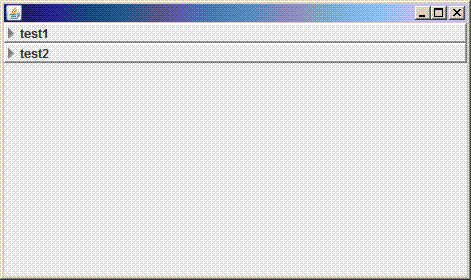
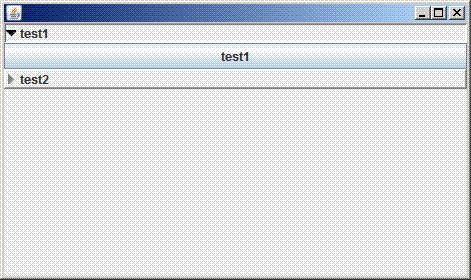
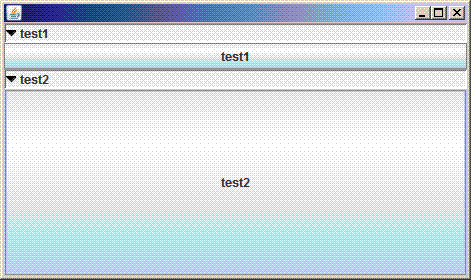
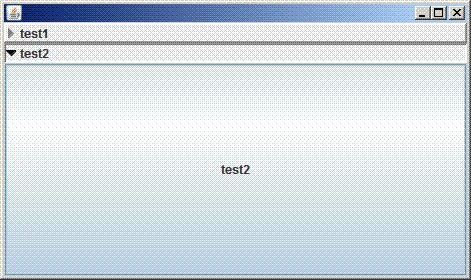
程序中的应用: