dojox.grid.DataGrid 编程篇(一)
dojox.grid.DataGrid 编程篇(1)最近使用了dojo组件,其中使用了 dojox.grid.DataGrid 进行一览表示的核心组
dojox.grid.DataGrid 编程篇(1)
最近使用了dojo组件,其中使用了 dojox.grid.DataGrid 进行一览表示的核心组件,这里总结一些实际使用中遇到的问题和解决方法。
官方Guide: http://dojotoolkit.org/reference-guide/1.8/dojox/grid/DataGrid.html
【准备】
引用 DataGrid 的 CSS,dojo js,导入要使用的组件:
■DataGrid 属性(table 里的属性)
dojoType: dojox.grid.DataGrid (定义dojo组件的类型,这里当然是 dojox.grid.DataGrid 或者是 DataGrid 的继承类)
structure: js定义的表格
store: 数据源,可以是:dojo.data.ItemFileReadStore (只读),dojo.data.ItemFileWriteStore (可写)等
selectionMode: 表格的选择方式:
none(不选择),
single(单行选择),
multiple(多选,点一行加一行的选择),
extended(扩展选择,按下ctrl键+选择,增加选择行)(默认方式)
sortInfo:
设置排序的方式:升序,降序
canSort: 可以指定那一列排序或者不能排序
rowHeight: 定义行高,这是一个重要属性(对性能有影响)
rowsPerPage: 一次加载的每页的行数(默认: 25行)
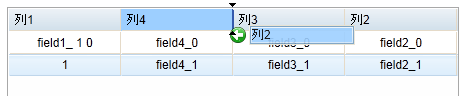
columnReordering: 允许拖拽调整列的顺序(默认: false)
...
■DataGrid的Cell属性
field: 对应数据源里的列
width: 宽度定义,可以用px 或者 %
formatter: 设定一个 js function,返回 HTML 用于再次编辑显示内容
比如为某列加上个link:
<th field="f1" formatter="
addLink">field1</th>
<table dojoType='dojox.grid.DataGrid' id='grid4' jsid='js_grid4' style='border:1px #a8a8a8 solid;width:450px;height:200px;' store="getDataStore(10)" selectionMode='single' canSort="false"> <thead> <tr> <th colspan="2" cellStyles="display:none;">merge 1</th> <th colspan="2" cellStyles="display:none;">merge 2</th> </tr> <tr> <th field="f1" width="25%">列1</th> <th field="f2" width="25%">列2</th> <th field="f3" width="25%">列3</th> <th field="f4" width="25%">列4</th> </tr></thead></table>
⑤ 设置固定列
通过 <colgroup> 定义:
<colgroup span="2" noscroll="true"></colgroup>
<colgroup span="5"></colgroup>
-- 本章结束 --
