第四章替程序制作自定义主题
第四章为程序制作自定义主题Chapter 4: Tutorials for Using Xtreme Toolkit Pro v13.2 Up | Previous | N
第四章为程序制作自定义主题
Chapter 4: Tutorials for Using Xtreme Toolkit Pro v13.2 Up | Previous | Next怎样为程序制作自定义主题你可以为程序制作自定义主题,通过继承toolkit中的任一主题类 。源代码链接
通过继承toolkit中的任一可用的主题类,你可以制作自定义主题.制作一个类似Visual Studio 6.0的双把手( gripper) 主题.
- 新建一个类,派生自 toolkit中的预定义主题. 我们将使用
CXTPDefaultTheme; 不过你也可以使用下面任何一个主题类::CXTPDefaultTheme 继承Office 2000 风格
CXTPOfficeTheme继承Office XP 风格
CXTPOffice2003Theme 继承Office 2003 风格
CXTPNativeXPTheme 继承本地 XP 风格class CDoubleGripperTheme : public CXTPDefaultTheme{ virtual CSize DrawCommandBarGripper( CDC* pDC, CXTPCommandBar* pBar, BOOL bDraw);};// DrawCommandBarGripper函数.// bDraw 为假返回 gripper size.// bDraw 为真,绘制gripper.CSize CDoubleGripperTheme::DrawCommandBarGripper(CDC *pDC, CXTPCommandBar *pBar, BOOL bDraw){ // If 工具栏垂直停靠 if (pBar->GetPosition() == xtpBarRight || pBar->GetPosition() == xtpBarLeft) { if (bDraw) { CXTPClientRect rc(pBar); Draw3dRect(pDC, CRect(3, 3, rc.right - 3, 6), COLOR_BTNHILIGHT, COLOR_3DSHADOW); Draw3dRect(pDC, CRect(3, 7, rc.right - 3, 10), COLOR_BTNHILIGHT, COLOR_3DSHADOW); } return CSize(0, 10); } // if 工具栏水平停靠 elseif (pBar->GetPosition() == xtpBarTop || pBar->GetPosition() == xtpBarBottom) { CXTPClientRect rc(pBar); if (bDraw) { Draw3dRect(pDC, CRect(3, 3, 6, rc.bottom - 3),COLOR_BTNHILIGHT, COLOR_3DSHADOW); Draw3dRect(pDC, CRect(7, 3, 10, rc.bottom - 3),COLOR_BTNHILIGHT, COLOR_3DSHADOW); } return CSize(10, 0); } else return CXTPDefaultTheme::DrawCommandBarGripper(pDC, pBar, bDraw);} - 在CMainFrame::OnCreate()方法中调用
CXTPPaintManager::SetCustomTheme 使用我们刚创建的主题风格:****************************************************************************************************************************************
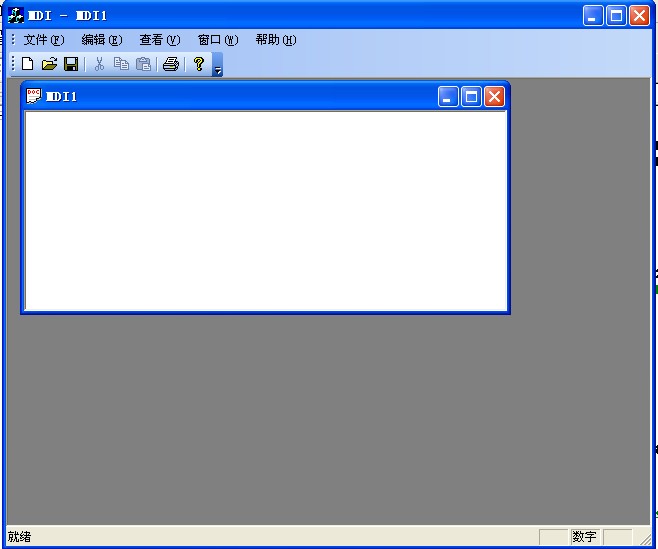
OfficeXP风格程序对比(译者加),左边是连续三个点
*****************************************************************************************************************************************
-------------------------------------------------------------------------------------
原文
- Create a new class derived from one of the predefiend themes found in the toolkit. We are going to use
CXTPDefaultTheme; however you can use any of the following theme classes:CXTPDefaultTheme to inherit Office 2000 theme
CXTPOfficeTheme to inherit Office XP theme
CXTPOffice2003Theme to inherit Office 2003 theme
CXTPNativeXPTheme to inherit Native XP themeclass CDoubleGripperTheme : public CXTPDefaultTheme{ virtual CSize DrawCommandBarGripper( CDC* pDC, CXTPCommandBar* pBar, BOOL bDraw);};// DrawCommandBarGripper function.// if bDraw if FALSE must return gripper size.// if bDraw is TRUE must draw gripper.CSize CDoubleGripperTheme::DrawCommandBarGripper(CDC* pDC, CXTPCommandBar* pBar, BOOL bDraw){ // If Toolbar is vertical docked if (pBar->GetPosition() == xtpBarRight || pBar->GetPosition() == xtpBarLeft) { if (bDraw) { CXTPClientRect rc(pBar); Draw3dRect(pDC, CRect(3, 3, rc.right - 3, 6), COLOR_BTNHILIGHT, COLOR_3DSHADOW); Draw3dRect(pDC, CRect(3, 7, rc.right - 3, 10), COLOR_BTNHILIGHT, COLOR_3DSHADOW); } return CSize(0, 10); } // if Toolbar is horizontal docked else if (pBar->GetPosition() == xtpBarTop || pBar->GetPosition() == xtpBarBottom) { CXTPClientRect rc(pBar); if (bDraw) { Draw3dRect(pDC, CRect(3, 3, 6, rc.bottom - 3), COLOR_BTNHILIGHT, COLOR_3DSHADOW); Draw3dRect(pDC, CRect(7, 3, 10, rc.bottom - 3), COLOR_BTNHILIGHT, COLOR_3DSHADOW); } return CSize(10, 0); } else return CXTPDefaultTheme::DrawCommandBarGripper(pDC, pBar, bDraw);}
- Call
CXTPPaintManager::SetCustomTheme fromCMainFrame::OnCreate() method to use the theme we just created:
