android 从服务器下载更新新版本软件 demo
下面介绍的是apk如何进行版本的检测及下载更新!
?
最终效果:
?
更新前:
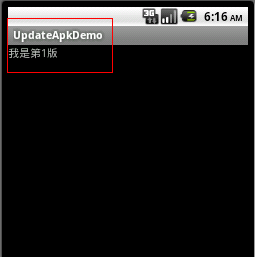
?
?
更新提示:
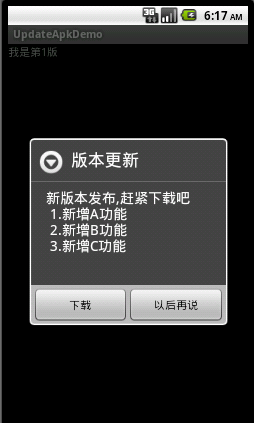
?
?下载后提示安装:
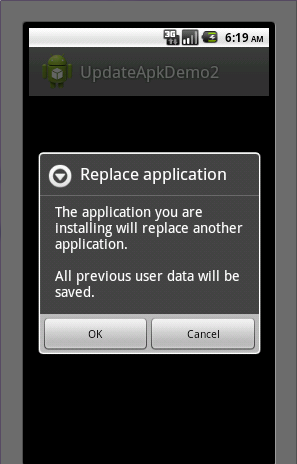
?
安装更新后:
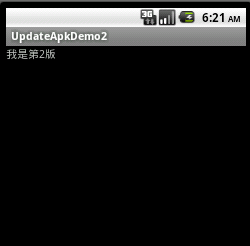
?
?
由于版本的更新及下载都是通过网络从服务端上获取的,所以需要一个服务端。
?
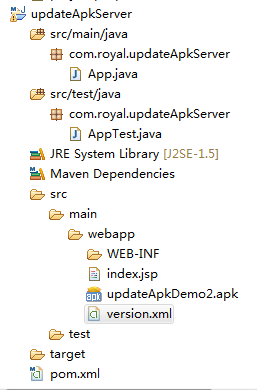
新建一个服务端 updateApkServer,在这里该服务端没有特殊用途,只用来提供版本信息而已。其项目结构图:
?
所有的版本信息记录在 version.xml
?
?
<?xml version="1.0" encoding="UTF-8"?><update><version>2.0_20120530</version><versionCode>2</versionCode><updateTime>2012-05-30</updateTime><apkName>安卓_02_20120530.apk</apkName><downloadURL>http://localhost:8080/updateApkServer/sems.apk</downloadURL><displayMessage>新版本发布,赶紧下载吧 ## 1.新增A功能 ## 2.新增B功能## 3.新增C功能</displayMessage></update>?
服务端上有个updateApkDemo2.apk,其实就是把下面的客户端改了下内容和名称把它扔了进来,只是为了个demo下载演示而已。
?
OK,服务端就这样了。
?
?
?
下面是android端。
?
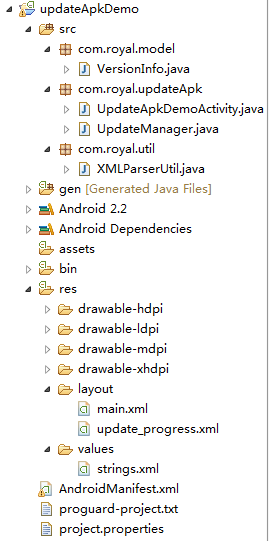
客户端项目结构图:
?
UpdateApkDemoActivity.java
package com.royal.updateApk;import android.app.Activity;import android.os.Bundle;/** * 更新视图界面类 * * @author Royal * */public class UpdateApkDemoActivity extends Activity {/** Called when the activity is first created. */@Overridepublic void onCreate(Bundle savedInstanceState) {super.onCreate(savedInstanceState);setContentView(R.layout.main);// 版本更新检查UpdateManager um = new UpdateManager(UpdateApkDemoActivity.this);um.checkUpdate();}}?
?
一个比较重要的版本更新核心服务类,靠他了。
?
UpdateManager.java
package com.royal.updateApk;import java.io.File;import java.io.FileOutputStream;import java.io.IOException;import java.io.InputStream;import java.net.HttpURLConnection;import java.net.MalformedURLException;import java.net.URL;import android.app.AlertDialog.Builder;import android.content.Context;import android.content.DialogInterface;import android.content.DialogInterface.OnClickListener;import android.content.Intent;import android.content.pm.PackageInfo;import android.content.pm.PackageManager;import android.content.pm.PackageManager.NameNotFoundException;import android.net.Uri;import android.os.Environment;import android.os.Handler;import android.os.Message;import android.view.LayoutInflater;import android.view.View;import android.widget.ProgressBar;import com.royal.model.VersionInfo;import com.royal.util.XMLParserUtil;/** * APK更新管理类 * * @author Royal * */public class UpdateManager {// 上下文对象private Context mContext;//更新版本信息对象private VersionInfo info = null;// 下载进度条private ProgressBar progressBar;// 是否终止下载private boolean isInterceptDownload = false;//进度条显示数值private int progress = 0;/** * 参数为Context(上下文activity)的构造函数 * * @param context */public UpdateManager(Context context) {this.mContext = context;}public void checkUpdate() {// 从服务端获取版本信息info = getVersionInfoFromServer();if (info != null) {try {// 获取当前软件包信息PackageInfo pi = mContext.getPackageManager().getPackageInfo(mContext.getPackageName(), PackageManager.GET_CONFIGURATIONS);// 当前软件版本号int versionCode = pi.versionCode;if (versionCode < info.getVersionCode()) {// 如果当前版本号小于服务端版本号,则弹出提示更新对话框showUpdateDialog();}} catch (NameNotFoundException e) {e.printStackTrace();}}}/** * 从服务端获取版本信息 * * @return */private VersionInfo getVersionInfoFromServer() {VersionInfo info = null;URL url = null;try {// 10.0.2.2相当于localhosturl = new URL("http://10.0.2.2:8080/updateApkServer/version.xml");} catch (MalformedURLException e) {e.printStackTrace();}if (url != null) {try {// 使用HttpURLConnection打开连接HttpURLConnection urlConn = (HttpURLConnection) url.openConnection();// 读取服务端version.xml的内容(流)info = XMLParserUtil.getUpdateInfo(urlConn.getInputStream());urlConn.disconnect();} catch (IOException e) {e.printStackTrace();}}return info;}/** * 提示更新对话框 * * @param info * 版本信息对象 */private void showUpdateDialog() {Builder builder = new Builder(mContext);builder.setTitle("版本更新");builder.setMessage(info.getDisplayMessage());builder.setPositiveButton("下载", new OnClickListener() {@Overridepublic void onClick(DialogInterface dialog, int which) {dialog.dismiss();// 弹出下载框showDownloadDialog();}});builder.setNegativeButton("以后再说", new OnClickListener() {@Overridepublic void onClick(DialogInterface dialog, int which) {dialog.dismiss();}});builder.create().show();}/** * 弹出下载框 */private void showDownloadDialog() {Builder builder = new Builder(mContext);builder.setTitle("版本更新中...");final LayoutInflater inflater = LayoutInflater.from(mContext);View v = inflater.inflate(R.layout.update_progress, null);progressBar = (ProgressBar) v.findViewById(R.id.pb_update_progress);builder.setView(v);builder.setNegativeButton("取消", new OnClickListener() {public void onClick(DialogInterface dialog, int which) {dialog.dismiss();//终止下载isInterceptDownload = true;}});builder.create().show();//下载apkdownloadApk();}/** * 下载apk */private void downloadApk(){//开启另一线程下载Thread downLoadThread = new Thread(downApkRunnable);downLoadThread.start();}/** * 从服务器下载新版apk的线程 */private Runnable downApkRunnable = new Runnable(){@Overridepublic void run() {if (!android.os.Environment.getExternalStorageState().equals(android.os.Environment.MEDIA_MOUNTED)) {//如果没有SD卡Builder builder = new Builder(mContext);builder.setTitle("提示");builder.setMessage("当前设备无SD卡,数据无法下载");builder.setPositiveButton("确定", new OnClickListener() {@Overridepublic void onClick(DialogInterface dialog, int which) {dialog.dismiss();}});builder.show();return;}else{try {//服务器上新版apk地址URL url = new URL("http://10.0.2.2:8080/updateApkServer/updateApkDemo2.apk");HttpURLConnection conn = (HttpURLConnection)url.openConnection();conn.connect();int length = conn.getContentLength();InputStream is = conn.getInputStream();File file = new File(Environment.getExternalStorageDirectory().getAbsolutePath() + "/updateApkFile/");if(!file.exists()){//如果文件夹不存在,则创建file.mkdir();}//下载服务器中新版本软件(写文件)String apkFile = Environment.getExternalStorageDirectory().getAbsolutePath() + "/updateApkFile/" + info.getApkName();File ApkFile = new File(apkFile);FileOutputStream fos = new FileOutputStream(ApkFile);int count = 0;byte buf[] = new byte[1024];do{int numRead = is.read(buf);count += numRead;//更新进度条progress = (int) (((float) count / length) * 100);handler.sendEmptyMessage(1);if(numRead <= 0){//下载完成通知安装handler.sendEmptyMessage(0);break;}fos.write(buf,0,numRead);//当点击取消时,则停止下载}while(!isInterceptDownload);} catch (MalformedURLException e) {e.printStackTrace();} catch (IOException e) {e.printStackTrace();}}}};/** * 声明一个handler来跟进进度条 */private Handler handler = new Handler() {public void handleMessage(Message msg) {switch (msg.what) {case 1:// 更新进度情况progressBar.setProgress(progress);break;case 0:progressBar.setVisibility(View.INVISIBLE);// 安装apk文件installApk();break;default:break;}};};/** * 安装apk */private void installApk() {// 获取当前sdcard存储路径File apkfile = new File(Environment.getExternalStorageDirectory().getAbsolutePath() + "/updateApkFile/" + info.getApkName());if (!apkfile.exists()) {return;}Intent i = new Intent(Intent.ACTION_VIEW);// 安装,如果签名不一致,可能出现程序未安装提示i.setDataAndType(Uri.fromFile(new File(apkfile.getAbsolutePath())), "application/vnd.android.package-archive"); mContext.startActivity(i);}}?
update_prgress.xml ?用于显示下载时的进度条
?
<?xml version="1.0" encoding="utf-8"?><LinearLayout xmlns:android="http://schemas.android.com/apk/res/android" android:layout_width="fill_parent" android:layout_height="wrap_content" > <ProgressBar android:id="@+id/pb_update_progress" style="?android:attr/progressBarStyleHorizontal" android:layout_width="fill_parent" android:layout_height="wrap_content" /></LinearLayout>?
?
另外附上2个类,pojo、util
?
VersionInfo.java
package com.royal.model;/** * 软件版本信息对象 * * @author Royal * */public class VersionInfo {// 版本描述字符串private String version;// 版本更新时间private String updateTime;// 新版本更新下载地址private String downloadURL;// 更新描述信息private String displayMessage;// 版本号private int versionCode;// apk名称private String apkName;public String getVersion() {return version;}public void setVersion(String version) {this.version = version;}public String getUpdateTime() {return updateTime;}public void setUpdateTime(String updateTime) {this.updateTime = updateTime;}public String getDownloadURL() {return downloadURL;}public void setDownloadURL(String downloadURL) {this.downloadURL = downloadURL;}public String getDisplayMessage() {return displayMessage;}public void setDisplayMessage(String displayMessage) {this.displayMessage = displayMessage;}public int getVersionCode() {return versionCode;}public void setVersionCode(int versionCode) {this.versionCode = versionCode;}public String getApkName() {return apkName;}public void setApkName(String apkName) {this.apkName = apkName;}}?XMLParserUtil.java ?就是用来解析服务端 version.xml 用的
?
package com.royal.util;import java.io.IOException;import java.io.InputStream;import org.xmlpull.v1.XmlPullParser;import org.xmlpull.v1.XmlPullParserException;import org.xmlpull.v1.XmlPullParserFactory;import com.royal.model.VersionInfo;/** * XML文档解析工具类 * * @author Royal * */public class XMLParserUtil {/** * 获取版本更新信息 * * @param is * 读取连接服务version.xml文档的输入流 * @return */public static VersionInfo getUpdateInfo(InputStream is) {VersionInfo info = new VersionInfo();try {XmlPullParserFactory factory = XmlPullParserFactory.newInstance();factory.setNamespaceAware(true);XmlPullParser parser = factory.newPullParser();parser.setInput(is, "UTF-8");int eventType = parser.getEventType();while (eventType != XmlPullParser.END_DOCUMENT) {switch (eventType) {case XmlPullParser.START_TAG:if ("version".equals(parser.getName())) {info.setVersion(parser.nextText());} else if ("updateTime".equals(parser.getName())) {info.setUpdateTime(parser.nextText());} else if ("updateTime".equals(parser.getName())) {info.setUpdateTime(parser.nextText());} else if ("downloadURL".equals(parser.getName())) {info.setDownloadURL(parser.nextText());} else if ("displayMessage".equals(parser.getName())) {info.setDisplayMessage(parseTxtFormat(parser.nextText(), "##"));} else if ("apkName".equals(parser.getName())) {info.setApkName(parser.nextText());} else if ("versionCode".equals(parser.getName())) {info.setVersionCode(Integer.parseInt(parser.nextText()));}break;case XmlPullParser.END_TAG:break;}eventType = parser.next();}} catch (XmlPullParserException e) {e.printStackTrace();} catch (IOException e) {e.printStackTrace();}return info;}/** * 根据指定字符格式化字符串(换行) * * @param data * 需要格式化的字符串 * @param formatChar * 指定格式化字符 * @return */public static String parseTxtFormat(String data, String formatChar) {StringBuffer backData = new StringBuffer();String[] txts = data.split(formatChar);for (int i = 0; i < txts.length; i++) {backData.append(txts[i]);backData.append("\n");}return backData.toString();}}?最后一个别忘了开启网络权限和SD卡读写权限。
?
AndroidManifest.xml
?
<?xml version="1.0" encoding="utf-8"?><manifest xmlns:android="http://schemas.android.com/apk/res/android" package="com.royal.updateApk" android:versionCode="1" android:versionName="1.0" > <uses-sdk android:minSdkVersion="8" /> <application android:icon="@drawable/ic_launcher" android:label="@string/app_name" > <activity android:name=".UpdateApkDemoActivity" android:label="@string/app_name" > <intent-filter> <action android:name="android.intent.action.MAIN" /> <category android:name="android.intent.category.LAUNCHER" /> </intent-filter> </activity> </application> <!-- 开启网络权限 --> <uses-permission android:name="android.permission.INTERNET" /> <!-- 在SDCard中创建与删除文件权限 --> <uses-permission android:name="android.permission.MOUNT_UNMOUNT_FILESYSTEMS" /> <!-- 往SDCard写入数据权限 --> <uses-permission android:name="android.permission.WRITE_EXTERNAL_STORAGE" /></manifest>?
?
?
?
?
?
?
?
?
