OpenCV学习备忘 Vol .2 播放视频文件
?
作者:Akira.Panda
参考书籍及资料OpenCV中文社区 《学习OpenCV》 内容提要播放视频文件 使用播放控制条,控制播放进度?准备工作准备一段视频格式最好为avi或者mp4格式的,不要RMVB格式。
实验1 播放视频,按ESC键退出代码?
/** main.cpp** Created on: 2011-10-26* Author: Akira.Pan*/#include "highgui.h"int main(int argc, char ** argv) { char* fileName = "E:\\Media\\20110606(001).mp4"; char* windowTitle = "Vedio"; int ESC_KEY = 27; cvNamedWindow(windowTitle, CV_WINDOW_AUTOSIZE); CvCapture *capture = cvCreateFileCapture(fileName); IplImage* frame; while (1) { frame = cvQueryFrame(capture); if (!frame) { break; } cvShowImage(windowTitle, frame); int c = cvWaitKey(33); if (c == ESC_KEY) { break; } } cvReleaseCapture(&capture); cvDestroyWindow(windowTitle); return 0;}??
代码解析重要函数CvCapture * cvCreateFileCapture(char* filename ) 从指定路径中读取视频文件,相对的还有从设备中(设摄像头)读出。IplImage* cvQueryFrame( CvCapture* capture ) 获取下一帧图片,如果下一帧无图片为空则表示视频结束void cvReleaseCapture( CvCapture** capture ) 释放掉一段Capture资源?
实验2 播放视频,按ESC键退出,上面有播放进度控制条代码?
/* * main.cpp * * Created on: 2011-10-26 * Author: Akira.Pan */#include "highgui.h"int gSliderPos = 0;CvCapture* gCapture = NULL;void showPosFrame(int pos) { /*show the pos of frame*/ cvSetCaptureProperty(gCapture, CV_CAP_PROP_POS_FRAMES, pos);}int main(int argc, char ** argv) { char* fileName = "E:\\Media\\20110606(001).mp4"; char* windowTitle = "Vedio"; int ESC_KEY = 27; cvNamedWindow(windowTitle, CV_WINDOW_AUTOSIZE); CvCapture *capture = cvCreateFileCapture(fileName); gCapture = capture; int frameCount = (int) cvGetCaptureProperty(capture, CV_CAP_PROP_FRAME_COUNT); if (frameCount != 0) { cvCreateTrackbar("Track Bar", windowTitle, &gSliderPos, frameCount, showPosFrame); } IplImage* frame; while (1) { frame = cvQueryFrame(capture); if (!frame) { break; } cvShowImage(windowTitle, frame); gSliderPos++; if (gSliderPos % 150 == 0) cvSetTrackbarPos("Track Bar", windowTitle, gSliderPos); int c = cvWaitKey(50); if (c == ESC_KEY) { break; } } cvReleaseCapture(&capture); cvDestroyWindow(windowTitle); return 0;}??
代码解析重要函数int??? cvSetCaptureProperty( CvCapture* capture, int property_id, double value ); 设置Capture的一项属性,我们这里设置的当前的Frame的位置。使Capture获取的下一帧的位置变为Frame的Pos位置;double cvGetCaptureProperty( CvCapture* capture, int property_id );获取Capture一项属性,这里获取的是CV_CAP_PROP_FRAME_COUNT即所有Frame的总数;int cvCreateTrackbar( const char* trackbar_name, const char* window_name,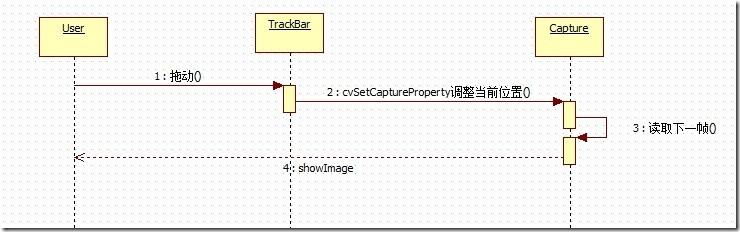
用户拖动了TrackBar之后,触发了on_click时间,程序执行回调函数showPosFrame(int);而该函数的主要作用是指定capture的播放的frame的位置。通过调整其播放帧数调整播放的进度。
?
