
Spring MVC+Hibernate+Spring集成小例子
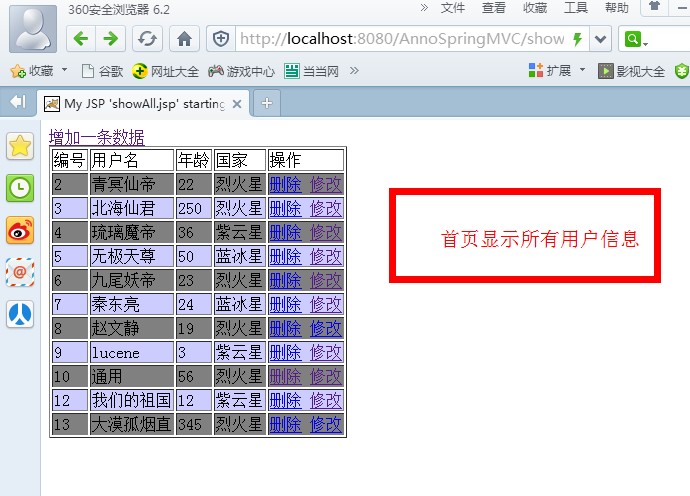
上次,散仙给了一个关于Sping MVC注解简单的小例子,那么本次呢,给出一个稍微复杂的基于增加改查的小项目,下面先介绍下此项目对应的一些信息。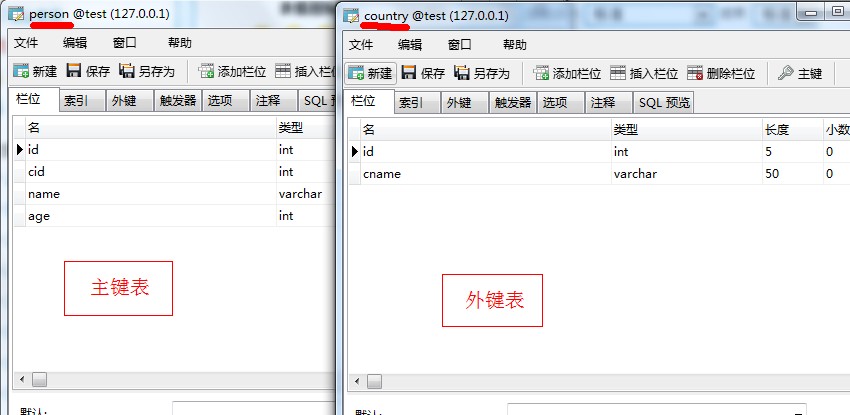
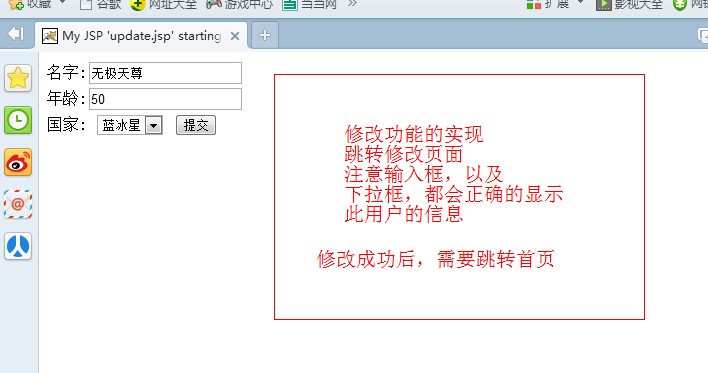
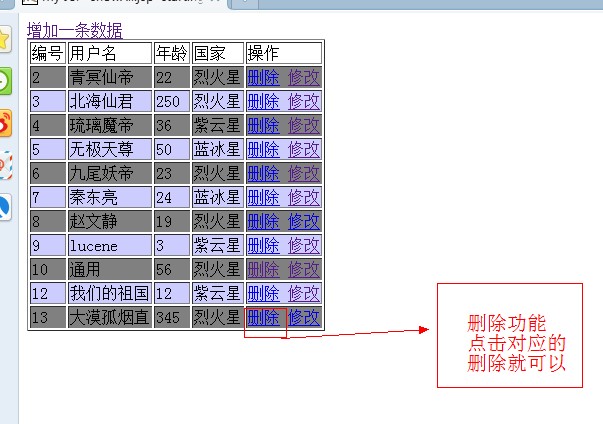
spring的配置文件:<?xml version="1.0" encoding="UTF-8"?><beans default-autowire="byName" xmlns="http://www.springframework.org/schema/beans" xmlns:xsi="http://www.w3.org/2001/XMLSchema-instance" xmlns:context="http://www.springframework.org/schema/context" xmlns:mvc="http://www.springframework.org/schema/mvc" xsi:schemaLocation="http://www.springframework.org/schema/beans http://www.springframework.org/schema/beans/spring-beans.xsd http://www.springframework.org/schema/context http://www.springframework.org/schema/context/spring-context-3.0.xsd http://www.springframework.org/schema/mvc http://www.springframework.org/schema/mvc/spring-mvc-3.0.xsd "> <!-- 注解扫描包 --> <context:component-scan base-package="controller" /> <!-- 开启注解 --> <mvc:annotation-driven /> <!-- <bean id="mappingJacksonHttpMessageConverter"/></list></property></bean>--> <!-- <bean value="application/atom+xml"/> <entry key="html" value="text/html"/> <entry key="json" value="application/json"/> </map> </property> <property name="viewResolvers"> <list> <bean value="/WEB-INF/jsp/"/> <property name="suffix" value=".jsp"/> </bean> </list> </property> <property name="defaultViews"> <list> <bean /> </list> </property> </bean> --> <bean value="org.springframework.web.servlet.view.JstlView"/> <property name="prefix" value="/WEB-INF/jsp/"/> <property name="suffix" value=".jsp"/> </bean> <!-- 处理器映射 --> <!-- <bean ></bean> --> <!-- 注解使用的 HandlerMapping --> <bean mapping="/jquery/**" /> <!-- <mvc:resources location="/jsp/" mapping="/jsp/**" /> --></beans>
web.xml的配置文件:<?xml version="1.0" encoding="UTF-8"?><web-app version="3.0" xmlns="http://java.sun.com/xml/ns/javaee" xmlns:xsi="http://www.w3.org/2001/XMLSchema-instance" xsi:schemaLocation="http://java.sun.com/xml/ns/javaee http://java.sun.com/xml/ns/javaee/web-app_3_0.xsd"> <display-name></display-name> <!-- 配置上下文参数 --> <context-param> <param-name>contextConfigLocation</param-name> <param-value>classpath:ac*.xml</param-value> </context-param> <!-- 配置监听器 --> <listener> <listener-class>org.springframework.web.context.ContextLoaderListener</listener-class> </listener> <servlet> <!-- 第一个首先调用的前端控制器,注意与WEB-INFO下servlet的xml相对应 --> <servlet-name>qin</servlet-name> <servlet-class>org.springframework.web.servlet.DispatcherServlet</servlet-class> <load-on-startup>1</load-on-startup> </servlet> <servlet-mapping> <servlet-name>qin</servlet-name> <url-pattern>/</url-pattern> </servlet-mapping> <servlet> <servlet-name>forwarding</servlet-name> <servlet-class>com.qin.sanxian.ForwardServlet</servlet-class> </servlet> <!-- 处理post提交的乱码解决 --><filter> <filter-name>CharacterEncodingFilter</filter-name> <filter-class>org.springframework.web.filter.CharacterEncodingFilter</filter-class> <init-param> <param-name>encoding</param-name> <param-value>utf-8</param-value> </init-param> </filter> <!-- 配置Session --> <filter> <filter-name>osiv</filter-name> <filter-class>org.springframework.orm.hibernate3.support.OpenSessionInViewFilter</filter-class> </filter> <filter-mapping> <filter-name>osiv</filter-name> <url-pattern>/*</url-pattern> </filter-mapping><filter-mapping> <filter-name>CharacterEncodingFilter</filter-name> <url-pattern>/*</url-pattern> </filter-mapping> <welcome-file-list> <welcome-file>index.jsp</welcome-file> </welcome-file-list></web-app>
ac.xml的配置:<?xml version="1.0" encoding="UTF-8"?><beans default-autowire="byName" xmlns="http://www.springframework.org/schema/beans"xmlns:xsi="http://www.w3.org/2001/XMLSchema-instance" xmlns:p="http://www.springframework.org/schema/p"xmlns:tx="http://www.springframework.org/schema/tx" xmlns:aop="http://www.springframework.org/schema/aop"xsi:schemaLocation="http://www.springframework.org/schema/beans http://www.springframework.org/schema/beans/spring-beans-3.0.xsd http://www.springframework.org/schema/tx http://www.springframework.org/schema/tx/spring-tx-3.0.xsd http://www.springframework.org/schema/aop http://www.springframework.org/schema/aop/spring-aop-3.0.xsd"><!-- 配置数据源 --><bean id="dataSource"><property name="driverClassName" value="com.mysql.jdbc.Driver"></property><property name="url" value="jdbc:mysql://localhost:3306/test"></property><property name="username" value="root"></property><property name="password" value="ninemax"></property></bean><bean id="sessionFactory"/></property><property name="hibernateProperties"><props><prop key="hibernate.dialect">org.hibernate.dialect.MySQLDialect</prop></props></property><property name="mappingResources"><list><value>entity/Country.hbm.xml</value><value>entity/Person.hbm.xml</value></list></property></bean><!-- 配置hibernate事务管理器 --><bean id="tx"transaction-manager="tx"><tx:attributes><tx:method name="*" propagation="REQUIRED" /><tx:method name="get*" propagation="SUPPORTS" /><tx:method name="find*" read-only="true" /></tx:attributes></tx:advice><!-- 定义AOP切面 --><aop:config><aop:pointcut expression="execution(* commons.*.*(..))"id="pc" /><aop:advisor advice-ref="txAdvice" pointcut-ref="pc" /></aop:config><!-- 注入父类 --><bean name="basedao" abstract="true"> </bean></beans>
ac.Dao的配置文件:<?xml version="1.0" encoding="UTF-8"?><beans default-autowire="byName" xmlns="http://www.springframework.org/schema/beans"xmlns:xsi="http://www.w3.org/2001/XMLSchema-instance" xmlns:p="http://www.springframework.org/schema/p"xmlns:tx="http://www.springframework.org/schema/tx" xmlns:aop="http://www.springframework.org/schema/aop"xsi:schemaLocation="http://www.springframework.org/schema/beans http://www.springframework.org/schema/beans/spring-beans-3.0.xsd http://www.springframework.org/schema/tx http://www.springframework.org/schema/tx/spring-tx-3.0.xsd http://www.springframework.org/schema/aop http://www.springframework.org/schema/aop/spring-aop-3.0.xsd"> <bean id="personDao" parent="basedao"></bean> <bean id="countryDao" parent="basedao"></bean> </beans>
控制器的核心代码:package controller;import java.util.ArrayList;import java.util.List;import javax.annotation.Resource;import javax.servlet.http.HttpServletRequest;import javax.servlet.http.HttpServletResponse; import org.springframework.stereotype.Controller; import org.springframework.web.bind.annotation.RequestBody;import org.springframework.web.bind.annotation.RequestMapping;import org.springframework.web.bind.annotation.RequestMethod;import org.springframework.web.bind.annotation.ResponseBody; import com.google.gson.Gson; import dao.CountryDao;import dao.PersonDao;import entity.Country;import entity.Person;/** * @author 秦东亮 * 技术群:324714439 * * * */@Controllerpublic class PersonController { @Resource(name="personDao") private PersonDao personDao; public PersonDao getPersonDao() {return personDao;} public void setPersonDao(PersonDao personDao) {this.personDao = personDao;}@Resource(name="countryDao")private CountryDao countryDao; public CountryDao getCountryDao() {return countryDao;}public void setCountryDao(CountryDao countryDao) {this.countryDao = countryDao;}/** * 输出所有的用户信息 * * **/@RequestMapping( value="/showAll")public String showAll(HttpServletRequest request)throws Exception{ request.setAttribute("plist", personDao.find(" from Person ")); return "showAll"; }/** * 输出所有的国家信息 * * **/@RequestMapping( value="/add")public String add(HttpServletRequest request)throws Exception{ request.setAttribute("clist", countryDao.find(" from Country ")); return "adda"; } /** * 删除的方法 * */@RequestMapping( value="/delete")public String delete(HttpServletRequest request)throws Exception{ int id=Integer.parseInt(request.getParameter("id")); personDao.delete(personDao.get(id)); return "redirect:/showAll"; } /** * 删除的方法 * request域的写法 * */@RequestMapping( value="/update")public String update(HttpServletRequest request)throws Exception{ int id=Integer.parseInt(request.getParameter("id")); request.setAttribute("p", personDao.get(id)); request.setAttribute("clist", countryDao.find(" from Country ")); return "update"; } /** * 更新的操作 * 封装成实体类的写法 * */@RequestMapping( value="/sup",method=RequestMethod.POST)public String sup(Person person,HttpServletRequest request){ try{personDao.update(person);// System.out.println("111");//System.out.println(person.getName());//System.out.println(person.getCountry().getId());//System.out.println(request.getParameter("name")); }catch (Exception e) { e.printStackTrace();} return "redirect:/showAll"; }/** * 保存一条数据 * 没有使用实体类自动封装的功能 * * **/@RequestMapping( value="/save",method=RequestMethod.POST) public void save(HttpServletRequest request,HttpServletResponse response)throws Exception{ // personDao.save(person);//保存成功 Person person=new Person(); person.setAge(Integer.parseInt(request.getParameter("age"))); person.setName(request.getParameter("name")); Country c=new Country(); c.setId(Integer.parseInt(request.getParameter("cid"))); person.setCountry(c); personDao.save(person); //System.out.println("cid : "+request.getParameter("cid")); Gson g=new Gson();// List<String> list=new ArrayList<String>();// list.add("A");// list.add("B");// list.add("C");// list.add("D"); response.setCharacterEncoding("UTF-8"); response.setContentType("application/json;charset=utf-8"); //response.getWriter().write(g.toJson(list)); response.getWriter().write(g.toJson("添加成功!")); //response.getWriter().write("1"); }/** * 保存一条数据 * 基于ajax的json自动封装的 * 实体类 * 注意有嵌套类时的 * 写法"county.id" * * **/@RequestMapping( value="/savetwo",method=RequestMethod.POST) public void savetwo(Person person,HttpServletRequest request,HttpServletResponse response)throws Exception{ personDao.save(person);//保存成功 //System.out.println(person); //System.out.println("cid : "+request.getParameter("cid")); Gson g=new Gson();// List<String> list=new ArrayList<String>();// list.add("A");// list.add("B");// list.add("C");// list.add("D"); response.setCharacterEncoding("UTF-8"); response.setContentType("application/json;charset=utf-8"); //response.getWriter().write(g.toJson(list)); response.getWriter().write(g.toJson("添加成功!")); //response.getWriter().write("1"); }}
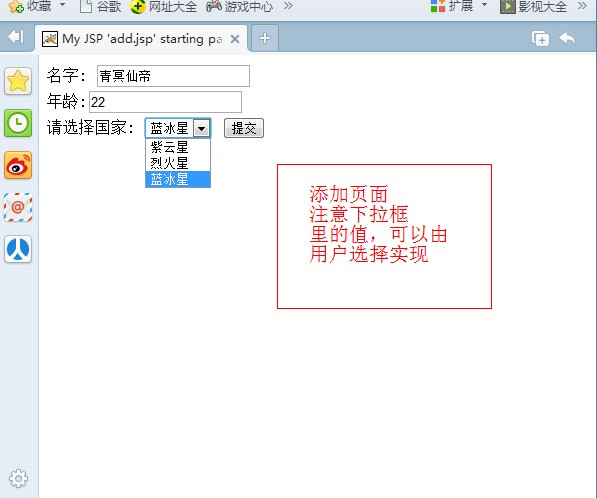
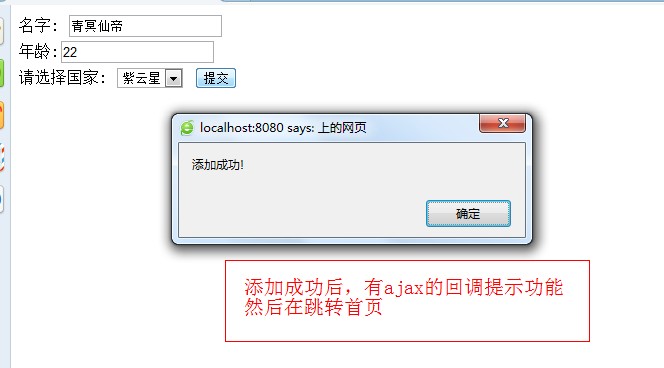
添加的JSP页面的代码 :<%@ page language="java" import="java.util.*" pageEncoding="UTF-8"%> <%@ taglib uri="http://java.sun.com/jstl/core_rt" prefix="c" %><!DOCTYPE HTML PUBLIC "-//W3C//DTD HTML 4.01 Transitional//EN"><html> <head> <title>My JSP 'add.jsp' starting page</title> <meta http-equiv="pragma" content="no-cache"><meta http-equiv="cache-control" content="no-cache"><meta http-equiv="expires" content="0"> <meta http-equiv="keywords" content="keyword1,keyword2,keyword3"><meta http-equiv="description" content="This is my page"><!--<link rel="stylesheet" type="text/css" href="styles.css">--> <script type="text/javascript" src="jquery/jquery-1.7.1.min.js"></script></head> <script type="text/javascript"> /* $(function(){ $("#btn").bind('click',function(){ alert('123'); var name=$("#name").val(); var age=$("#age").val(); var cid=$("#cid").val(); $.ajax({type:"post",url:"save",data:{name:name,age:age,country.id=cid}, dataType:"json", success: function(msg) { alert(msg)}}); }); }); */ function qin(){ var name=$("#name").val(); var age=$("#age").val(); var cid=$("#cid").val(); $.ajax({type:"post", url:"savetwo", data:{name:name,age:age,"country.id":cid},// data:{name:name,age:age,cid:cid}, dataType:"json", success: function(msg) { alert(msg) location.href = "showAll";}}); } </script> <body> 名字: <input id="name" name="name"><br> 年龄:<input id="age" name="age"><br> 请选择国家: <select id="cid" name="cname" > <c:forEach items="${clist }" var="c"> <option value="${c.id}" >${c.cname} </option> </c:forEach> </select> <button id="btn" onclick="qin()" >提交</button> </body></html>
最后,散仙先总结下自己写这个小项目的最大的2个收获之处:
1,关于Sping MVC的json问题,因为在项目中使用到了Ajax传参以及返回参数,所以就避免不了与json打交道,所以就需要配置Sping MVC支持json的转换,这个问题比较蛋疼,可能也是散仙还不够熟练吧,Sping MVC内置支持的json需要下载什么jakson的包,但是经过一番折腾,老是启动报错,可能是版本不一致问题,最后弃用Sping MVC的内置json功能,使用流的形式的返回json,然后进行处理,包括在Struts2里面散仙也弃用了其自身携带的json功能,而是结合json工具,比如gson,fastgson,来完成ajax的一些问题,这样以来,就很简单,而且不容易出错的出色的完成某些功能。
2,第二个收获之处,关于Sping MVC提交的数据,怎么跟后台的实体类相绑定的问题,或者实体类里面又嵌套了一个实体类这样应该如何绑定参数?
其实这些问题在struts2里面还是比较好解决的,都以后台的(Action)里面实体类的属性名绑定就OK了,简单类型person.name就在表单的name里写一致就OK了,ajax无表单情况下也是如此,如果含有嵌套类需要类似使用person.country.name这样写即可,ajax无表单提交情况一样。在Spring MVC里如果是表单提交则写name就可以,如果是ajax无表单的异步提交则需要加上双引号"country.name",类似这样,另外一点关于多选框提交时,<option>标签里一定要有值,否则获取select标签时,会出现类似400错误,而Sping后台却无任何异常,所以这一点需要重点注意一下。
Spring MVC+Hibernate+Spring集成小事例
Spring MVC+Hibernate+Spring集成小例子上次,散仙给了一个关于Sping MVC注解简单的小例子,那么本次呢,给出