
android 开发中GridView中如何添加一张图片
就像微信一样,在它的gridview里一直有一张“+”的图片,且随着图片的选取,它会一直往后退,直至选满9张图片,它就消失了,请问这是怎么实现的?求高手解答!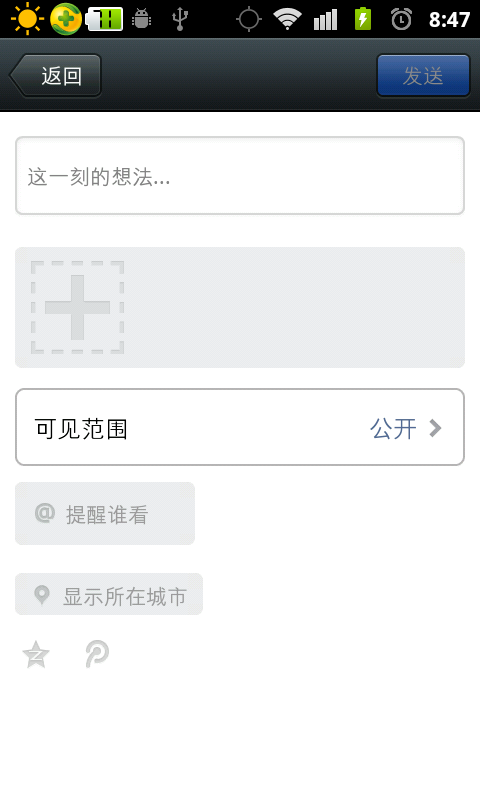
[解决办法]
addview 最好是用HorizontalScrollView 里面含有一个线性布局,线性布局.addView(img)
[解决办法]
我帮你做了个动态向GridView添加图片的APK 需要的话可以M我想怎么添加就怎么添加
[解决办法]
xml配置如下:
<RelativeLayout
android:id="@+id/photo_post_select_grid_frame"
android:layout_width="fill_parent"
android:layout_height="wrap_content"
android:layout_marginLeft="10dp"
android:layout_marginRight="10dp"
android:layout_marginTop="10dp" >
<com.gf.component.widget.ExtendGridView
android:id="@+id/photo_post_select_grid"
android:layout_width="fill_parent"
android:layout_height="wrap_content"
android:background="@drawable/gf_inputbox_upload_pic"
android:fadingEdge="none"
android:gravity="center"
android:horizontalSpacing="4dip"
android:listSelector="@color/transparent"
android:padding="10dip"
android:scrollbarStyle="insideOverlay"
android:scrollbarThumbVertical="@drawable/gf_scrollbar"
android:scrollingCache="false"
android:stretchMode="columnWidth"
android:verticalSpacing="4dip"
gf:stretchable="true" />
</RelativeLayout>
其中ExtendGridView实现如下
public class ExtendGridView extends GridView {
private int mHorizontalSpacing;
private int mVerticalSpacing;
private int mNumColumns;
private boolean mStretchable;
private boolean mPenetrateTouch;
private int mScreenWidth, mScreenHeight;
public ExtendGridView(Context context) {
this(context, null);
}
public ExtendGridView(Context context, AttributeSet attrs) {
this(context, attrs, 0);
}
public ExtendGridView(Context context, AttributeSet attrs, int defStyle) {
super(context, attrs, defStyle);
TypedArray a = context.obtainStyledAttributes(attrs, R.styleable.GridView);
mStretchable = a.getBoolean(R.styleable.GridView_stretchable, false);
mPenetrateTouch = a.getBoolean(R.styleable.GridView_penetrateTouch, false);
a.recycle();
init();
}
@Override
public void setHorizontalSpacing(int horizontalSpacing) {
super.setHorizontalSpacing(horizontalSpacing);
mHorizontalSpacing = horizontalSpacing;
}
public int getHorizontalSpacing() {
return mHorizontalSpacing;
}
@Override
public void setVerticalSpacing(int verticalSpacing) {
super.setVerticalSpacing(verticalSpacing);
mVerticalSpacing = verticalSpacing;
}
public int getVerticalSpacing() {
return mVerticalSpacing;
}
@Override
public void setNumColumns(int numColumns) {
super.setNumColumns(numColumns);
mNumColumns = numColumns;
}
public int getNumColumns() {
return mNumColumns;
}
public void setStretchable(boolean stretchable) {
if (mStretchable != stretchable) {
mStretchable = stretchable;
requestLayout();
}
}
public boolean isStretchable() {
return mStretchable;
}
public void setPenetrateTouch(boolean penetrate) {
mPenetrateTouch = penetrate;
}
public boolean isPenetrateTouch() {
return mPenetrateTouch;
}
public int computeItemWidth() {
int width = getWidth() > 0 ? getWidth() : getMeasuredWidth();
// use screen width as max width.
if (width <= 0) width = mScreenWidth;
int horizontalSpace = getHorizontalSpacing();
int horizontalPadding = getPaddingLeft() + getPaddingRight();
int columnsNum = getNumColumns();
int itemSize = (width - horizontalPadding - (columnsNum - 1) * horizontalSpace) / columnsNum;
if (itemSize < 0) {
return LayoutParams.WRAP_CONTENT;
}
return itemSize;
}
@Override
protected void onMeasure(int widthMeasureSpec, int heightMeasureSpec) {
final boolean stretchable = mStretchable;
if (stretchable) {
heightMeasureSpec = MeasureSpec.makeMeasureSpec(Integer.MAX_VALUE >> 2, MeasureSpec.AT_MOST);
}
super.onMeasure(widthMeasureSpec, heightMeasureSpec);
}
@TargetApi(Build.VERSION_CODES.FROYO)
@Override
protected void onConfigurationChanged(Configuration newConfig) {
super.onConfigurationChanged(newConfig);
updateScreenSize();
}
@Override
public boolean onTouchEvent(MotionEvent ev) {
// final int action = ev.getAction();
final int x = (int) ev.getX();
final int y = (int) ev.getY();
int motionPosition = pointToPosition(x, y);
if (mPenetrateTouch && motionPosition < 0) {
return false;
}
return super.onTouchEvent(ev);
}
private void init() {
updateScreenSize();
}
private void updateScreenSize() {
Display display = ((WindowManager) getContext().getSystemService(Context.WINDOW_SERVICE)).getDefaultDisplay();
mScreenWidth = display.getWidth();
mScreenHeight = display.getHeight();
}
}
然后接下来是我们的主代码
viewGridView = (ExtendGridView) findViewById(R.id.photo_post_select_grid);
viewGridView.setNumColumns(GRID_COLUMN_COUNT);
viewGridView
.setOnItemClickListener(new AdapterView.OnItemClickListener() {
@Override
public void onItemClick(AdapterView<?> parent, View view,
int position, long id) {
if (adapter.isExtra(position)) {
if (getSelectedImageList().size() < getMaxPhotoCnt()) {
showSelectImageDialog();
}
} else {
// 大图预览
onClickPhotoPreview(viewGridView, position,
getSelectedImageList());
}
}
});