
【讨论】通过bindService启动的service,在unbindService后service也结束了
这个问题以前讨论过,各个文档blog上也是这么写的,但有人还是说即使unbindService了,service还是会继续运行。
但刚才验证,unbindService后,执行了service的onDestroy方法,service也停止了。
下面是一个通过servcie来实现计数的功能,并且在activity中显示出此计数
1.接口ICountService.java,只有一个返回计数值的函数声明
package com.min.localservicedemo;

public interface ICountService {
public abstract int getCount();
}
2.服务类CountService.java,用于实现计数功能,在一个新线程中执行,并更新view显示当前计数值
package com.min.localservicedemo;

import android.app.Service;
import android.content.Intent;
import android.os.Binder;
import android.os.IBinder;
import android.util.Log;

public class CountService extends Service implements ICountService {
private static final String TAG = "CountService";
private boolean threadDisable;
private int count;
private ServiceBinder serviceBinder = new ServiceBinder();

public class ServiceBinder extends Binder implements ICountService {

public int getCount() {
// TODO Auto-generated method stub
return count;
}

}

public int getCount() {
// TODO Auto-generated method stub
return count;
}

@Override
public IBinder onBind(Intent arg0) {
// TODO Auto-generated method stub
return serviceBinder;
}

@Override
public void onCreate() {
// TODO Auto-generated method stub
super.onCreate();

new Thread(new Runnable() {
public void run() {
// TODO Auto-generated method stub
while(!threadDisable) {
try {
Thread.sleep(1000);
} catch (InterruptedException e) {
e.printStackTrace();
}
count++;
Log.d(TAG, "count is " + count);

updateCount();
}
}
}
).start();
}

@Override
public void onStart(Intent intent, int startId) {
// TODO Auto-generated method stub
super.onStart(intent, startId);
}

@Override
public boolean onUnbind(Intent intent) {
// TODO Auto-generated method stub
return super.onUnbind(intent);
}

@Override
public void onDestroy() {
// TODO Auto-generated method stub
super.onDestroy();
threadDisable = true;
Log.d(TAG, "onDestroy");
}

/**
 * Update view
 */
public void updateCount() {
LocalServiceDemo.getMyHandler().sendEmptyMessage(1);
}
}
3.Activity类LocalServiceDemo.java,显示当前的计数值
package com.min.localservicedemo;

import android.app.Activity;
import android.content.ComponentName;
import android.content.Intent;
import android.content.ServiceConnection;
import android.os.Bundle;
import android.os.Handler;
import android.os.IBinder;
import android.os.Message;
import android.util.Log;
import android.widget.TextView;

public class LocalServiceDemo extends Activity {
private static final String TAG = "LocalServiceDemo";

private static TextView tvCount;
private static ICountService countService;

private static MyHandler myHandler = MyHandler.getInstance();

private ServiceConnection serviceConnection = new ServiceConnection() {

public void onServiceConnected(ComponentName name, IBinder service) {
// TODO Auto-generated method stub
countService = (ICountService)service;
Log.d(TAG, "onServiceConnected count is " + countService.getCount());
tvCount.setText("Count:" + countService.getCount());
}

public void onServiceDisconnected(ComponentName name) {
// TODO Auto-generated method stub
countService = null;
}

};

    /** Called when the activity is first created. */
    @Override
    public void onCreate(Bundle savedInstanceState) {
        super.onCreate(savedInstanceState);
        setContentView(R.layout.main);

        tvCount = (TextView)findViewById(R.id.tvCount);
        this.bindService(new Intent("com.min.localservicedemo.CountService"),
        serviceConnection, BIND_AUTO_CREATE);
    }

@Override
protected void onDestroy() {
// TODO Auto-generated method stub
super.onDestroy();
this.unbindService(serviceConnection);
Log.d(TAG, "onDestroy unbindService");
}

    public static class MyHandler extends Handler {
    private static MyHandler myHandler = null;

    private MyHandler() {
    }

    /**
     * Single Instance
     * @return
     */
    public static MyHandler getInstance() {
    if (myHandler == null) {
    myHandler = new MyHandler();
    }
    return myHandler;
    }

@Override
public void handleMessage(Message msg) {
// TODO Auto-generated method stub
if(msg.what == 1) {
tvCount.setText("Count:" + countService.getCount());
}

super.handleMessage(msg);
}

    }

    public static MyHandler getMyHandler() {
    return myHandler;
    }
}
4.log输出
03-26 01:33:16.710: INFO/ActivityManager(59): Starting activity: Intent {
act=android.intent.action.MAIN cat=[android.intent.category.LAUNCHER] flg=0x10200000
cmp=com.min.localservicedemo/.LocalServiceDemo }
03-26 01:33:17.480:
DEBUG/LocalServiceDemo(349): onServiceConnected count is 0
03-26 01:33:17.580:
INFO/ActivityManager(59): Displayed activity com.min.localservicedemo/.LocalServiceDemo:
666 ms (total 666 ms)
03-26 01:33:18.329: DEBUG/CountService(349): count is 1
03-26
01:33:19.388: DEBUG/CountService(349): count is 2
03-26 01:33:20.453: DEBUG/CountService
(349): count is 3
03-26 01:33:21.506: DEBUG/CountService(349): count is 4
03-26
01:33:22.573: DEBUG/CountService(349): count is 5
03-26 01:33:22.850: DEBUG/dalvikvm(127):
GC_EXPLICIT freed 227 objects / 11056 bytes in 168ms
03-26 01:33:23.612:
DEBUG/CountService(349): count is 6
03-26 01:33:24.671: DEBUG/CountService(349): count is
7
03-26 01:33:25.738: DEBUG/CountService(349): count is 8
03-26 01:33:26.804:
DEBUG/CountService(349): count is 9
03-26 01:33:27.871: DEBUG/CountService(349): count is
10
03-26 01:33:28.531: WARN/KeyCharacterMap(349): No keyboard for id 0
03-26 01:33:28.531:
WARN/KeyCharacterMap(349): Using default keymap: /system/usr/keychars/qwerty.kcm.bin
03-26
01:33:28.871: DEBUG/CountService(349): count is 11
03-26 01:33:29.231:
DEBUG/LocalServiceDemo(349): onDestroy unbindService
03-26 01:33:29.340:
DEBUG/CountService(349): onDestroy
03-26 01:33:29.941: DEBUG/CountService(349): count is
12
03-26 01:34:54.540: DEBUG/SntpClient(59): request time failed: java.net.SocketException:
Address family not supported by protocol
Log截图
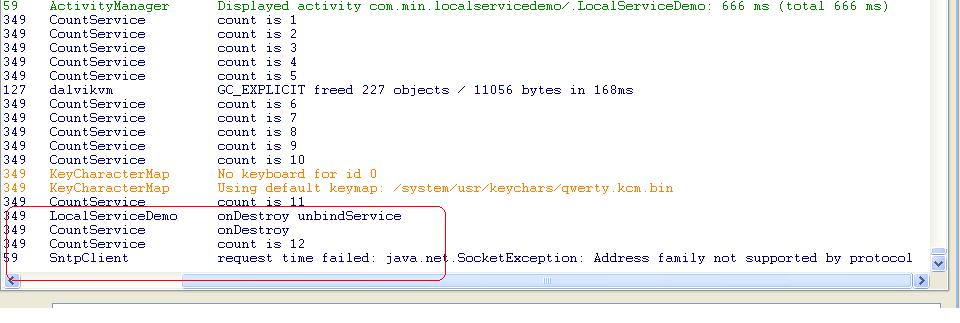
可以在log中看到,当退出activity时,执行了onDestroy函数的unbindService
然后又执行了CountService类的onDestroy,这时候service就结束了。
我是这么理解的,如果在unbindService后,service还能继续存在,那么就是我理解的有偏差。
欢迎各抒己见。
[解决办法]
如果不是通过bindService创建的服务(但仍然通过bindService得到了服务对象),就可能unbindService后还在运行,否则应该是结束掉了。
[解决办法]
楼主是BJ的么,祝你找个好工作。。对于面试考这些个理解性问题我很蛋疼。。。
[解决办法]
呵呵,建议你到google面试,百度那些人技术不行啊
[解决办法]
通过bindService启动的service有一个bound计数,当计数为0时,service就destroy了。
同一个app中的service和activity属于同一个进程,也是同一个线程,但是可以通过设置属性改变。
你看看下docs/guide/topics/fundamentals/services.html这个描述吧。我也只是把这个看完了,没在app中使用,刚刚入手android几个月。
[解决办法]
aidl只是一个stub,相当于代理,与服务没有关系。不会影响服务的生命周期。
service可以和activity在同一进程,也可以不在。这要看AndroidManifest.xml里面的定义。
service与server好像没有什么关系吧?前者是系统的概念,后者大多指c/s这种结构。
[解决办法]
这个对我来说很难,还没有想到什么办法。因为这是android系统决定要结束服务的,在所有连接都解绑之后。