
这个布局怎么写
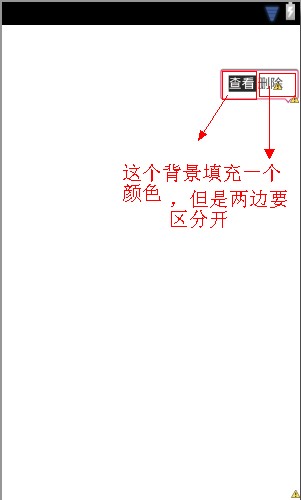
做一个类似手机qq的那种popupWindow,遇到了一些麻烦,那个文字的背景怎么才能填充到一半,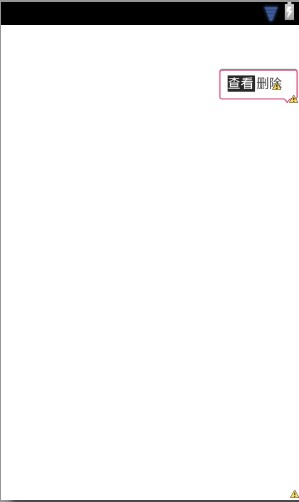
<?xml version="1.0" encoding="utf-8"?>
<LinearLayout xmlns:android="http://schemas.android.com/apk/res/android"
android:layout_width="100dip"
android:layout_height="50dip"
android:orientation="horizontal"
>
<Button
android:id="@+id/btn"
android:text="查看"
android:layout_weight="1.0"
android:layout_width="fill_parent"
android:layout_height="fill_parent"
android:background="自己写"/>
<Button
android:id="@+id/btn1"
android:text="删除"
android:layout_width="fill_parent"
android:layout_height="fill_parent"
android:layout_weight="1.0"
android:background="自己写"
/>
</LinearLayout>
[解决办法]
你的思路没问题啊,popupwindow里面自己布局,做两个控件分别给不同的背景图片
[解决办法]
<?xml version="1.0" encoding="utf-8"?>
<LinearLayout xmlns:android="http://schemas.android.com/apk/res/android"
android:layout_width="100dip"
android:layout_height="50dip"
android:orientation="horizontal"
>
<Button
android:id="@+id/btn"
android:text="查看"
android:layout_weight="1.0"
android:layout_width="fill_parent"
android:layout_height="fill_parent"
android:background="自己写"/>
<Button
android:id="@+id/btn1"
android:text="删除"
android:layout_width="fill_parent"
android:layout_height="fill_parent"
android:layout_weight="1.0"
android:background="自己写"
/>
</LinearLayout>
谢谢谢谢,还请教一个问题,上图是怎么获取当前listview的位置的。。
这个view获取要放在adapter中,然后实现popupwindow显示在这个view的下面
[解决办法]
<?xml version="1.0" encoding="utf-8"?>
<LinearLayout xmlns:android="http://schemas.android.com/apk/res/android"
android:layout_width="100dip"
android:layout_height="50dip"
android:orientation="horizontal"
>
<Button
android:id="@+id/btn"
android:text="查看"
android:layout_weight="1.0"
android:layout_width="fill_parent"
android:layout_height="fill_parent"
android:background="自己写"/>
<Button
android:id="@+id/btn1"
android:text="删除"
android:layout_width="fill_parent"
android:layout_height="fill_parent"
android:layout_weight="1.0"
android:background="自己写"
/>
</LinearLayout>
谢谢谢谢,还请教一个问题,上图是怎么获取当前listview的位置的。。
这个view获取要放在adapter中,然后实现popupwindow显示在这个view的下面
区别只在于显示popupwindow的代码要写在adapter内部或者是将内部获取的view传参出去
[解决办法]
<?xml version="1.0" encoding="utf-8"?>
<LinearLayout xmlns:android="http://schemas.android.com/apk/res/android"
android:layout_width="100dip"
android:layout_height="50dip"
android:orientation="horizontal"
>
<Button
android:id="@+id/btn"
android:text="查看"
android:layout_weight="1.0"
android:layout_width="fill_parent"
android:layout_height="fill_parent"
android:background="自己写"/>
<Button
android:id="@+id/btn1"
android:text="删除"
android:layout_width="fill_parent"
android:layout_height="fill_parent"
android:layout_weight="1.0"
android:background="自己写"
/>
</LinearLayout>
谢谢谢谢,还请教一个问题,上图是怎么获取当前listview的位置的。。
这个view获取要放在adapter中,然后实现popupwindow显示在这个view的下面
区别只在于显示popupwindow的代码要写在adapter内部或者是将内部获取的view传参出去
谢谢。哈哈。想起来了
我的分

[解决办法]
你在外面建一个View对象在里面接收一下convertview
[解决办法]
<?xml version="1.0" encoding="utf-8"?>
<LinearLayout xmlns:android="http://schemas.android.com/apk/res/android"
android:layout_width="100dip"
android:layout_height="50dip"
android:orientation="horizontal"
>
<Button
android:id="@+id/btn"
android:text="查看"
android:layout_weight="1.0"
android:layout_width="fill_parent"
android:layout_height="fill_parent"
android:background="自己写"/>
<Button
android:id="@+id/btn1"
android:text="删除"
android:layout_width="fill_parent"
android:layout_height="fill_parent"
android:layout_weight="1.0"
android:background="自己写"
/>
</LinearLayout>
谢谢谢谢,还请教一个问题,上图是怎么获取当前listview的位置的。。
这个view获取要放在adapter中,然后实现popupwindow显示在这个view的下面
区别只在于显示popupwindow的代码要写在adapter内部或者是将内部获取的view传参出去
谢谢。哈哈。想起来了
我的分
会给分的。你那么好!还遇到了一个问题。。就是
我在getview里initPopupWindow,但是convertView出错了。。上面那个提示去掉final,下面那个提示添加final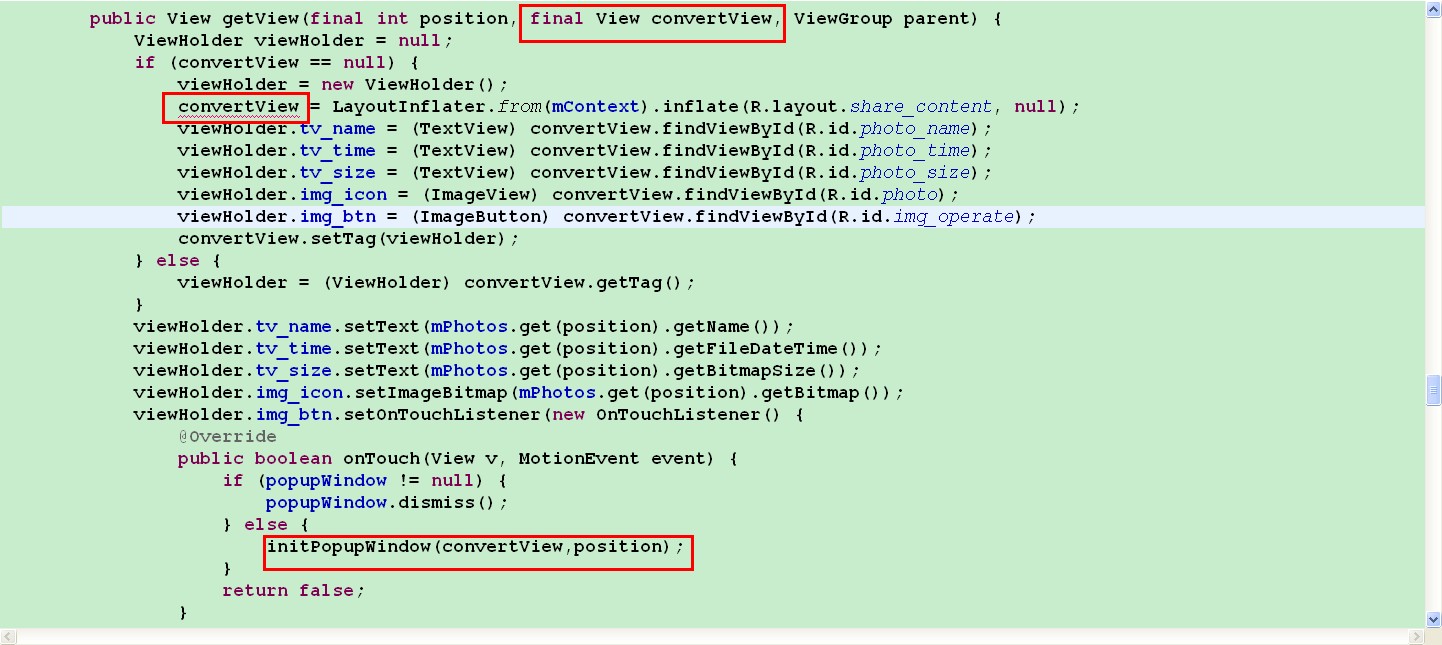
你在外面建一个View对象在里面接收一下convertview
[解决办法]
<?xml version="1.0" encoding="utf-8"?>
<LinearLayout xmlns:android="http://schemas.android.com/apk/res/android"
android:layout_width="100dip"
android:layout_height="50dip"
android:orientation="horizontal"
>
<Button
android:id="@+id/btn"
android:text="查看"
android:layout_weight="1.0"
android:layout_width="fill_parent"
android:layout_height="fill_parent"
android:background="自己写"/>
<Button
android:id="@+id/btn1"
android:text="删除"
android:layout_width="fill_parent"
android:layout_height="fill_parent"
android:layout_weight="1.0"
android:background="自己写"
/>
</LinearLayout>
谢谢谢谢,还请教一个问题,上图是怎么获取当前listview的位置的。。
这个view获取要放在adapter中,然后实现popupwindow显示在这个view的下面
区别只在于显示popupwindow的代码要写在adapter内部或者是将内部获取的view传参出去
谢谢。哈哈。想起来了
我的分
会给分的。你那么好!还遇到了一个问题。。就是
我在getview里initPopupWindow,但是convertView出错了。。上面那个提示去掉final,下面那个提示添加final
还有你不用在ontouch里面处理popupwindow.dismiss()