
android中数据库内容写入到外部txt文件
database = SQLiteDatabase.openOrCreateDatabase(DBManager.DB_PATH + "/" + DBManager.DB_NAME, null);
Cursor c=database.rawQuery("select * from t_firstcheckinfo ",null);
if(c.moveToFirst())
{
while(!c.isAfterLast())
{
int id=c.getInt(0);
((Declare)getApplication()).setId(id);
String barcode=c.getString(1);
((Declare)getApplication()).setBarcode(barcode);
int number=c.getInt(2);
((Declare)getApplication()).setNumber(number);
String firstemployee=c.getString(3);
((Declare)getApplication()).setUser(firstemployee);
String shopname=c.getString(4);
((Declare)getApplication()).setShopname(shopname);
String shelfno=c.getString(5);
((Declare)getApplication()).setShelfno(shelfno);
String firsttime=c.getString(6);
((Declare)getApplication()).setTime(firsttime);
String firstposition=c.getString(7);
((Declare)getApplication()).setPosition(firstposition);
String goodsname=c.getString(8);
((Declare)getApplication()).setGoodsname(goodsname);
c.moveToNext();
}
}
Intent intent=new Intent(DataexportActivity.this,WritetxtActivity.class);
startActivity(intent);
}
});
然后WritetxtActivity.class 代码为
public class WritetxtActivity extends Activity{
private SQLiteDatabase database;
@Override
protected void onCreate(Bundle savedInstanceState) {
super.onCreate(savedInstanceState);
try {
database = SQLiteDatabase.openOrCreateDatabase(DBManager.DB_PATH + "/" + DBManager.DB_NAME, null);
Cursor c1=database.rawQuery("select * from t_firstcheckinfo ",null);
FileOutputStream fos=new FileOutputStream("D:\\checkinfo.txt");
OutputStreamWriter osw=new OutputStreamWriter(fos);
BufferedWriter bf=new BufferedWriter(osw);
for(int i=0;i<c1.getCount();i++)//9个元素 一换行。
{
bf.newLine();//先换行
int id=((Declare)getApplicationContext()).getId();
bf.write(id+"\t");
bf.flush();
String goodsname=((Declare)getApplicationContext()).getGoodsname();
bf.write(goodsname+"\t");
bf.flush();
String barcode=((Declare)getApplicationContext()).getBarcode();
bf.write(barcode+"\t");
bf.flush();
int number=((Declare)getApplicationContext()).getNumber();
bf.write(number+"\t");
bf.flush();
String employee=((Declare)getApplicationContext()).getUser();
bf.write(employee+"\t");
bf.flush();
String shopname=((Declare)getApplicationContext()).getShopname();
bf.write(shopname+"\t");
bf.flush();
String shelfno=((Declare)getApplicationContext()).getShelfno();
bf.write(shelfno+"\t");
bf.flush();
String time=((Declare)getApplicationContext()).getTime();
bf.write(time+"\t");
bf.flush();
String position=((Declare)getApplicationContext()).getPosition();
bf.write(position+"\t");
bf.flush();
bf.newLine();
bf.flush();
}
bf.close();
} catch (IOException e) {
// TODO Auto-generated catch block
e.printStackTrace();
}
}
}
现在问题是 我每次调试时,进入WritetxtActivity之后,不走for循环,程序直接就跑到catch那里了,然后logcat中的信息提示如下: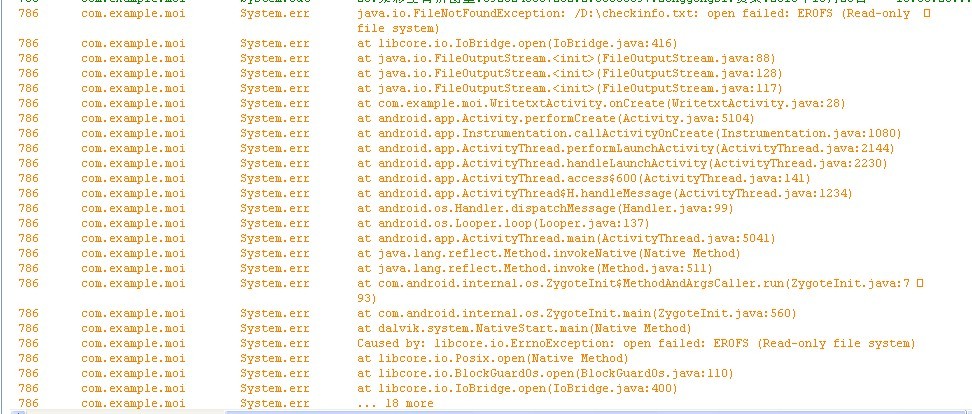
不知道怎么解决啊,跪求解决方案。 android 数据库 存储成外部的txt文件中
[解决办法]
你在android跑的程序能把文件输出到D盘??你应该反文件存到SDCard上面..
[解决办法]
http://blog.csdn.net/q445697127/article/details/7519761
这个是我以前写的一个例子,你可以大概看看
[解决办法]
android 怎么访问pc的D盘噻? 建议你还是先写到sdcard上 然后在上传到pc服务端就行了噻