
jQuery 页面载入进度条 (必有一款适合你----综合搜集版)??上图展示了传统 Wordpress 模板在浏览器中的载入
jQuery 页面载入进度条 (必有一款适合你----综合搜集版)
?
?
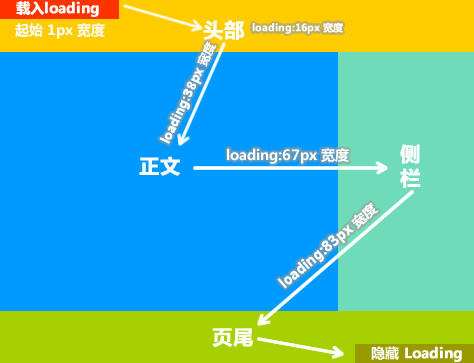
上图展示了传统 Wordpress 模板在浏览器中的载入顺序,Loading 条的出现和消失分布于头尾。
?
?
如果我们在页面的不同位置放置多个 JS ,每个 JS 用于逐步增加 Loading 条的宽度,那么这个 Loading 条无疑会更具实用价值。它在一定程度上缓解了访客等待载入的枯燥感,同时还能客观反映页面载入的进度。若再配以 jQuery 内建的动画效果,其完全可以与浏览器自带的状态条媲美。
先来看一个演示:地址?。
?
要得到演示上的进度条效果,首先?,引入 jQuery 框架(一定要放在页头?<head> 标签内)。然后在 <body> 标签起始位置放置:
Html代码??
- <!DOCTYPE?html?PUBLIC?"-//W3C//DTD?XHTML?1.0?Transitional//EN"?"http://www.w3.org/TR/xhtml1/DTD/xhtml1-transitional.dtd">??
- <html?xmlns="http://www.w3.org/1999/xhtml">??
- <head>??
- <title>Loading?Status?Bar</title>??
- <meta?name="robots"?content="noindex,follow"?/>??
- <script?type="text/javascript"?src="http://ajax.googleapis.com/ajax/libs/jquery/1.2.6/jquery.min.js"></script>??
- <script?type="text/javascript">??
- ????document.writeln("<style?type="text\/css">#loading{width:100px;height:20px;background:#A0DB0E;padding:5px;position:fixed;left:0;top:0}#loading?div{width:1px;height:20px;background:#F1FF4D;font:10px/20px?Arial}<\/style>");??
- </script>??
- ??
- <meta?http-equiv="Content-Type"?content="text/html;?charset=utf-8"?/></head>??
- <body>??
- <noscript>您的浏览器不支持?Javascript</noscript>??
- ??
- <div?id="loading">??
- ????<div></div>??
- </div>??
- ??
- <??for($i=0;$i<100000;$i++){?echo?$i;}??>??
- ????<script?type="text/javascript">$("#loading?div").animate({width:"16px"}).text("16%")</script>??
- <??echo?'<br><br><br>';?for($i=0;$i<100000;$i++){?echo?$i;}??>??
- ??
- <script?type="text/javascript">setTimeout(function(){$("#loading?div").animate({width:"34px"}).text("34%")},500)</script>??
- <script?type="text/javascript">setTimeout(function(){$("#loading?div").animate({width:"67px"}).text("67%")},1000)</script>??
- <script?type="text/javascript">setTimeout(function(){$("#loading?div").animate({width:"82px"}).text("82%")},1500)</script>??
- <script?type="text/javascript">setTimeout(function(){$("#loading?div").animate({width:"100px"}).text("100%")},2000)</script>??
- <script?type="text/javascript">setTimeout(function(){$("#loading").hide(500)},3000)</script>??
- ??
- </body>??
- </html>??
第三种 导向型
?
?
Html代码??- <!DOCTYPE?HTML?PUBLIC?"-//W3C//DTD?XHTML?1.0?Transitional//EN"?"http://www.w3.org/TR/xhtml1/DTD/xhtml1-transitional.dtd">??
- <html?xmlns="http://www.w3.org/1999/xhtml">??
- <head>??
- <meta?http-equiv="content-type"?content="text/html;?charset=UTF-8">??
- <title>Loading</title>??
- <style?type="text/css">??
- .proccess{??
- ????border:1px?solid;??
- ????width:8px;??
- ????height:8px;??
- ????background:#ffffff;??
- ????margin:3px;??
- }??
- </style>??
- ??
- <script?language="JavaScript">??
- ????var?url?=?'http://deographics.com/';??
- </script>??
- ??
- </head>??
- ??
- <body??onLoad="location.href?=?url;"?style='overflow:hidden;?overflow-y:hidden'>??
- ????<div?align=center>??
- ????????<font?class=fontbig>友情提示,页面正在加载中,请等待......</font>??
- ????????<div?align="center">??
- ????????????<form?method="post"?name="proccess">??
- ????????????????<script?type="text/javascript">???
- ????????????????????for(i=0;i<30;i++){??
- ????????????????????????document.write("<input?class=proccess>");??
- ????????????????????}??
- ????????????????</script>??
- ????????????</form>??
- ????????</div>??
- ??
- ????????<div?align="center">??
- ????????????<script?language=JavaScript>??
- ????????????????var?p=0,j=0;??
- ????????????????var?c=new?Array('lightskyblue','white')??
- ????????????????setInterval('proccess();',100)??
- ????????????????function?proccess(){??
- ????????????????????document.forms.proccess.elements[p].style.background=c[j];?p+=1;??
- ????????????????????if(p==30){?p=0;j=1-j;?}??
- ????????????????}??
- ????????????</script>??
- ????????</div>??
- ????</div>??
- ??
- ????<div?align="center">??
- ????????<script>??
- ????????????if?(document.layers){??
- ????????????????document.write('<Layer?src="'?+?url?+?'?"?visibility="hide">?</Layer>');??
- ????????????}else?if?(document.all?||?document.getElementById){??
- ????????????????document.write('<iframe?src="'?+?url?+?'"?style="visibility:?hidden;"></iframe>');??
- ????????????}else{??
- ????????????????location.href?=?url;??
- ????????????}??
- ????????</script>??
- ????</div>??
- </body>??
- </html>??
?Html代码??
- <!DOCTYPE?HTML?PUBLIC?"-//W3C//DTD?HTML?4.01//EN"?"http://www.w3.org/TR/html4/strict.dtd">??
- <html?xmlns="http://www.w3.org/1999/xhtml">??
- <head>??
- <meta?http-equiv="Content-Type"?content="text/html;?charset=utf-8">??
- <title>Iframe?Loading</title>??
- </head>??
- ??
- <body>?????
- ????<div?id="load"><img?src="http://sysimages.tq.cn/images/analysis_images/ajax-loader.gif"?/> loading...</div>??
- ????<iframe?style="visibility:hidden"?onreadystatechange="stateChangeIE(this)"?onload="stateChangeFirefox(this)"?name="callframe"?id="callframe"?width="420"?height="100"?frameborder="0"?scrolling="no"?marginheight="0"></iframe>??
- ??
- ????<script>?????
- ????????function?stateChangeIE(_frame){??
- ????????????if?(_frame.readyState=="interactive"){?//state:?loading?,interactive,?complete??
- ????????????????var?loader?=?document.getElementById("load");??
- ????????????????loader.innerHTML??=?"";??
- ????????????????loader.style.display?=?"none";????
- ????????????????_frame.style.visibility?=?"visible";?????
- ????????????}?????
- ????????}??
- ??
- ????????function?stateChangeFirefox(_frame){??
- ????????????var?loader?=?document.getElementById("load");??
- ????????????loader.innerHTML??=?"";??
- ????????????loader.style.display?=?"none";????
- ????????????_frame.style.visibility?=?"visible";?????
- ????????}??
- ??
- ????????callframe.location.href="http://deographics.com/";??
- ????</script>?????
- </body>??
- </html>??
1: (Loading) the send( ) method has been invoked, request in progress.?
2: (Loaded) the send( ) method has completed, entire response received.?
3: (Interactive) the response is being parsed.?
4: (Completed) the response has been parsed, is ready for harvesting.?
0 - (未初始化)还没有调用send()方法
1 - (载入)已调用send()方法,正在发送请求
2 - (载入完成)send()方法执行完成,已经接收到全部响应内容
3 - (交互)正在解析响应内容
4 - (完成)响应内容解析完成,可以在客户端调用了?第五种 加载图片?Html代码??
- <html>??
- <head>??
- <title>JavaScript图片预加载代码,显示loading</title>??
- ??
- <style?type="text/css">??
- ????div{??
- ????????border:#aaaaaa?3px?solid;??
- ????????width:200px;??
- ????????padding:2px;??
- ????????margin:2px?9px;??
- ????????font-size:12px;??
- ????????line-height:22px;??
- ????????color:#999999;??
- ????}??
- ??
- ????.ipt1{??
- ????????width:160px;??
- ????????font-size:12px;??
- ????????color:#1F6478;??
- ????????border:#999999?1px?solid;??
- ????????margin-left:9px;??
- ????}??
- ??
- ????.ipt2{??
- ????????border:#999999?1px?solid;??
- ????????margin-left:6px;color:#666666;??
- ????}??
- ??
- ????p{??
- ????????margin:0px;??
- ????????padding:0px;??
- ????????background-image:url(http://www.codefans.net/jscss/demoimg/loading.gif);??
- ????????background-position:center;??
- ????????background-repeat:no-repeat;??
- ????????width:200px;??
- ????????height:200px;??
- ????????text-align:center;??
- ????????font-size:12px;??
- ????????color:#999999;??
- ????????line-height:26px;??
- ????}??
- </style>??
- ??
- <script?language="javascript"?type="text/javascript">??
- ????function?preloadimg(url,obj,ipt){??
- ????????var?img?=?new?Image();??
- ????????obj.innerHTML?=?"<p>Loading...</p>";??
- ????????img.onload?=?function(){??
- ????????????obj.innerHTML?=?"";??
- ????????????obj.style.width?=?String(img.width)+"px";??
- ????????????ipt.style.width?=?String(img.width-40)+"px";??
- ????????????obj.appendChild(img);??
- ????????};??
- ??
- ????????img.onerror?=?function(){??
- ????????????obj.innerHTML="Loading?Fail?!"??
- ????????};??
- ??
- ????????img.src?=?url;?//img.src?一定要写在img.onload之后,否则在IE中会出现问题??
- ????}??
- ??
- ????function?show(){??
- ????????var?div?=?document.getElementsByTagName("div")[0];??
- ????????var?input?=?document.getElementsByTagName("input");??
- ??
- ????????preloadimg("http://www.codefans.net/jscss/demoimg/wall9.jpg",div,input[0]);??
- ????????input[0].onclick?=?function(){this.value=""};??
- ????????input[1].onclick?=?function(){preloadimg(input[0].value,div,input[0]);}??
- ????}??
- ????window.onload?=?show;??
- </script>??
- ??
- </head>??
- ??
- <body>??
- <div></div><br?/>??
- <input?type="text"?value="将图片地址粘贴在这里"?class="ipt1"/><input?type="button"?value="开始加载"?class="ipt2"/>??
- </body>??
- </html>??
- <script?src="jquery-1.3.2.min.js"?type="text/javascript"></script>??
- <script?src="MinmyLazyload.js"?type="text/javascript"></script>??
- <body>??
- <img?original="http://justcoding.iteye.com/uploadfiles/20100424-2_20914.jpg">??
- <img?original="http://justcoding.iteye.com/uploadfiles/20100423-1_85399.jpg">??
- <script?type="text/javascript">$("img").lazyload({?placeholder:?"img-loader.gif",?effect:"fadeIn"?});??
- </script>??
- </body>???
- <style>??
- ????#loading{font-size:12px;color:#FFFFFF;background:#FF0000;position:absolute;top:500px;left:500px;?z-index:1002;?padding:2px?10px?2px?10px}??
- </style>??
- ??
- <body>??
- ????<div?id="loading">页面加载中…</div>??
- ???????
- ????..........??
- ???????
- ????<script?type="text/javascript">??
- ????????document.write('<style>#loading{display:none;}</style>');??
- ????</script>??
- </body>??
- </html>??