
.NET支持上下左右移动操作效果如下图:代码如下:public partial class ShowSet : System.Web.UI.Page{Hasht
.NET支持上下左右移动操作
效果如下图:
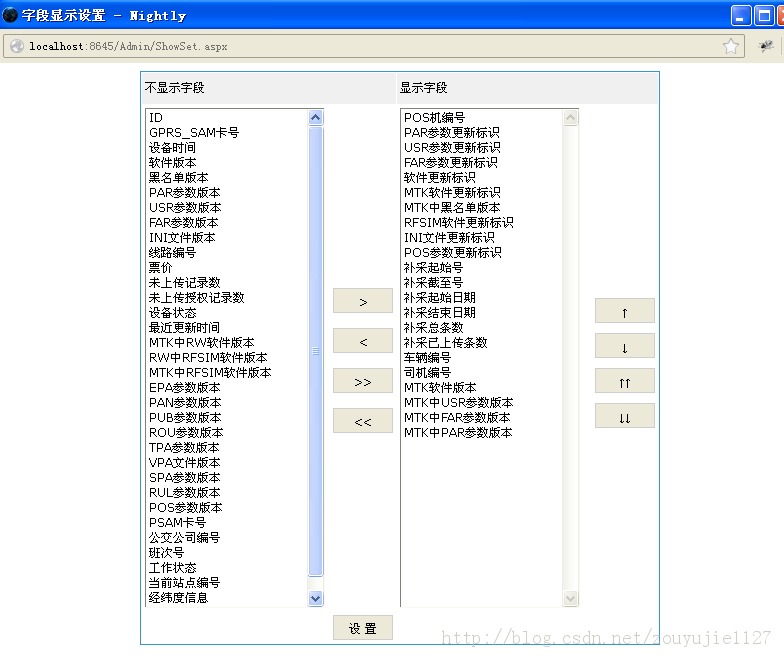
代码如下:
public partial class ShowSet : System.Web.UI.Page { Hashtable resources = EquStatusSearch.resources; private string names = null; IniOperation ini = new IniOperation("i18n"); protected void Page_Load(object sender, EventArgs e) { if (!Page.IsPostBack) { names = QuarrysClass.All; initi18n(); string[] all =string.IsNullOrEmpty(names)?null: names.Split(',');//分割出所有列 hidfShows.Value =ini.IniValue("Set", "Show"); string include = hidfShows.Value;//获取当前页展示列 if (string.IsNullOrEmpty(names)||all == null) { //请先点加载配置信息 return; } for (int i = 0; i < all.Length; i++)//遍历所有列 { if (include.IndexOf("@" + all[i] + "@") == -1)//当前列中不包含分割出来的列时放在不显示框中 { xListBox1.Items.Add(new ListItem(resources[all[i]].ToString(),all[i])); } } string[] showNames = include.Split(','); string newName=string.Empty; foreach (string name in showNames) { newName = name.Trim('@'); string colName = resources[newName] == null ? string.Empty : resources[newName].ToString(); if (!string.IsNullOrEmpty(newName)) { xListBox2.Items.Add(new ListItem(colName, newName)); } } } } //调用显示和展示字段名称 private void initi18n() { this.Page.Title =string.IsNullOrEmpty(resources["ShowSetName"].ToString())? "字段显示设置" : resources["ShowSetName"].ToString(); xLabel1.Text =string.IsNullOrEmpty(resources["ShowSetNoShow"].ToString())?"不显示字段":resources["ShowSetNoShow"].ToString(); xLabel2.Text = string.IsNullOrEmpty(resources["ShowSetShow"].ToString())?"显示字段":resources["ShowSetShow"].ToString(); } //将未显示字段右移到显示字段框,并清除掉不显示的选择到的项 protected void xButton1_Click(object sender, EventArgs e) { if (xListBox1.SelectedItem == null) { return; } xListBox2.Items.Add(xListBox1.SelectedItem); xListBox1.Items.Remove(xListBox1.SelectedItem); } //将显示字段左移到未显示字段框,并清除掉显示的选择到的项 protected void xButton2_Click(object sender, EventArgs e) { if (xListBox2.SelectedItem == null) { return; } xListBox1.Items.Add(xListBox2.SelectedItem); xListBox2.Items.Remove(xListBox2.SelectedItem); } //将左边所有不显示项加到右边的显示项中 protected void xButton3_Click(object sender, EventArgs e) { foreach (ListItem item in xListBox1.Items) { xListBox2.Items.Add(item); } xListBox1.Items.Clear(); } //将右边所有不显示项加到左边的显示项中 protected void xButton4_Click(object sender, EventArgs e) { foreach (ListItem item in xListBox2.Items) { xListBox1.Items.Add(item); } xListBox2.Items.Clear(); } //点击设置按钮事件, protected void btnSet_Click(object sender, EventArgs e) { try { string str = ""; for (int i = 0; i < xListBox2.Items.Count; i++)//循环添加显示项组成字符串 { str += "@" + xListBox2.Items[i].Value + "@,"; } if ("".Equals(str))//如果显示项为空直接清除显示页面的所有字段 { QuarrysClass.Shows = ""; } else { //重新复制显示字段到显示页面 QuarrysClass.Shows = str.Substring(0, str.Length - 1); } //调用主页面将显示字段写入到i18n文件中 ini.IniWriteValue("Set", "Show", QuarrysClass.Shows); Page.ClientScript.RegisterStartupScript(this.GetType(), "warn", "alert('设置成功!');window.opener.searchData();window.close();", true); } catch (Exception ex) { string strScript = string.Format("alert('设置失败!{0}');", ex.Message); Page.ClientScript.RegisterStartupScript(this.GetType(), "warn", strScript, true); } } //上移 protected void btnUp_Click(object sender, EventArgs e) { UpMove(xListBox2); } //下移 protected void btnDown_Click(object sender, EventArgs e) { DownMove(xListBox2); } void UpMove(ListBox ListBox2) { //若不是第一行则上移 if (ListBox2.SelectedIndex > 0) { string name = ListBox2.SelectedItem.Text; string ID = ListBox2.SelectedItem.Value; int index = ListBox2.SelectedIndex; ListBox2.SelectedItem.Text = ListBox2.Items[index - 1].Text; ListBox2.SelectedItem.Value = ListBox2.Items[index - 1].Value; ListBox2.Items[index - 1].Text = name; ListBox2.Items[index - 1].Value = ID; ListBox2.SelectedIndex--; } } void DownMove(ListBox lbox) { if (lbox.SelectedIndex < lbox.Items.Count - 1) { string name = lbox.SelectedItem.Text; string ID = lbox.SelectedItem.Value; int index = lbox.SelectedIndex; lbox.SelectedItem.Text = lbox.Items[index + 1].Text; lbox.SelectedItem.Value = lbox.Items[index + 1].Value; lbox.Items[index + 1].Text = name; lbox.Items[index + 1].Value = ID; lbox.SelectedIndex++; } } void TopMove(ListBox lbox) { int index = 0; ListItem item = lbox.SelectedItem; lbox.Items.Remove(item); lbox.Items.Insert(index, item); } void BottomMove(ListBox lbox) { int index = lbox.Items.Count - 1; ListItem item = lbox.SelectedItem; lbox.Items.Remove(item); lbox.Items.Insert(index, item); } protected void btnTop_Click(object sender, EventArgs e) { TopMove(xListBox2); } protected void btnBottom_Click(object sender, EventArgs e) { BottomMove(xListBox2); } }