
我的Android进阶之旅------>Android之动画之Frame Animation实例
============================首先看看官网上关于Frame animation的介绍================================
地址:http://developer.android.com/guide/topics/resources/animation-resource.html#Frame
Frame animation
An animation defined in XML that shows a sequence of images in order (like a film).
- FILE LOCATION:
res/drawable/filename.xml
The filename will be used as the resource ID.- COMPILED RESOURCE DATATYPE:
- Resource pointer to an
AnimationDrawable. - RESOURCE REFERENCE:
- In Java:
R.drawable.filename
In XML:@[package:]drawable.filename - SYNTAX:
<?xml version="1.0" encoding="utf-8"?><animation-list xmlns:android="http://schemas.android.com/apk/res/android" android:oneshot=["true" | "false"] > <item android:drawable="@[package:]drawable/drawable_resource_name" android:duration="integer" /></animation-list>
<animation-list>- Required. This must be the root element. Contains one or more
<item>elements.attributes:
- Boolean. "true" if you want to perform the animation once; "false" to loop the animation.
android:oneshot <item>- A single frame of animation. Must be a child of a
<animation-list>element.attributes:
- Drawable resource. The drawable to use for this frame.
android:duration- Integer. The duration to show this frame, in milliseconds.
android:drawable - Drawable resource. The drawable to use for this frame.
step1:新建一个Android项目FrameAnimationDemo
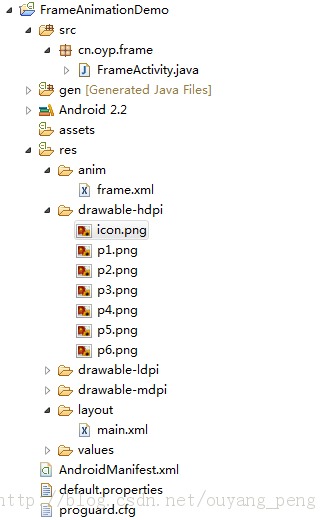
step2:准备好该应用使用的图片,用来做Frame Animation的,并将动画放入drawable目录下


step3:新建一个用来描述Frame动画的xml文件,res/anim/frame.xml
package cn.oyp.frame;import android.app.Activity;import android.graphics.drawable.AnimationDrawable;import android.graphics.drawable.Drawable;import android.os.Bundle;import android.view.View;import android.widget.ImageView;public class FrameActivity extends Activity {// 显示动画的组件private ImageView imgDance;// Frame动画private AnimationDrawable animDance;/** Called when the activity is first created. */@Overridepublic void onCreate(Bundle savedInstanceState) {super.onCreate(savedInstanceState);setContentView(R.layout.main);// 实例化组件imgDance = (ImageView) super.findViewById(R.id.ImgDance);}/** * 如果在onCreate()中调用AnimationDrawable的start()方法,则它只停留在第一帧,并没有出现我们期望的动画, * 这是因为窗口Window对象还没有完全初始化,AnimationDrawable不能完全追加到窗口Window对象中。 * 而onWindowFocusChanged是在onCreate之后被调用的,当Activity展示给用户时,onWindowFocusChanged方法就会被调用, * 所以在这儿调用AnimationDrawable的start()方法可以实现动画效果。 */@Overridepublic void onWindowFocusChanged(boolean hasFocus) {super.onWindowFocusChanged(hasFocus);// 将动画资源文件res/anim/frame.xml设置为ImageView的背景imgDance.setBackgroundResource(R.anim.frame);// 获取ImageView背景,此时已被编译成AnimationDrawableanimDance = (AnimationDrawable) imgDance.getBackground();animDance.start();}/** * 按钮:停止‘跳舞’动画 */public void stopFrame(View view) {animDance = (AnimationDrawable) imgDance.getBackground();if (animDance.isRunning()) { // 如果正在运行,就停止animDance.stop();}}/** * 按钮:开始‘跳舞’动画 */public void runFrame(View view) {// 完全编码实现的动画效果animDance = new AnimationDrawable();for (int i = 1; i <= 6; i++) {// 根据资源名称和目录获取R.java中对应的资源IDint id = getResources().getIdentifier("p" + i, "drawable",getPackageName());// 根据资源ID获取到Drawable对象Drawable drawable = getResources().getDrawable(id);// 将此帧添加到AnimationDrawable中animDance.addFrame(drawable, 500);}animDance.setOneShot(false); // 设置为loopimgDance.setBackgroundDrawable(animDance); // 将动画设置为ImageView背景animDance.start(); // 开始动画}}效果如下:

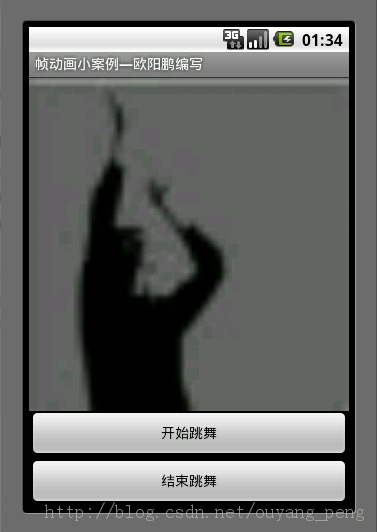

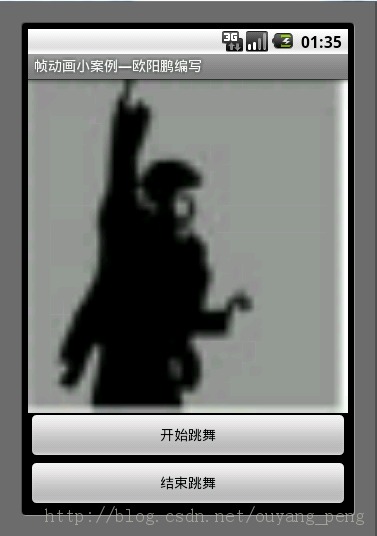


=================================================================================================
作者:欧阳鹏 欢迎转载,与人分享是进步的源泉!
转载请保留原文地址:http://blog.csdn.net/ouyang_peng
==================================================================================================