
FileUpload文件上传问题两种方法都能上传文件成功,请问加PostedFile和不加PostedFile有什么区别???菜鸟求
FileUpload文件上传问题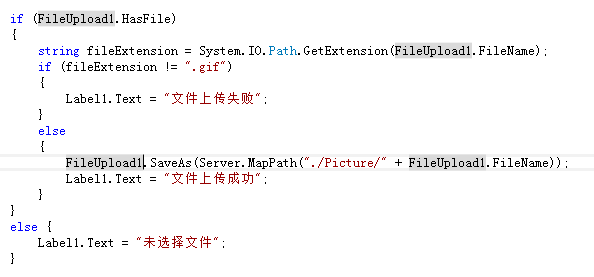
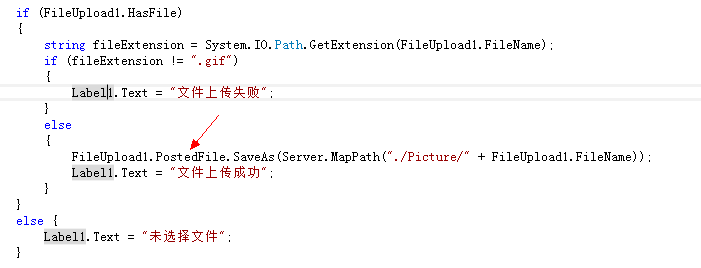
两种方法都能上传文件成功,请问加PostedFile和不加PostedFile有什么区别??? 菜鸟求解答
[解决办法]
this.FileUpload1.SaveAs
  //
        // 摘要:
        //     将上载文件的内容保存到 Web 服务器上的指定路径。
        //
        // 参数:
        //   filename:
        //     一个字符串,指定服务器上用于保存上载文件的位置的完整路径。
        //
        // 异常:
        //   System.Web.HttpException:
        //     filename 不是完整路径。
        public void SaveAs(string filename);


this.FileUpload1.PostedFile.SaveAs
  // 摘要:
        //     保存上载文件的内容。
        //
        // 参数:
        //   filename:
        //     保存的文件的名称。
        //
        // 异常:
        //   System.Web.HttpException:
        //     System.Web.Configuration.HttpRuntimeSection 对象的 System.Web.Configuration.HttpRuntimeSection.RequireRootedSaveAsPath
        //     属性设置为 true,但 filename 不是绝对路径。
        public void SaveAs(string filename);
[解决办法]
效果一样吧,只不过方式有些不一样
------解决方案--------------------
我也觉得是一样的。FileUpload内部有PostedFile Object.
The PostedFile property gets the underlying HttpPostedFile object for the file to upload. You can use this property to access additional properties on the file. The ContentLength property gets the length of the file. The ContentType property gets the MIME content type of the file. In addition, you can use the PostedFile property to access the FileName property, the InputStream property, and the SaveAs method. However, the same functionality is provided by the FileName property, the FileContent property, and the SaveAs method.
[解决办法]
Fileupload.SaveAs 是可以指定任意的保存位置
Fileupload.Postedfile.SaveAs 是在已经确定保存位置的情况下,直接保存文件
假如你已经确定了保存位置,你就没必要每次再去确认一次了,这时候可以用第二种方法。否则就用第一种方法。