android基础6——设置圆角按钮圆角的按钮实现扁平化的UI很有美感,但是实现起来也不算太难。在res目录下的draw
android基础6——设置圆角按钮
圆角的按钮实现扁平化的UI很有美感,但是实现起来也不算太难。
在res目录下的drawable-mdpi建立xml文件shape.xml,如下图所示:
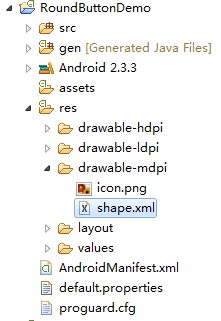
shape.xml
<?xml version="1.0" encoding="UTF-8"?> <shape xmlns:android="http://schemas.android.com/apk/res/android" android:shape="rectangle"> <!-- 填充的颜色 --> <solid android:color="#FFFFFF" /> <!-- 设置按钮的四个角为弧形 --> <!-- android:radius 弧形的半径 --> <corners android:radius="5dip" /> <!-- padding:Button里面的文字与Button边界的间隔 --> <padding android:left="10dp" android:top="10dp" android:right="10dp" android:bottom="10dp" /> </shape>
main.xml
在android:background="@drawable/shape"就使用了shape.xml资源

<?xml version="1.0" encoding="utf-8"?> <LinearLayout xmlns:android="http://schemas.android.com/apk/res/android" android:orientation="vertical" android:layout_width="fill_parent" android:layout_height="fill_parent" > <TextView android:layout_width="fill_parent" android:layout_height="wrap_content" android:text="@string/hello" /> <Button android:id="@+id/roundButton" android:text=" 圆角按钮 " android:layout_width="wrap_content" android:layout_height="wrap_content" android:background="@drawable/shape" /> </LinearLayout>
strings.xml<?xml version="1.0" encoding="utf-8"?> <resources> <string name="hello">Hello World, RoundButtonDemoActivity!</string> <string name="app_name">RoundButtonDemo</string> </resources>
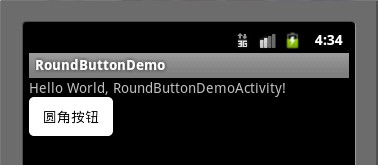
RoundButtonDemoActivity.javapackage com.android.RoundButtonDemo.activity; import android.app.Activity; import android.os.Bundle; import android.view.View; import android.view.View.OnClickListener; import android.widget.Button; import android.widget.Toast; public class RoundButtonDemoActivity extends Activity { Button roundButton; @Override public void onCreate(Bundle savedInstanceState) { super.onCreate(savedInstanceState); setContentView(R.layout.main); roundButton=(Button)findViewById(R.id.roundButton); //使用匿名类注册Button事件 roundButton.setOnClickListener(new OnClickListener() { public void onClick(View v) { Toast.makeText(RoundButtonDemoActivity.this, "你点击了圆角按钮",Toast.LENGTH_LONG).show(); } }); } } 效果图:
package com.android.RoundButtonDemo.activity; import android.app.Activity; import android.os.Bundle; import android.view.View; import android.view.View.OnClickListener; import android.widget.Button; import android.widget.Toast; public class RoundButtonDemoActivity extends Activity { Button roundButton; @Override public void onCreate(Bundle savedInstanceState) { super.onCreate(savedInstanceState); setContentView(R.layout.main); roundButton=(Button)findViewById(R.id.roundButton); //使用匿名类注册Button事件 roundButton.setOnClickListener(new OnClickListener() { public void onClick(View v) { Toast.makeText(RoundButtonDemoActivity.this, "你点击了圆角按钮",Toast.LENGTH_LONG).show(); } }); } } 效果图: