Android应用的自动升级、更新模块的实现我们看到很多Android应用都具有自动更新功能,用户一键就可以完成软
Android应用的自动升级、更新模块的实现
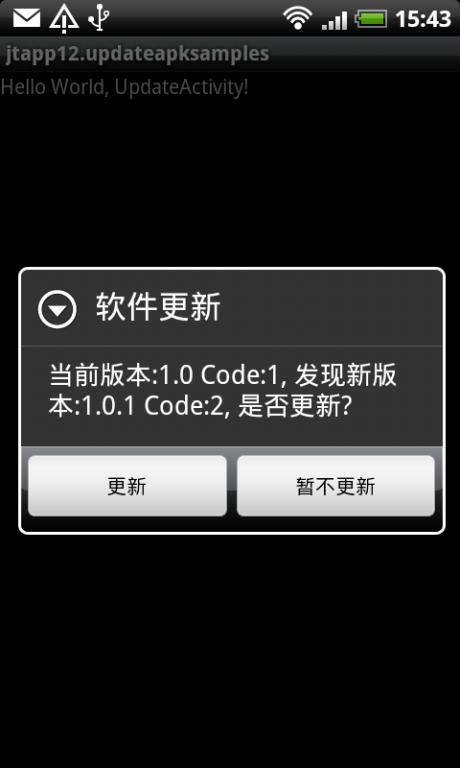
我们看到很多Android应用都具有自动更新功能,用户一键就可以完成软件的升级更新。得益于Android系统的软件包管理和安装机制,这一功能实现起来相当简单,下面我们就来实践一下。首先给出界面效果:
1. 准备知识?
在AndroidManifest.xml里定义了每个Android apk的版本标识:
<manifest?xmlns:android="http://schemas.android.com/apk/res/android"????????package="com.myapp"????????android:versionCode="1"????????android:versionName="1.0.0">??<application></application>??</manifest>??
其中,android:versionCode和android:versionName两个字段分别表示版本代码,版本名称。versionCode是整型数字,versionName是字符串。由于version是给用户看的,不太容易比较大小,升级检查时,可以以检查versionCode为主,方便比较出版本的前后大小。
那么,在应用中如何读取AndroidManifest.xml中的versionCode和versionName呢?可以使用PackageManager的API,参考以下代码:
public?static?int?getVerCode(Context?context)?{??????????int?verCode?=?-1;??????????try?{??????????????verCode?=?context.getPackageManager().getPackageInfo(??????????????????????"com.myapp",?0).versionCode;??????????}?catch?(NameNotFoundException?e)?{??????????????Log.e(TAG,?e.getMessage());??????????}??????????return?verCode;??????}???????????public?static?String?getVerName(Context?context)?{??????????String?verName?=?"";??????????try?{??????????????verName?=?context.getPackageManager().getPackageInfo(??????????????????????"com.myapp",?0).versionName;??????????}?catch?(NameNotFoundException?e)?{??????????????Log.e(TAG,?e.getMessage());??????????}??????????return?verName;?????}??
或者在AndroidManifest中将android:versionName="1.2.0"写成android:versionName="@string/app_versionName",然后在values/strings.xml中添加对应字符串,这样实现之后,就可以使用如下代码获得版本名称:
public?static?String?getVerName(Context?context)?{??????????String?verName?=?context.getResources()??????????.getText(R.string.app_versionName).toString();??????????return?verName;??}??
同理,apk的应用名称可以这样获得:
public?static?String?getAppName(Context?context)?{??????????String?verName?=?context.getResources()??????????.getText(R.string.app_name).toString();??????????return?verName;??}??
?
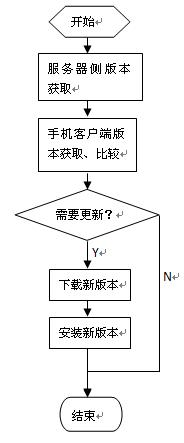
2. 流程框架
?3. 版本检查?
在服务端放置最新版本的apk文件,如:http://localhost/myapp/myapp.apk
同时,在服务端放置对应此apk的版本信息调用接口或者文件,如:http://localhost/myapp/ver.json?
ver.json中的内容为:
?
[{"appname":"jtapp12","apkname":"jtapp-12-updateapksamples.apk","verName":1.0.1,"verCode":2}]???
然后,在手机客户端上进行版本读取和检查:
private?boolean?getServerVer?()?{??????????try?{??????????????String?verjson?=?NetworkTool.getContent(Config.UPDATE_SERVER??????????????????????+?Config.UPDATE_VERJSON);??????????????JSONArray?array?=?new?JSONArray(verjson);??????????????if?(array.length()?>?0)?{??????????????????JSONObject?obj?=?array.getJSONObject(0);??????????????????try?{??????????????????????newVerCode?=?Integer.parseInt(obj.getString("verCode"));??????????????????????newVerName?=?obj.getString("verName");??????????????????}?catch?(Exception?e)?{??????????????????????newVerCode?=?-1;??????????????????????newVerName?=?"";??????????????????????return?false;??????????????????}??????????????}??????????}?catch?(Exception?e)?{??????????????Log.e(TAG,?e.getMessage());??????????????return?false;??????????}??????????return?true;??????}???
比较服务器和客户端的版本,并进行更新操作。
if?(getServerVerCode())?{???????????int?vercode?=?Config.getVerCode(this);?//?用到前面第一节写的方法???????????if?(newVerCode?>?vercode)?{???????????????doNewVersionUpdate();?//?更新新版本???????????}?else?{???????????????notNewVersionShow();?//?提示当前为最新版本???????????}???????}???????????
详细方法:
?
private?void?notNewVersionShow()?{??????int?verCode?=?Config.getVerCode(this);??????String?verName?=?Config.getVerName(this);??????StringBuffer?sb?=?new?StringBuffer();??????sb.append("当前版本:");??????sb.append(verName);??????sb.append("?Code:");??????sb.append(verCode);??????sb.append(",/n已是最新版,无需更新!");??????Dialog?dialog?=?new?AlertDialog.Builder(Update.this).setTitle("软件更新")??????????????.setMessage(sb.toString())//?设置内容??????????????.setPositiveButton("确定",//?设置确定按钮??????????????????????new?DialogInterface.OnClickListener()?{??????????????????????????@Override??????????????????????????public?void?onClick(DialogInterface?dialog,??????????????????????????????????int?which)?{??????????????????????????????finish();??????????????????????????}??????????????????????}).create();//?创建??????//?显示对话框??????dialog.show();??}??private?void?doNewVersionUpdate()?{??????int?verCode?=?Config.getVerCode(this);??????String?verName?=?Config.getVerName(this);??????StringBuffer?sb?=?new?StringBuffer();??????sb.append("当前版本:");??????sb.append(verName);??????sb.append("?Code:");??????sb.append(verCode);??????sb.append(",?发现新版本:");??????sb.append(newVerName);??????sb.append("?Code:");??????sb.append(newVerCode);??????sb.append(",?是否更新?");??????Dialog?dialog?=?new?AlertDialog.Builder(Update.this)??????????????.setTitle("软件更新")??????????????.setMessage(sb.toString())??????????????//?设置内容??????????????.setPositiveButton("更新",//?设置确定按钮??????????????????????new?DialogInterface.OnClickListener()?{??????????????????????????@Override??????????????????????????public?void?onClick(DialogInterface?dialog,??????????????????????????????????int?which)?{??????????????????????????????pBar?=?new?ProgressDialog(Update.this);??????????????????????????????pBar.setTitle("正在下载");??????????????????????????????pBar.setMessage("请稍候...");??????????????????????????????pBar.setProgressStyle(ProgressDialog.STYLE_SPINNER);??????????????????????????????downFile(Config.UPDATE_SERVER?+?Config.UPDATE_APKNAME);??????????????????????????}??????????????????????})??????????????.setNegativeButton("暂不更新",??????????????????????new?DialogInterface.OnClickListener()?{??????????????????????????public?void?onClick(DialogInterface?dialog,??????????????????????????????????int?whichButton)?{??????????????????????????????//?点击"取消"按钮之后退出程序??????????????????????????????finish();??????????????????????????}??????????????????????}).create();//?创建??????//?显示对话框??????dialog.show();??}???
4. 下载模块
注,本部分参考了前人的相关实现,见 http://apps.hi.baidu.com/share/detail/24172508
?
void?downFile(final?String?url)?{??????pBar.show();??????new?Thread()?{??????????public?void?run()?{??????????????HttpClient?client?=?new?DefaultHttpClient();??????????????HttpGet?get?=?new?HttpGet(url);??????????????HttpResponse?response;??????????????try?{??????????????????response?=?client.execute(get);??????????????????HttpEntity?entity?=?response.getEntity();??????????????????long?length?=?entity.getContentLength();??????????????????InputStream?is?=?entity.getContent();??????????????????FileOutputStream?fileOutputStream?=?null;??????????????????if?(is?!=?null)?{??????????????????????File?file?=?new?File(??????????????????????????????Environment.getExternalStorageDirectory(),??????????????????????????????Config.UPDATE_SAVENAME);??????????????????????fileOutputStream?=?new?FileOutputStream(file);??????????????????????byte[]?buf?=?new?byte[1024];??????????????????????int?ch?=?-1;??????????????????????int?count?=?0;??????????????????????while?((ch?=?is.read(buf))?!=?-1)?{??????????????????????????fileOutputStream.write(buf,?0,?ch);??????????????????????????count?+=?ch;??????????????????????????if?(length?>?0)?{??????????????????????????}??????????????????????}??????????????????}??????????????????fileOutputStream.flush();??????????????????if?(fileOutputStream?!=?null)?{??????????????????????fileOutputStream.close();??????????????????}??????????????????down();??????????????}?catch?(ClientProtocolException?e)?{??????????????????e.printStackTrace();??????????????}?catch?(IOException?e)?{??????????????????e.printStackTrace();??????????????}??????????}??????}.start();??}???
下载完成,通过handler通知主ui线程将下载对话框取消。
void?down()?{??????????handler.post(new?Runnable()?{??????????????public?void?run()?{??????????????????pBar.cancel();??????????????????update();??????????????}??????????});??}??????
5. 安装应用?
void?update()?{??????Intent?intent?=?new?Intent(Intent.ACTION_VIEW);??????intent.setDataAndType(Uri.fromFile(new?File(Environment??????????????.getExternalStorageDirectory(),?Config.UPDATE_SAVENAME)),??????????????"application/vnd.android.package-archive");??????startActivity(intent);??}??
如果你将apk应用发布到market上,那么,你会发现market内建了类似的模块,可以自动更新或者提醒你是否更新应用。那么,对于你自己的应用需要自动更新的话,自己内建一个是不是更加方便了呢?本文提到的代码大多是在UpdateActivity.java中实现,为了能够使更新过程更加友好,可以在最初launcher的Activity中建立一个线程,用来检查服务端是否有更新。有更新的时候就启动UpdateActivity,这样的使用体验更加平滑。
本文例程源码查看/下载:
http://code.google.com/p/androidex/source/browse/trunk/jtapp-12-updateapksamples
?
?


