
Android Service 高手进阶篇
大家都知道 ,Service 是Android四大组件之一,主要是用来实现这样的需求:你需要 一个长久运行的服务在后台,比如音乐播放服务,退出界面,在后台时,仍然会在播放。
1、Service的生命周期篇首先来谈谈Service的生命周期,如下图所示:
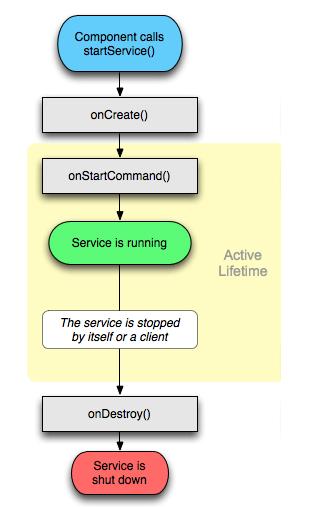
一个 Service经过 startService 之后,会经历OnCreate->onStartCommand 方法,至此,一个Service就处于Running 状态,如果不去主动的stopService或者调用stopSelf,方法,这个Service会在后台一直运行。
如果调用了stopService,则会进入到onDestroy状态。
如果Service还没有运行,则android先调用onCreate()然后调用onStartCommand();如果Service已经运行,则只调用onStartCommand(),所以一个Service的onStartCommand方法可能会重复调用多次。
另外Service的启动,有两种方式,一种是startService,一种是bindService,这两种方式的执行,其生命周期函数的执行会有所不同:
1.当启动时,单独调用bindService方法,在unbindService后,会执行service的onUnbind,会执行onDestroy方法。
2.当启动时,先调用startService,在调用bindService方法后,在unbindService后,会执行service的onUnbind,不会执行onDestroy方法。除非你在执行stopService.
3.先调用startService,在调用stopService,会执行service的onDestroy方法。
应当注意的问题:
1、你应当注意 使用 startService 启动服务之后,一定要使用 stopService停止服务,不管你是否使用bindService;
2、同时使用 startService 与 bindService 要注意到,Service 的终止,需要unbindService与stopService同时调用,才能终止 Service,不管 startService 与 bindService 的调用顺序,如果先调用 unbindService 此时服务不会自动终止,再调用 stopService 之后服务才会停止,如果先调用 stopService 此时服务也不会终止,而再调用 unbindService 或者 之前调用 bindService 的 Context 不存在了(如Activity 被 finish 的时候)之后服务才会自动停止;
2、高手必须要懂的部分 2.1 如何尽量保证你的Service能不被杀死?
Service 被启动的时候,会执行onStartCommand()方法,这个方法会返回int 状态,返回不同的状态,会影响service的执行行为。
START_STICKY:如果service进程被kill掉,保留service的状态为开始状态,但不保留递送的intent对象。随后系统会尝试重新创建service,由于服务状态为开始状态,所以创建服务后一定会调用onStartCommand(Intent,int,int)方法。如果在此期间没有任何启动命令被传递到service,那么参数Intent将为null。 START_NOT_STICKY:“非粘性的”。使用这个返回值时,如果在执行完onStartCommand后,服务被异常kill掉,系统将会把它置为started状态,系统不会自动重启该服务,直到startService(Intent intent)方法再次被调用;。 START_REDELIVER_INTENT:重传Intent。使用这个返回值时,如果在执行完onStartCommand后,服务被异常kill掉,系统会自动重启该服务,并将Intent的值传入。 START_STICKY_COMPATIBILITY:START_STICKY的兼容版本,但不保证服务被kill后一定能重启。 我们发现有的应用通过进程管理工具杀掉之后,为什么又自动重启了?貌似是小强,始终杀不死,这是何原因呢? onStartCommand()方法,返回了状态START_REDELIVER_INTENT,有了这个状态之后,如果进程被异常终止掉,系统会自动重启该服务,也就是说用户不能决定进程的生死,进程的生命周期管理是交给Android 系统来管理的,系统杀死哪个进程,是根据进程的优先级和内存阀值来决定的。 所以为了使你的Service存活周期更长,就在启动service的时候返回 START_REDELIVER_INTENT 状态,或者将你的Service 提升为前台service. 2.2 前台Service 和后台Service的区别
类别区别应用前台服务会在通知一栏显示 ONGOING 的 Notification,进程优先级更高,不容易被killed当服务被终止的时候,通知一栏的 Notification 也会消失,这样对于用户有一定的通知作用。常见的如音乐播放服务。后台服务默认的服务即为后台服务,即不会在通知一栏显示 ONGOING 的 Notification。当服务被终止的时候,用户是看不到效果的。某些不需要运行或终止提示的服务,如天气更新,日期同步,邮件同步等。 2.3 如何创建前台Service
前台服务的优点上面已经说明,但设置服务为前台服务,我们需要注意在 sdk 2.0 及其以后版本使用的方法是 startForeground 与 stopForeground,之前版本使用的是 setForeground ,因此如果你应用程序的最低运行环境要求是 2.0,那么这里可以直接运用新方法,如果运行环境是2.0以下,那么为了保证向后兼容性,这里必须使用反射技术来调用新方法。
下面是我仿照 Demos重新敲的代码,对某些地方进行了修改,因此更具有说明性:
??package com.test; import java.lang.reflect.InvocationTargetException;import java.lang.reflect.Method; import android.app.Notification;import android.app.NotificationManager;import android.app.PendingIntent;import android.app.Service;import android.content.Context;import android.content.Intent;import android.os.IBinder; public class ForegroundService extends Service { private static final Class[] mStartForegroundSignature = new Class[] { int.class, Notification.class}; private static final Class[] mStopForegroundSignature = new Class[] { boolean.class}; private NotificationManager mNM; private Method mStartForeground; private Method mStopForeground; private Object[] mStartForegroundArgs = new Object[2]; private Object[] mStopForegroundArgs = new Object[1]; @Override public IBinder onBind(Intent intent) { return null; } @Override public void onCreate() { super.onCreate(); mNM = (NotificationManager)getSystemService(Context.NOTIFICATION_SERVICE); try { mStartForeground = ForegroundService.class.getMethod("startForeground", mStartForegroundSignature); mStopForeground = ForegroundService.class.getMethod("stopForeground", mStopForegroundSignature); } catch (NoSuchMethodException e) { mStartForeground = mStopForeground = null; } // 我们并不需要为 notification.flags 设置 FLAG_ONGOING_EVENT,因为 // 前台服务的 notification.flags 总是默认包含了那个标志位 Notification notification = new Notification(R.drawable.icon, "Foreground Service Started.", System.currentTimeMillis()); PendingIntent contentIntent = PendingIntent.getActivity(this, 0, new Intent(this, Main.class), 0); notification.setLatestEventInfo(this, "Foreground Service", "Foreground Service Started.", contentIntent); // 注意使用 startForeground ,id 为 0 将不会显示 notification startForegroundCompat(1, notification); } @Override public void onDestroy() { super.onDestroy(); stopForegroundCompat(1); } // 以兼容性方式开始前台服务 private void startForegroundCompat(int id, Notification n){ if(mStartForeground != null){ mStartForegroundArgs[0] = id; mStartForegroundArgs[1] = n; try { mStartForeground.invoke(this, mStartForegroundArgs); } catch (IllegalArgumentException e) { e.printStackTrace(); } catch (IllegalAccessException e) { e.printStackTrace(); } catch (InvocationTargetException e) { e.printStackTrace(); } return; } setForeground(true); mNM.notify(id, n); } // 以兼容性方式停止前台服务 private void stopForegroundCompat(int id){ if(mStopForeground != null){ mStopForegroundArgs[0] = Boolean.TRUE; try { mStopForeground.invoke(this, mStopForegroundArgs); } catch (IllegalArgumentException e) { e.printStackTrace(); } catch (IllegalAccessException e) { e.printStackTrace(); } catch (InvocationTargetException e) { e.printStackTrace(); } return; } // 在 setForeground 之前调用 cancel,因为我们有可能在取消前台服务之后 // 的那一瞬间被kill掉。这个时候 notification 便永远不会从通知一栏移除 mNM.cancel(id); setForeground(false); } }
特别注意:
1、使用 startForeground ,如果 id 为 0 ,那么 notification 将不会显示。
2.4 Service 与Thread 的关系(没有半毛钱关系) 很多时候,你可能会问,为什么要用 Service,而不用 Thread 呢,因为用 Thread 是很方便的,比起 Service 也方便多了,下面我详细的来解释一下。1). Thread:Thread 是程序执行的最小单元,它是分配CPU的基本单位。可以用 Thread 来执行一些异步的操作。
2). Service:Service 是android的一种机制,当它运行的时候如果是Local Service,那么对应的 Service 是运行在主进程的 main 线程上的。如:onCreate,onStart 这些函数在被系统调用的时候都是在主进程的 main 线程上运行的。如果是Remote Service,那么对应的 Service 则是运行在独立进程的 main 线程上。因此请不要把 Service 理解成线程,它跟线程半毛钱的关系都没有!
既然这样,那么我们为什么要用 Service 呢?其实这跟 android 的系统机制有关,我们先拿 Thread 来说。Thread 的运行是独立于 Activity 的,也就是说当一个 Activity 被 finish 之后,如果你没有主动停止 Thread 或者 Thread 里的 run 方法没有执行完毕的话,Thread 也会一直执行。因此这里会出现一个问题:当 Activity 被 finish 之后,你不再持有该 Thread 的引用。另一方面,你没有办法在不同的 Activity 中对同一 Thread 进行控制。
举个例子:如果你的 Thread 需要不停地隔一段时间就要连接服务器做某种同步的话,该 Thread 需要在 Activity 没有start的时候也在运行。这个时候当你 start 一个 Activity 就没有办法在该 Activity 里面控制之前创建的 Thread。因此你便需要创建并启动一个 Service ,在 Service 里面创建、运行并控制该 Thread,这样便解决了该问题(因为任何 Activity 都可以控制同一 Service,而系统也只会创建一个对应 Service 的实例)。
因此你可以把 Service 想象成一种消息服务,而你可以在任何有 Context 的地方调用 Context.startService、Context.stopService、Context.bindService,Context.unbindService,来控制它,你也可以在 Service 里注册 BroadcastReceiver,在其他地方通过发送 broadcast 来控制它,当然这些都是 Thread 做不到的。 2.5 在什么情况下需要同时使用startService 和bindService
如果你只是想要启动一个后台服务长期进行某项任务那么使用 startService 便可以了。
如果你想要与正在运行的 Service 取得联系,那么有两种方法,一种是使用 broadcast ,另外是使用 bindService ,前者的缺点是如果交流较为频繁,容易造成性能上的问题,并且 BroadcastReceiver 本身执行代码的时间是很短的(也许执行到一半,后面的代码便不会执行),而后者则没有这些问题,因此我们肯定选择使用 bindService(这个时候你便同时在使用 startService 和 bindService 了,这在 Activity 中更新 Service 的某些运行状态是相当有用的)。另外如果你的服务只是公开一个远程接口,供连接上的客服端(android 的 Service 是C/S架构)远程调用执行方法。这个时候你可以不让服务一开始就运行,而只用 bindService ,这样在第一次 bindService 的时候才会创建服务的实例运行它,这会节约很多系统资源,特别是如果你的服务是Remote Service,那么该效果会越明显(当然在 Service 创建的时候会花去一定时间,你应当注意到这点)。
如果Service还没有运行,则android先调用onCreate()然后调用onStart();如果Service已经运行,则只调用onStart(),所以一个Service的onStart方法可能会重复调用多次。