
使用CSplitter分割窗口时触发断点,代码如下。
BOOL CMainFrame::OnCreateClient(LPCREATESTRUCT lpcs, CCreateContext* pContext)
{
// TODO: 在此添加专用代码和/或调用基类
BOOL bCreateSpltr = wndSplitter.CreateStatic( this, 2, 1);
// COneView and CAnotherView are user-defined views derived from CMDIView
wndSplitter.CreateView(0,0,RUNTIME_CLASS(CttestView), CSize(0,0), pContext);
wndSplitter.CreateView(1,0,RUNTIME_CLASS(CViewother), CSize(0,0),pContext);
return (bCreateSpltr);
return CMDIFrameWndEx::OnCreateClient(lpcs, pContext);
}
这个是分割窗口的代码,能过编译。
点击重试后触发断点,停在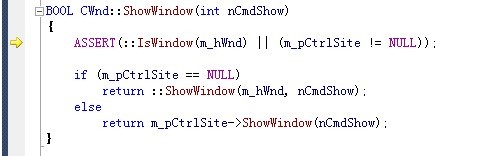
到底是什么问题啊!!! 类 窗口分割 线程
[解决办法]
BOOL CMainFrame::OnCreateClient(LPCREATESTRUCT /*lpcs*/,
CCreateContext* pContext)
{
// create splitter window
if (!m_wndSplitter.CreateStatic(this, 1, 2))
return FALSE;
CString strSetFile = GetSetFileName();
int nLeftWidth = GetPrivateProfileInt(_T("Wnd Sets"),_T("LeftWidth"), 220, strSetFile);
if (!m_wndSplitter.CreateView(0, 0, RUNTIME_CLASS(CLeftView), CSize(nLeftWidth, 100), pContext)
[解决办法]
!m_wndSplitter.CreateView(0, 1, RUNTIME_CLASS(CServiceToolView), CSize(100, 100), pContext))
{
m_wndSplitter.DestroyWindow();
return FALSE;
}
return TRUE;
}
[解决办法]
以前我也遇到过这样的问题,你要把你分割窗口的代码放在你的ChildFram::oncreate里面,你先去试一试,代码如下:
BOOL CChildFrame::OnCreateClient(LPCREATESTRUCT lpcs, CCreateContext* pContext)
{
// TODO: 在此添加专用代码和/或调用基类
if (!m_wndSplitter.CreateStatic(this,1,2)) { return FALSE; }
if (!m_wndSplitter.CreateView(0,0,RUNTIME_CLASS(CEffectShowView),CSize(1150,1000),pContext)) { return FALSE; }
if (!m_wndSplitter.CreateView(0,1,RUNTIME_CLASS(RightView),CSize(100,100),pContext)) { return FALSE; }
return TRUE;
return CMDIChildWndEx::OnCreateClient(lpcs, pContext);
}
应用CSplitter分割窗口时触发断点,代码如下
使用CSplitter分割窗口时触发断点,代码如下。BOOL CMainFrame::OnCreateClient(LPCREATESTRUCT lpcs, CCrea