
蛋碎的Extjs,求指导,看着例子的能看懂,稍有改变就...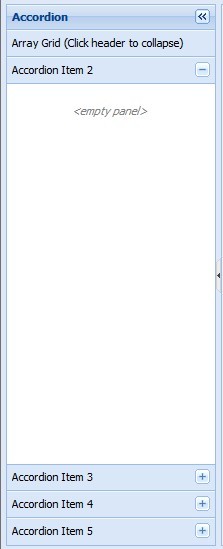
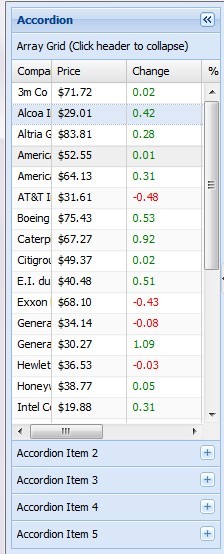
两张图片里面的js代码是像qq列表一样可以展开的,里面的数据时静态的,但是我现在想用动态的数据,就是有两list1和list2,比如list1是包括了{同学,朋友,家人},而list2是里面同学,朋友,家人里面的具体的名字,数据时动态传过来的,混着js代码和java代码,搞得我现在都晕了!!有哪个大神指导一下啊,还有list里面的数据格式好像也要转成json吧!!! 下面是哪个例子的js代码:
<html>Ext?JS HTML java
<head>
<title>Accordion Layout</title>
<!-- Ext -->
<link rel="stylesheet" type="text/css" href="../../resources/css/ext-all.css" />
<!-- GC -->
<style type="text/css">
html, body {
font: normal 12px verdana;
margin: 0;
padding: 0;
border: 0 none;
overflow: hidden;
height: 100%;
}
.empty .x-panel-body {
padding-top:20px;
text-align:center;
font-style:italic;
color: gray;
font-size:11px;
}
</style>
<script type="text/javascript" src="../../ext-all.js"></script>
<script type="text/javascript">
Ext.require(['*']);
Ext.onReady(function(){
// sample static data for the store
var myData = [
['3m Co', 71.72, 0.02, 0.03, '9/1 12:00am'],
['Alcoa Inc', 29.01, 0.42, 1.47, '9/1 12:00am'],
['Altria Group Inc', 83.81, 0.28, 0.34, '9/1 12:00am'],
['American Express Company', 52.55, 0.01, 0.02, '9/1 12:00am'],
['American International Group, Inc.', 64.13, 0.31, 0.49, '9/1 12:00am'],
['AT&T Inc.', 31.61, -0.48, -1.54, '9/1 12:00am'],
['Boeing Co.', 75.43, 0.53, 0.71, '9/1 12:00am'],
['Caterpillar Inc.', 67.27, 0.92, 1.39, '9/1 12:00am'],
['Citigroup, Inc.', 49.37, 0.02, 0.04, '9/1 12:00am'],
['E.I. du Pont de Nemours and Company', 40.48, 0.51, 1.28, '9/1 12:00am'],
['Exxon Mobil Corp', 68.1, -0.43, -0.64, '9/1 12:00am'],
['General Electric Company', 34.14, -0.08, -0.23, '9/1 12:00am'],
['General Motors Corporation', 30.27, 1.09, 3.74, '9/1 12:00am'],
['Hewlett-Packard Co.', 36.53, -0.03, -0.08, '9/1 12:00am'],
['Honeywell Intl Inc', 38.77, 0.05, 0.13, '9/1 12:00am'],
['Intel Corporation', 19.88, 0.31, 1.58, '9/1 12:00am'],
['International Business Machines', 81.41, 0.44, 0.54, '9/1 12:00am'],
['Johnson & Johnson', 64.72, 0.06, 0.09, '9/1 12:00am'],
['JP Morgan & Chase & Co', 45.73, 0.07, 0.15, '9/1 12:00am'],
['McDonald\'s Corporation', 36.76, 0.86, 2.40, '9/1 12:00am'],
['Merck & Co., Inc.', 40.96, 0.41, 1.01, '9/1 12:00am'],
['Microsoft Corporation', 25.84, 0.14, 0.54, '9/1 12:00am'],
['Pfizer Inc', 27.96, 0.4, 1.45, '9/1 12:00am'],
['The Coca-Cola Company', 45.07, 0.26, 0.58, '9/1 12:00am'],
['The Home Depot, Inc.', 34.64, 0.35, 1.02, '9/1 12:00am'],
['The Procter & Gamble Company', 61.91, 0.01, 0.02, '9/1 12:00am'],
['United Technologies Corporation', 63.26, 0.55, 0.88, '9/1 12:00am'],
['Verizon Communications', 35.57, 0.39, 1.11, '9/1 12:00am'],
['Wal-Mart Stores, Inc.', 45.45, 0.73, 1.63, '9/1 12:00am']
];
/**
* Custom function used for column renderer
* @param {Object} val
*/
function change(val) {
if (val > 0) {
return '<span style="color:green;">' + val + '</span>';
} else if (val < 0) {
return '<span style="color:red;">' + val + '</span>';
}
return val;
}
/**
* Custom function used for column renderer
* @param {Object} val
*/
function pctChange(val) {
if (val > 0) {
return '<span style="color:green;">' + val + '%</span>';
} else if (val < 0) {
return '<span style="color:red;">' + val + '%</span>';
}
return val;
}
// create the data store
var store = Ext.create('Ext.data.ArrayStore', {
fields: [
{name: 'company'},
{name: 'price', type: 'float'},
{name: 'change', type: 'float'},
{name: 'pctChange', type: 'float'},
{name: 'lastChange', type: 'date', dateFormat: 'n/j h:ia'}
],
data: myData
});
// create the Grid
var grid = Ext.create('Ext.grid.Panel', {
hideCollapseTool: true,
store: store,
columnLines: true,
columns: [
{
text : 'Company',
flex : 1,
sortable : false,
dataIndex: 'company'
},
{
text : 'Price',
width : 75,
sortable : true,
renderer : 'usMoney',
dataIndex: 'price'
},
{
text : 'Change',
width : 75,
sortable : true,
renderer : change,
dataIndex: 'change'
},
{
text : '% Change',
width : 75,
sortable : true,
renderer : pctChange,
dataIndex: 'pctChange'
},
{
text : 'Last Updated',
width : 85,
sortable : true,
renderer : Ext.util.Format.dateRenderer('m/d/Y'),
dataIndex: 'lastChange'
},
{
xtype: 'actioncolumn',
width: 50,
items: [{
icon : '../shared/icons/fam/delete.gif', // Use a URL in the icon config
tooltip: 'Sell stock',
handler: function(grid, rowIndex, colIndex) {
var rec = store.getAt(rowIndex);
alert("Sell " + rec.get('company'));
}
}, {
getClass: function(v, meta, rec) { // Or return a class from a function
if (rec.get('change') < 0) {
this.items[1].tooltip = 'Hold stock';
return 'alert-col';
} else {
this.items[1].tooltip = 'Buy stock';
return 'buy-col';
}
},
handler: function(grid, rowIndex, colIndex) {
var rec = store.getAt(rowIndex);
alert((rec.get('change') < 0 ? "Hold " : "Buy ") + rec.get('company'));
}
}]
}
],
title: 'Array Grid (Click header to collapse)',
viewConfig: {
stripeRows: true
}
});
var item1 = grid;
var item2 = Ext.create('Ext.Panel', {
title: 'Accordion Item 2',
html: '<empty panel>',
cls:'empty'
});
var item3 = Ext.create('Ext.Panel', {
title: 'Accordion Item 3',
html: '<empty panel>',
cls:'empty'
});
var item4 = Ext.create('Ext.Panel', {
title: 'Accordion Item 4',
html: '<empty panel>',
cls:'empty'
});
var item5 = Ext.create('Ext.Panel', {
title: 'Accordion Item 5',
html: '<empty panel>',
cls:'empty'
});
var accordion = Ext.create('Ext.Panel', {
title: 'Accordion',
collapsible: true,
region:'west',
margins:'5 0 5 5',
split:true,
width: 210,
layout:'accordion',
items: [item1, item2, item3, item4, item5]
});
var viewport = Ext.create('Ext.Viewport', {
layout:'border',
items:[
accordion, {
region:'center',
margins:'5 5 5 0',
cls:'empty',
bodyStyle:'background:#f1f1f1',
html:'<br/><br/><empty center panel>'
}]
});
});
</script>
</head>
<body>
<script type="text/javascript" src="../shared/examples.js"></script><!-- EXAMPLES -->
</body>
</html>
[解决办法]
list转成json随便找个JsonUtil工具类不就转了?