
jquery基本特效,等待中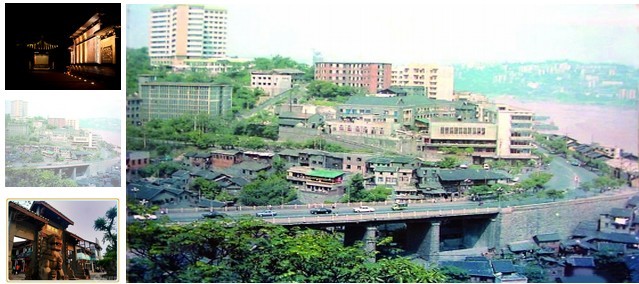
如图 3张图片实现自动播放,播放的图片右边图片相应透明度%50,
当鼠标停在某张图片上时,右边显示对应图片
当鼠标离开时 继续播放
注:右边的3张图片是竖起放的,必须用margin-top:-280这种方法实现
代码如下:
.mt_right
{
height: 280px;
width: 634px;
float: left;
}
.mtr_left
{
height: 280px;
width: 116px;
margin-right: 5px;
float: left;
overflow: hidden;
}
.mtrl_img
{
height: 87px;
width: 116px;
margin-bottom: 10px;
}
.mtr_right
{
margin:0;
padding:0;
height: 280px;
width: 513px;
float: left;
overflow:hidden;
}
.mtr_img
{
height: 280px;
width: 513px;
float: left;
}
<div class="mt_right">
<div class="mtr_left">
<div class="mtrl_img">
<img id="img1" style="height: 100%; width: 100%;" src="Images/鸿恩寺公园.jpg" alt="jquery根本特效,等待中" />
</div>
<div class="mtrl_img">
<img id="img2" style="height: 100%; width: 100%;" src="Images/有多少风光成传说.jpg"
alt="jquery根本特效,等待中" />
</div>
<div class="mtrl_img">
<img id="img3" style="height: 100%; width: 100%;" src="Images/千年磁器口.jpg"
alt="jquery根本特效,等待中" />
</div>
</div>
<div class="mtr_right">
<div class="mtr_img">
<asp:Repeater ID="RegBigImg" runat="server" DataSourceID="ObjDataConditions">
<ItemTemplate>
<a href="">
<img style="height: 100%; width: 100%;" src="<%# Eval("jdPhotoOne", "ImagesFile/{0}")%>"
alt="jquery根本特效,等待中" title="<%#Eval("jdName") %>" /></a>
</ItemTemplate>
</asp:Repeater>
</div>
</div>
</div>
求源码,最好我把js代码复制过去就可以用了 jquery 特效
[解决办法]
<!DOCTYPE html PUBLIC "-//W3C//DTD XHTML 1.0 Transitional//EN" "http://www.w3.org/TR/xhtml1/DTD/xhtml1-transitional.dtd">
<html><head>
<style>
.mt_right
{
    height: 280px;
    width: 634px;
    float: left;
}
.mtr_left
{
    height: 280px;
    width: 116px;
    margin-right: 5px;
    float: left;
    overflow: hidden;
}
.mtrl_img
{
    height: 87px;
    width: 116px;
    margin-bottom: 10px;
}
.mtr_right
{
    margin:0;
    padding:0;
    height: 280px;
    width: 513px;
    float: left;
    overflow:hidden;
}
.mtr_img
{
    height: 280px;
    width: 513px;
    float: left;
}
.mtr_left .alpha{opacity:.5;filter:alpha(opacity=50);}/*透明样式*/
</style>
<script type="text/javascript" src="http://www.coding123.net/js/jquery.js"></script>
<script>
    $(function () {
        var imgs = $('div.mtr_left div'), imgb = $('div.mtr_right'), h = imgb.height(), total = imgs.size(), nowIndex = 0
        , timer, delay = 3000, animateDelay = 500;
        function animate(isInit) {
            if (isInit !== true) {
                nowIndex++;
                if (nowIndex >= total) nowIndex = 0;
            }
            imgs.removeClass('alpha').eq(nowIndex).addClass('alpha');
            imgb.clearQueue().animate({ 'scrollTop': nowIndex * h }, animateDelay);
        }
        function Timer(isClear) { if (isClear) clearInterval(timer); else timer = setInterval(animate, delay); }
        imgs.mouseenter(function () { Timer(true); nowIndex = $(this).index(); animate(true); }).mouseleave(function () { Timer(); });
        imgb.mouseenter(function () { Timer(true); }).mouseleave(function () { Timer(); });
        animate(true);
        Timer();
    });
</script></head><body>
 <div class="mt_right">
                    <div class="mtr_left">
                        <div class="mtrl_img">
                            <img id="img1" style="height: 100%; width: 100%;" src="1.jpg" alt="jquery根本特效,等待中"/>
                        </div>
                        <div class="mtrl_img">
                            <img id="img2" style="height: 100%; width: 100%;" src="2.jpg"
                                alt="jquery根本特效,等待中" />
                        </div>
                        <div class="mtrl_img">
                            <img id="img3" style="height: 100%; width: 100%;" src="3.jpg"
                                alt="jquery根本特效,等待中" />
                        </div>
                    </div>
                    <div class="mtr_right">
                        <div class="mtr_img">
                                    <a href="">
                                        <img style="height: 100%; width: 100%;" src="1.jpg"
                                            alt="jquery根本特效,等待中" title="1.jpg" /></a>
                                <a href="">
                                        <img style="height: 100%; width: 100%;" src="2.jpg"
                                            alt="jquery根本特效,等待中" title="2.jpg" /></a><a href="">
                                        <img style="height: 100%; width: 100%;" src="3.jpg"
                                            alt="jquery根本特效,等待中" title="3.jpg" /></a>
                        </div>
                    </div>
                </div></body></html>
[解决办法]
给楼主整了下,和版主的还是有很大的差距的啊,不过基本功能算是实现了。
<!DOCTYPE html>
<html>
    <head>
        <meta http-equiv="Content-Type" content="text/html; charset=UTF-8">
        <title>图片轮播</title>
        <style type="text/css">
            .imgContent{
                margin: 0 auto;
                margin-top: 50px;
                width: 900px;
            }
            .mt_right{
                height: 280px;
                width: 644px;
                float: left;
            }
            .mtr_left{
                height: 280px;
                width: 116px;
                margin-right: 5px;
                float: left;
                overflow: hidden;
            }
            .mtrl_img{
                height: 87px;
                width: 116px;
                cursor: pointer;
                margin-bottom: 10px;
            }
            .mtr_right{
                margin:0;
                padding:0;
                height: 280px;
                width: 513px;
                float: left;
                overflow:hidden;
            }
            .mtr_img{
                height: 280px;
                width: 513px;
                float: left;
            }
        </style>
        <script type="text/javascript" src="http://www.coding123.net/js/jquery.js"></script>
        <script type="text/javascript">
            var vv = null;
            $(function(){
                var imgArr = ["images/1.jpg","images/2.jpg","images/3.jpg"];
                $("#imgContent").attr("src",imgArr[0]);
                $($(".mtrl_img").get(0)).css("opacity","0.5");
                function carouselFunc(index){
                    var time = 1000;
                    var carousel = setInterval(function(){
                        index++;
                        if(index == imgArr.length){
                            index = 0;
                        }
                        $($(".mtrl_img").get(index)).css("opacity","0.5");
                        var $siblingsObj = $($(".mtrl_img").get(index)).siblings();
                        for(var i = 0;i < $siblingsObj.size();i++){
                            $($siblingsObj.get(i)).css("opacity","1");
                        }
                        $("#imgContent").attr("src",imgArr[index]);
                    },time)
                    return carousel;
                }
                vv = carouselFunc(0);
                $(".mtrl_img").mouseover(function(){
                    var $thissiblingsObj = $(this).siblings();
                    for(var i = 0;i < $thissiblingsObj.size();i++){
                        $($thissiblingsObj.get(i)).css("opacity","1");
                    }
                    $(this).css("opacity","0.5");
                    var imgId = $(this).find("img").attr("src");
                    $("#imgContent").attr("src",imgId);
                    clearInterval(vv);
                }).mouseout(function(e){
                    $(this).css("opacity","1");
                    var imgId = e.target.id;
                    var src = $("#" + imgId).attr("src");
                    var j = 0;
                    for(var i = 0;i < imgArr.length;i++){
                        if(src == imgArr[i]){
                            j = i;
                            break;
                        }
                    }
                    vv = carouselFunc(j);
                })
            })
        </script>
    </head>
    <body>
        <div class="imgContent">
            <div class="mt_right">
                <div class="mtr_left">
                    <div class="mtrl_img">
                        <img id="img1" style="height: 100%; width: 100%;" src="images/1.jpg" alt="jquery根本特效,等待中" />
                    </div>
                    <div class="mtrl_img">
                        <img id="img2" style="height: 100%; width: 100%;" src="images/2.jpg" alt="jquery根本特效,等待中" />
                    </div>
                    <div class="mtrl_img">
                        <img id="img3" style="height: 100%; width: 100%;" src="images/3.jpg" alt="jquery根本特效,等待中" />
                    </div>
                </div>
                <div class="mtr_right">
                    <div class="mtr_img">
                        <img id="imgContent" style="height: 100%; width: 100%;" src="" />
                    </div>
                </div>
            </div>
        </div>
    </body>
</html>