
【Android开发学习25】界面布局之相对布局RelativeLayout一、基础知识:android:layout_above 将该控件的底部
【Android开发学习25】界面布局之相对布局RelativeLayout
一、基础知识:
android:layout_above 将该控件的底部至于给定ID的控件之上android:layout_below 将该控件的顶部至于给定ID的控件之下android:layout_toLeftOf 将该控件的右边缘和给定ID的控件的左边缘对齐android:layout_toRightOf 将该控件的左边缘和给定ID的控件的右边缘对齐android:layout_alignBaseline 该控件的baseline和给定ID的控件的baseline对齐android:layout_alignBottom 将该控件的底部边缘与给定ID控件的底部边缘android:layout_alignLeft 将该控件的左边缘与给定ID控件的左边缘对齐android:layout_alignRight 将该控件的右边缘与给定ID控件的右边缘对齐android:layout_alignTop 将给定控件的顶部边缘与给定ID控件的顶部对齐android:alignParentBottom 如果该值为true,则将该控件的底部和父控件的底部对齐android:layout_alignParentLeft 如果该值为true,则将该控件的左边与父控件的左边对齐android:layout_alignParentRight 如果该值为true,则将该控件的右边与父控件的右边对齐android:layout_alignParentTop 如果该值为true,则将空间的顶部与父控件的顶部对齐android:layout_centerHorizontal 如果值为真,该控件将被至于水平方向的中央android:layout_centerInParent 如果值为真,该控件将被至于父控件水平方向和垂直方向的中央android:layout_centerVertical 如果值为真,该控件将被至于垂直方向的中央
二、代码展示:
1."Acticity_07\src\yan\acticity_07\MainActivity.java"
package yan.activity_07;import android.os.Bundle;import android.app.Activity;import android.view.Menu;public class MainActivity extends Activity {@Overrideprotected void onCreate(Bundle savedInstanceState) {super.onCreate(savedInstanceState);setContentView(R.layout.activity_main);}@Overridepublic boolean onCreateOptionsMenu(Menu menu) {// Inflate the menu; this adds items to the action bar if it is present.getMenuInflater().inflate(R.menu.activity_main, menu);return true;}}
2.“Acticity_07\res\layout\activity_main.xml”
<?xml version="1.0" encoding="utf-8"?><!--android:layout_above 将该控件的底部至于给定ID的控件之上android:layout_below 将该控件的顶部至于给定ID的控件之下android:layout_toLeftOf 将该控件的右边缘和给定ID的控件的左边缘对齐android:layout_toRightOf 将该控件的左边缘和给定ID的控件的右边缘对齐android:layout_alignBaseline 该控件的baseline和给定ID的控件的baseline对齐android:layout_alignBottom 将该控件的底部边缘与给定ID控件的底部边缘android:layout_alignLeft 将该控件的左边缘与给定ID控件的左边缘对齐android:layout_alignRight 将该控件的右边缘与给定ID控件的右边缘对齐android:layout_alignTop 将给定控件的顶部边缘与给定ID控件的顶部对齐android:alignParentBottom 如果该值为true,则将该控件的底部和父控件的底部对齐android:layout_alignParentLeft 如果该值为true,则将该控件的左边与父控件的左边对齐android:layout_alignParentRight 如果该值为true,则将该控件的右边与父控件的右边对齐android:layout_alignParentTop 如果该值为true,则将空间的顶部与父控件的顶部对齐android:layout_centerHorizontal 如果值为真,该控件将被至于水平方向的中央android:layout_centerInParent 如果值为真,该控件将被至于父控件水平方向和垂直方向的中央android:layout_centerVertical 如果值为真,该控件将被至于垂直方向的中央--><RelativeLayout xmlns:android="http://schemas.android.com/apk/res/android" android:layout_width="fill_parent" android:layout_height="wrap_content" android:padding="10px" > <TextView android:id="@+id/label" android:layout_width="fill_parent" android:layout_height="wrap_content" android:text="Type here:" /> <EditText android:id="@+id/entry" android:layout_width="fill_parent" android:layout_height="wrap_content" android:background="@android:drawable/editbox_background" android:layout_below="@id/label" /> <Button android:id="@+id/ok" android:layout_width="wrap_content" android:layout_height="wrap_content" android:layout_below="@id/entry" android:layout_alignParentRight="true" android:layout_marginLeft="10px" android:text="OK" /> <Button android:layout_width="wrap_content" android:layout_height="wrap_content" android:layout_toLeftOf="@id/ok" android:layout_alignTop="@id/ok" android:text="Cancel" /></RelativeLayout>
三、效果展示:
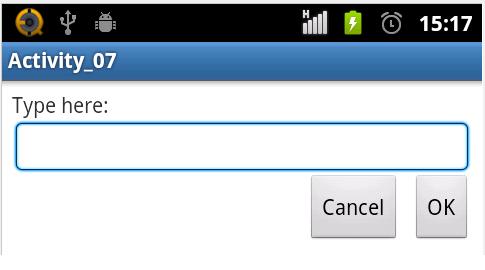
本文完整代码下载地址: http://download.csdn.net/detail/ypist/5144729
本文博客源地址:http://blog.csdn.net/ypist