
php版本 化妆程序 给图片添加饰物大家估计都用手机玩过 化妆整人的程序也就是对照片加工处理 添加饰物 然
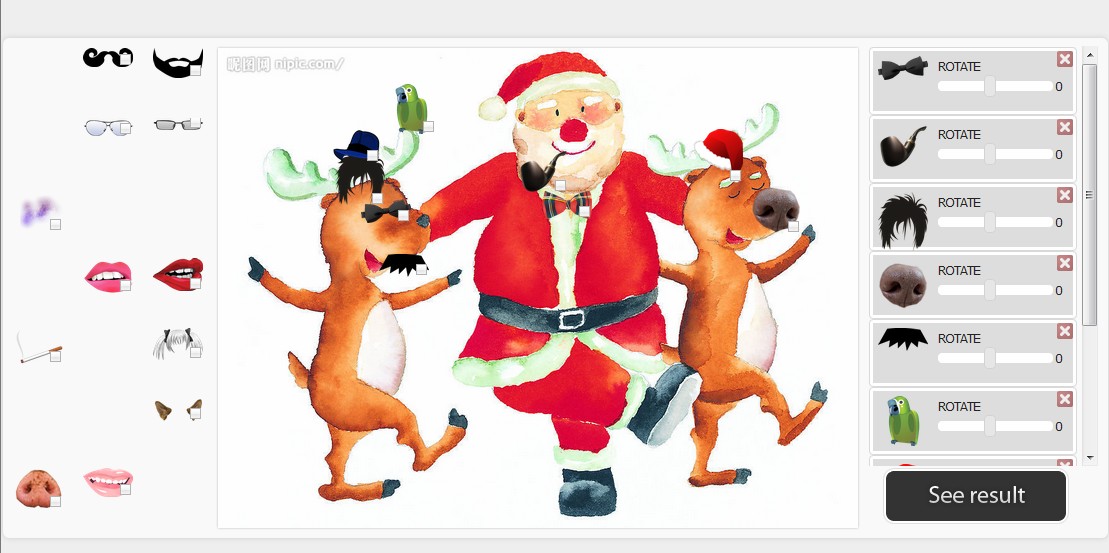
php版本 化妆程序 给图片添加饰物
大家估计都用手机玩过 化妆整人的程序
也就是对照片加工处理 添加饰物 然后生成一张图片 可以搞笑娱乐大家
?
?
?
本文主要采用的技术有
1.jquery的拖拽 drag& drop技术
2.PHP转换Json data
3.CSS3 +HTML5
?
首先我们建立一个大体的框架
?采用的css
?另外元素可以放大缩小 并且可以拖拽
$res = JSON_decode(stripslashes($_POST['JSONdata']), true);/* get data */$count_images = count($res['images']);/* the background image is the first one */$background = $res['images'][0]['src'];$photo1 = imagecreatefromjpeg($background);$foto1W = imagesx($photo1);$foto1H = imagesy($photo1);$photoFrameW = $res['images'][0]['width'];$photoFrameH = $res['images'][0]['height'];$photoFrame = imagecreatetruecolor($photoFrameW,$photoFrameH);imagecopyresampled($photoFrame, $photo1, 0, 0, 0, 0, $photoFrameW, $photoFrameH, $foto1W, $foto1H); /* the other images */for($i = 1; $i < $count_images; ++$i){ $insert = $res['images'][$i]['src']; $photoFrame2Rotation = (180-$res['images'][$i]['rotation']) + 180; $photo2 = imagecreatefrompng($insert); $foto2W = imagesx($photo2); $foto2H = imagesy($photo2); $photoFrame2W = $res['images'][$i]['width']; $photoFrame2H = $res['images'][$i]['height']; $photoFrame2TOP = $res['images'][$i]['top']; $photoFrame2LEFT= $res['images'][$i]['left']; $photoFrame2 = imagecreatetruecolor($photoFrame2W,$photoFrame2H); $trans_colour = imagecolorallocatealpha($photoFrame2, 0, 0, 0, 127); imagefill($photoFrame2, 0, 0, $trans_colour); imagecopyresampled($photoFrame2, $photo2, 0, 0, 0, 0, $photoFrame2W, $photoFrame2H, $foto2W, $foto2H); $photoFrame2 = imagerotate($photoFrame2,$photoFrame2Rotation, -1,0); /*after rotating calculate the difference of new height/width with the one before*/ $extraTop =(imagesy($photoFrame2)-$photoFrame2H)/2; $extraLeft =(imagesx($photoFrame2)-$photoFrame2W)/2; imagecopy($photoFrame, $photoFrame2,$photoFrame2LEFT-$extraLeft, $photoFrame2TOP-$extraTop, 0, 0, imagesx($photoFrame2), imagesy($photoFrame2));}// Set the content type header - in this case image/jpegheader('Content-type: image/jpeg');imagejpeg($photoFrame, $targetfile);imagedestroy($photoFrame);?