
有图有真相 JAVA应用 之 快捷工具托盘++之所以叫《JAVA应用 之 快捷工具托盘++》,是因为昨天在站里看到一哥
有图有真相 JAVA应用 之 快捷工具托盘++
之所以叫《JAVA应用 之 快捷工具托盘++》,是因为昨天在站里看到一哥们发的《快捷工具托盘》http://snkcxy.iteye.com/blog/1810057,自己闲来无事,重构了下他的代码,用Swing写了个UI,本质上还是去调用Runtime执行OS命令。还是一样,opensource,可以下载全部源码, 有图有真相,承认难看的不是有一点:), 本人微博:http://weibo.com/terrancetian,欢迎留言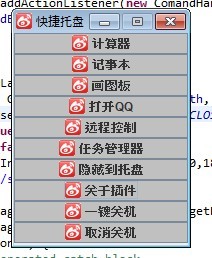
呵呵,找不到好看的logo,就随便用了新浪微博的。。。
这个关于,还是当年自己写的毕设时用的,直接拉来用了,懒的。。。
哦了,上code,首先,我把那一大堆命令都搞到了资源文件里,然后写个Properties去读:
public class PropertiesUtil {public final static String COMMAND_LIB = "com/objectivasoft/terrance/properties/all_comand.properties";/** * 加载属性文件, 初始化命令库 * @param path * @return */public static Properties getProperties(){Properties prop = new OrderedProperties();try {prop.load(PropertiesUtil.class.getClassLoader().getResourceAsStream(COMMAND_LIB));} catch (Exception e) {//logger.error(path + " 加载失败!");JOptionPane.showMessageDialog(null, "初始化命令库失败!", "ERROR", JOptionPane.ERROR_MESSAGE);}return prop;}这里说明一下http://snkcxy.iteye.com/blog/1810057,这哥们也说到HashMap的问题,我的Properties也是继承自HashTable,都是无需的元素,所以我重写了Properties的主要方法,用LinkedHashSet去拿资源,这样保证map的有序性和资源文件保持一致,不想贴代码了,请参考:http://unmi.cc/ordered-java-properties-class
下来就是来到久违的java Swing了:
public class ToolsPanel extends JFrame {private static final long serialVersionUID = 1541995806128793897L;//这玩意就是从资源文件里拿出来的mapprivate static final Properties commandProp = PropertiesUtil.getProperties();//插件上的按钮private JButton comandBtns[]; //构造方法public ToolsPanel() {super("快捷托盘");init();}@PostConstructprivate void init() {constractComponent();constractLayout();}/** 构造界面上的按钮 */private void constractComponent(){List<String> commands = new ArrayList<String>();for (Object item : commandProp.keySet()) {commands.add((String)item);}//构造按钮,并注册事件comandBtns = new JButton[commandProp.size()];for (int i = 0; i < commands.size(); i++) {//又是新浪。。。comandBtns[i] = new JButton(commands.get(i), new ImageIcon("src/com/objectivasoft/terrance/misc/sina.png"));comandBtns[i].setBackground(Color.LIGHT_GRAY);//注册点击事件comandBtns[i].addActionListener(new ComandHandler((String) commandProp.get(comandBtns[i].getText())));this.add(comandBtns[i]);}}/** 构造界面布局 */private void constractLayout(){//网格布局管理器this.setLayout(new GridLayout(comandBtns.length, 1));this.setDefaultCloseOperation(JFrame.EXIT_ON_CLOSE);this.setVisible(true);this.setResizable(false);this.setBounds(ComInfo.w/2-150,ComInfo.h/2-200,180,240);//嘿嘿,直接就用新浪微博的logo了...String src = "/img/sina.png";try {Image image=ImageIO.read(this.getClass().getResource(src));this.setIconImage(image); } catch (IOException e) {e.printStackTrace();}}}这个就是注册按钮事件的实现类,其实我更喜欢写Swing时候用匿名内部类,只不过不便读代码:
public class ComandHandler implements ActionListener {private static final Runtime rt = Runtime.getRuntime();private String comand;//这玩意就是按钮绑定的命令public ComandHandler(String comand) {super();this.comand = comand;}@Overridepublic void actionPerformed(ActionEvent e) {try {//关于系统按钮if (e.getActionCommand().equalsIgnoreCase("\u5173\u4E8E\u63D2\u4EF6")) {new AboutInfo();} else if (e.getActionCommand().equalsIgnoreCase("\u9690\u85CF\u5230\u6258\u76D8")) {//到系统托盘状态,这个就是我重构后的那哥们代码new SystemToolsTray();} else {//执行OS命令rt.exec(comand);}} catch (IOException e1) {JOptionPane.showMessageDialog(null, "执行系统命令失败!", "错误", JOptionPane.ERROR_MESSAGE);} catch (Exception e2) {JOptionPane.showMessageDialog(null, "系统异常!", "错误", JOptionPane.ERROR_MESSAGE);}}}哦了,那哥们的SystemToolsTray类,就不贴了,我主要重构的也就是把那一大堆map从properties里读了下,剩下也没做什么,项目里重要的就是那些东东了,其他的都在项目附件里。对了,运行RunUI.java就是项目入口。
ps:项目没怎么仔细搞,有些bug懒得改了,不过有一个问题还请各位大虾帮忙解决下,就是在系统托盘状态有中文乱码问题,现在还没想到什么办法解决:)