
android-使用PopupWindow实现自定义密码软键盘效果图: MainActivity.javapackage com.example.keyboardim
android-使用PopupWindow实现自定义密码软键盘
效果图:
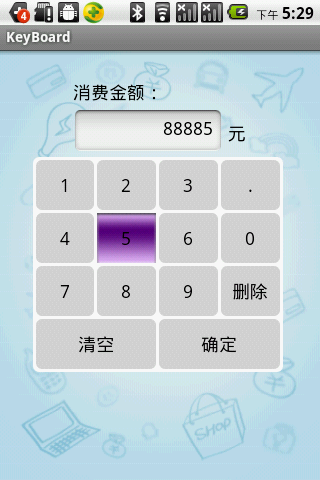
MainActivity.java
package com.example.keyboard;import android.app.Activity;import android.content.Intent;import android.os.Bundle;import android.text.InputType;import android.view.LayoutInflater;import android.view.View;import android.view.View.OnClickListener;import android.view.View.OnFocusChangeListener;import android.widget.Button;import android.widget.EditText;import android.widget.PopupWindow;import android.widget.Toast;public class MainActivity extends Activity {private EditText editText;private Button button;private String money = "";private PopupWindow popupWindow;private Button btn1,btn2,btn3,btn4,btn5,btn6,btn7,btn8,btn9,btn0,btn_dot,btn_del,btn_clear,btn_conf;@Overrideprotected void onCreate(Bundle savedInstanceState) {// TODO Auto-generated method stubsuper.onCreate(savedInstanceState);setContentView(R.layout.pay);editText = (EditText) findViewById(R.id.pay_edit);button = (Button) findViewById(R.id.pay_button);View keyboardView = LayoutInflater.from(this).inflate(R.layout.keyboard, null); popupWindow = new PopupWindow(keyboardView,250,215); btn0 = (Button) keyboardView.findViewById(R.id.keyboard_btn0); btn1 = (Button) keyboardView.findViewById(R.id.keyboard_btn1); btn2 = (Button) keyboardView.findViewById(R.id.keyboard_btn2); btn3 = (Button) keyboardView.findViewById(R.id.keyboard_btn3); btn4 = (Button) keyboardView.findViewById(R.id.keyboard_btn4); btn5 = (Button) keyboardView.findViewById(R.id.keyboard_btn5); btn6 = (Button) keyboardView.findViewById(R.id.keyboard_btn6); btn7 = (Button) keyboardView.findViewById(R.id.keyboard_btn7); btn8 = (Button) keyboardView.findViewById(R.id.keyboard_btn8); btn9 = (Button) keyboardView.findViewById(R.id.keyboard_btn9); btn_dot = (Button) keyboardView.findViewById(R.id.keyboard_btn_dot); btn_del = (Button) keyboardView.findViewById(R.id.keyboard_btn_del); btn_clear = (Button) keyboardView.findViewById(R.id.keyboard_btn_clear); btn_conf = (Button) keyboardView.findViewById(R.id.keyboard_btn_conf); btn0.setOnClickListener(new OnClickListener() {@Overridepublic void onClick(View arg0) {// TODO Auto-generated method stubmoney += "0";editText.setText(money);}}); btn1.setOnClickListener(new OnClickListener() { @Override public void onClick(View arg0) { // TODO Auto-generated method stub money += "1"; editText.setText(money); } }); btn2.setOnClickListener(new OnClickListener() { @Override public void onClick(View arg0) { // TODO Auto-generated method stub money += "2"; editText.setText(money); } }); btn3.setOnClickListener(new OnClickListener() { @Override public void onClick(View arg0) { // TODO Auto-generated method stub money += "3"; editText.setText(money); } }); btn4.setOnClickListener(new OnClickListener() { @Override public void onClick(View arg0) { // TODO Auto-generated method stub money += "4"; editText.setText(money); } }); btn5.setOnClickListener(new OnClickListener() { @Override public void onClick(View arg0) { // TODO Auto-generated method stub money += "5"; editText.setText(money); } }); btn6.setOnClickListener(new OnClickListener() { @Override public void onClick(View arg0) { // TODO Auto-generated method stub money += "6"; editText.setText(money); } }); btn7.setOnClickListener(new OnClickListener() { @Override public void onClick(View arg0) { // TODO Auto-generated method stub money += "7"; editText.setText(money); } }); btn8.setOnClickListener(new OnClickListener() { @Override public void onClick(View arg0) { // TODO Auto-generated method stub money += "8"; editText.setText(money); } }); btn9.setOnClickListener(new OnClickListener() { @Override public void onClick(View arg0) { // TODO Auto-generated method stub money += "9"; editText.setText(money); } }); btn_dot.setOnClickListener(new OnClickListener() { @Override public void onClick(View arg0) { // TODO Auto-generated method stub money += "."; editText.setText(money); } }); btn_del.setOnClickListener(new OnClickListener() {@Overridepublic void onClick(View v) {// TODO Auto-generated method stubtry {money = money.substring(0, money.length()-1);editText.setText(money);} catch (Exception e) {// TODO Auto-generated catch blocke.printStackTrace();}}}); btn_clear.setOnClickListener(new OnClickListener() {@Overridepublic void onClick(View v) {// TODO Auto-generated method stubmoney = "";editText.setText(money);}}); btn_conf.setOnClickListener(new OnClickListener() {@Overridepublic void onClick(View v) {// TODO Auto-generated method stubpopupWindow.dismiss();button.requestFocus();}}); //禁止EditText获得焦点后弹出系统键盘 editText.setInputType(InputType.TYPE_NULL); editText.setOnFocusChangeListener(new OnFocusChangeListener() {@Overridepublic void onFocusChange(View arg0, boolean arg1) {// TODO Auto-generated method stubif(arg1){popupWindow.showAsDropDown(editText,-40,0);popupWindow.setFocusable(true);popupWindow.update();}}});}}
keyboard_bg_big.xml
<?xml version="1.0" encoding="utf-8"?><selector xmlns:android="http://schemas.android.com/apk/res/android" > <item android:state_pressed="true" android:drawable="@drawable/key11"/> <item android:state_focused="true" android:drawable="@drawable/key12"/> <item android:state_focused="false" android:state_pressed="false" android:drawable="@drawable/keyboard_key_style" /> </selector>
keyboard_bg_small.xml
<?xml version="1.0" encoding="utf-8"?><selector xmlns:android="http://schemas.android.com/apk/res/android" > <item android:state_pressed="true" android:drawable="@drawable/key11"/> <item android:state_focused="true" android:drawable="@drawable/key12"/> <item android:state_focused="false" android:state_pressed="false" android:drawable="@drawable/keyboard_key_style" /> </selector>
keyboard_bg_style.xml
<?xml version="1.0" encoding="utf-8"?><shape xmlns:android="http://schemas.android.com/apk/res/android" android:shape="rectangle" > <gradient android:angle="90.0" android:endColor="#ffffff" android:startColor="#ffffff" /> <corners android:bottomLeftRadius="6.0dip" android:bottomRightRadius="6.0dip" android:topLeftRadius="6.0dip" android:topRightRadius="6.0dip" /></shape>
keyboard_key_style.xml
<?xml version="1.0" encoding="utf-8"?><shape xmlns:android="http://schemas.android.com/apk/res/android" android:shape="rectangle" > <size android:height="36.0dip" android:width="80.0dip" /> <gradient android:angle="90.0" android:endColor="#D7D7D7" android:startColor="#D7D7D7" /> <corners android:bottomLeftRadius="6.0dip" android:bottomRightRadius="6.0dip" android:topLeftRadius="6.0dip" android:topRightRadius="6.0dip" /></shape>