
Android开发--浅谈ExpandableListActivity
ExpandableListActivity使用使用方法(可以和ListActivity进行对比)创建一个Activity类继承ExpandableListActvity三个layout主布局 (注意这里2个id都是android内置的 不是+id)包含<ExpandableListView> 注意其中android:id="@id/android:list" 还有一个android:drawSelectorOnTop="false"(选中时是否遮盖文字)<TextView android:id="@id/android:empty"> 当无数据时一级目录布局二级目录布局(条目item样式)创建Adapter将simpleExpandableListAdapter对象设置给当前ExpandableListActivitysetListAdapter(adapter);SimpleExpandableListAdapter使用为ExpandableListActivity提供数据//定义List 为一级条目提供数据List<Map<String, String>> groups=new ArrayList<Map<String, String>>();需要几个条目 生成几个Map对象Map<String, String> m1=new HashMap<String, String>();m1.put(group,Group1);m2.put(group,Group2);groups.add(m1);groups.add(m2);
//定义List 设置二级子条目 一个子条目一个List 一个项 一个Map方法同上 建List(child1 child2)和Map(child:child1Data1;child:child1Data2)
//定义一个List 存储所有二级条目数据*List<List<Map<String, String>>> childs = new ArrayListM<List<Map<String, String>>>();childs.add(child1);childs.add(child2);
//生成一个SimpleExpandableListAdapter对象new SimpleExpandableListAdapter(...);参数包括(context上下文对象,一级条目List对象,一级条目布局, new String[]{"groups"})指定一级条目数据的key,new int[]{R.id.groupTo}指定一级条目数据显示的控件id,二级条目的数据childs,二级条目布局,二级条目数据key(child),二级条目控件id}
下图是实现的截图: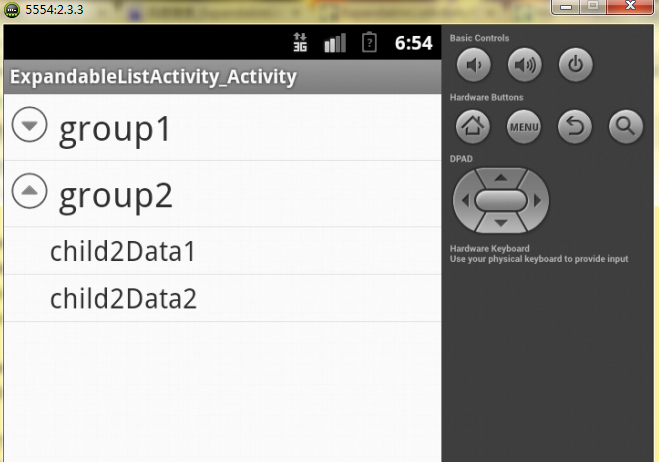
这个实例用到三个布局文件:第一个布局文件---主框架布局:
public class ExpandableListActivity_Activity extends ExpandableListActivity {@Overrideprotected void onCreate(Bundle savedInstanceState) {super.onCreate(savedInstanceState);setContentView(R.layout.activity_expandable_list_activity_);//定义一个List,这个List为一级条目提供数据List<Map<String, String>> group=new ArrayList<Map<String,String>>();Map<String, String> group1=new HashMap<String, String>();group1.put("group", "group1");Map<String, String> group2=new HashMap<String, String>();group2.put("group", "group2");group.add(group1);group.add(group2);//定义一个List,这个List为第一个一级条目提供二级条目数据List<Map<String, String>> child1=new ArrayList<Map<String,String>>();Map<String, String> child1Data1=new HashMap<String, String>();child1Data1.put("child", "child1Data1");Map<String, String> child1Data2=new HashMap<String, String>();child1Data2.put("child", "child1Data2");child1.add(child1Data1);child1.add(child1Data2);//定义一个List,这个List为第二个一级条目提供二级条目数据List<Map<String, String>> child2=new ArrayList<Map<String,String>>();Map<String, String> child2Data1=new HashMap<String, String>();child2Data1.put("child", "child2Data1");Map<String, String> child2Data2=new HashMap<String, String>();child2Data2.put("child", "child2Data2");child2.add(child2Data1);child2.add(child2Data2);//定义一个List,这个List存储所有的二级条目数据List<List<Map<String, String>>> childs=new ArrayList<List<Map<String,String>>>();childs.add(child1);childs.add(child2);//生成一个SimpleExpandableListAdapter对象/* * 1.context * 2.一级条目的数据 * 3.用来设置一级条目样式的布局文件 * 4.指定一级条目数据的key * 5.指定一级条目数据显示控件的id * 6.指定二级条目的数据 * 7.设置二级条目样式的布局文件 * 8.指定二级条目数据的key * 9.指定二级条目数据显示控件的id */SimpleExpandableListAdapter selaListActivity=new SimpleExpandableListAdapter(this, group, R.layout.group, new String[]{"group"}, new int[]{R.id.group}, childs,R.layout.child,new String[] {"child"}, new int[]{R.id.child});setListAdapter(selaListActivity);}@Overridepublic boolean onCreateOptionsMenu(Menu menu) {// Inflate the menu; this adds items to the action bar if it is present.getMenuInflater().inflate(R.menu.activity_expandable_list_activity_,menu);return true;}}