
Android--ListView滚动条样式当ListView的记录超过4页时才会显示滑块java代码:package com.example.test01
Android--ListView滚动条样式
当ListView的记录超过4页时才会显示滑块
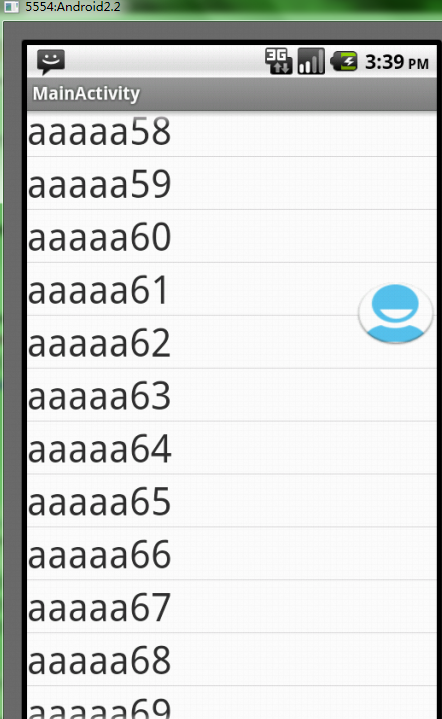
java代码:
package com.example.test0123;import java.lang.reflect.Field;import android.app.Activity;import android.graphics.drawable.Drawable;import android.os.Bundle;import android.view.View;import android.view.ViewGroup;import android.widget.AbsListView;import android.widget.BaseAdapter;import android.widget.ListView;import android.widget.TextView;public class TestList extends Activity {ListView lv;protected void onCreate(Bundle savedInstanceState) {super.onCreate(savedInstanceState);setContentView(R.layout.list);lv = (ListView) findViewById(R.id.listView1);lv.setAdapter(new ListAdapter());try {Field f = AbsListView.class.getDeclaredField("mFastScroller");f.setAccessible(true);Object o = f.get(lv);f = f.getType().getDeclaredField("mThumbDrawable");f.setAccessible(true);Drawable drawable = (Drawable) f.get(o);drawable = getResources().getDrawable(R.drawable.ic_launcher);f.set(o, drawable);} catch (Exception e) {throw new RuntimeException(e);}}public class ListAdapter extends BaseAdapter {public int getCount() {return 200;}public Object getItem(int position) {return null;}public long getItemId(int position) {return 0;}public View getView(int position, View convertView, ViewGroup parent) {TextView tv = new TextView(TestList.this);tv.setTextSize(30);tv.setText("aaaaa" + position);return tv;}}}
list.xml代码:设置fastScrollEnabled为true
<?xml version="1.0" encoding="utf-8"?><LinearLayout xmlns:android="http://schemas.android.com/apk/res/android" android:layout_width="match_parent" android:layout_height="match_parent" android:orientation="vertical" > <ListView android:id="@+id/listView1" android:layout_width="match_parent" android:layout_height="wrap_content" android:fastScrollEnabled="true" > </ListView></LinearLayout>