
Android界面设计基础:控件焦点4个步骤
?
现在,随着越来越多的Android的应用出现在Android Market上,如何能更加吸引用户成为摆在开发者面前的重要课题。作为Android应用,不仅要在内容上取胜,在比如界面等细节上也要很重视用户的使用体验,如果用户觉得操作困难和不符合操作习惯的话,就会认为应用不好用而不去下载或购买。在用户体验中,一些细节的问题更容易引起程序员的忽视。本文将介绍,在Android的界面设计中的各个控件的焦点顺序其中要注意的问题,这个很似简单的问题,值得开发者的重视。
AD:?
Android设备有多种多样,操纵界面也有所不同,比如有触摸屏、轨迹球,传统的手机键盘等,因此开发者需要更好地了解,当用户在应用程序界面中的不同控件间移动时,各个控件的获得焦点和失去焦点的顺序,以及如何根据用户的操作习惯去自定义这些顺序。
一般情况下,Android对于特定的布局界面,会自动得出一个合适的控件焦点顺序,很多情况下是足够用的了。但是在有的情况下是有例外的。控件的下一个焦点会到达哪一个控件,主要是判断当前控件在指定的方向布局上(up/down/left/right),哪一个是最领近的控件,其扫描顺序为从左到右,从上到下,就象平时阅读书籍一样。
然而,这种顺序有时会带来一点小问题,比如当控件都布置在屏幕的上方时,如果用户再按“up”键,则不会有任何效果,同样,当控件都在屏幕下方、左边、右边时,此时再按如“down”、“Left”,“Right”键时都不会再获得控件的焦点。
在本文的例子中,将讲解如何修改默认的控件焦点顺序,以定制特定的控件切换顺序,例子中,多个按钮以一个圆形进行了排列,例子可以在
http://android-mt-tutorials.googlecode.com/svn/trunk/SimpleFocus中下载。
步骤1 定义界面布局
我们先设计出界面的布局,代码如下,使用的是Relative相对布局:
1.<?xml version="1.0" encoding="utf-8"?>?
2.<RelativeLayout?
3. ? ?xmlns:android="http://schemas.android.com/apk/res/android"?
4. ? ?android:layout_width="fill_parent"?
5. ? ?android:layout_height="fill_parent">?
6. ? ?<Button?
7. ? ? ? ?style="@style/clockFaceNum"?
8. ? ? ? ?android:text="12"?
9. ? ? ? ?android:id="@+id/button12"?
10. ? ? ? ?android:layout_alignParentTop="true"?
11. ? ? ? ?android:layout_centerHorizontal="true">?
12. ? ?</Button>?
13. ? ?<Button?
14. ? ? ? ?style="@style/clockFaceNum"?
15. ? ? ? ?android:text="11"?
16. ? ? ? ?android:id="@+id/button11"?
17. ? ? ? ?android:layout_below="@+id/button12"?
18. ? ? ? ?android:layout_toLeftOf="@+id/button12">?
19. ? ?</Button>?
20. ? ?<Button?
21. ? ? ? ?style="@style/clockFaceNum"?
22. ? ? ? ?android:text="1"?
23. ? ? ? ?android:id="@+id/button1"?
24. ? ? ? ?android:layout_below="@+id/button12"?
25. ? ? ? ?android:layout_toRightOf="@+id/button12">?
26. ? ?</Button>?
27. ? ?<Button?
28. ? ? ? ?style="@style/clockFaceNum"?
29. ? ? ? ?android:text="10"?
30. ? ? ? ?android:id="@+id/button10"?
31. ? ? ? ?android:layout_below="@+id/button11"?
32. ? ? ? ?android:layout_toLeftOf="@+id/button11">?
33. ? ?</Button>?
34. ? ?<Button?
35. ? ? ? ?style="@style/clockFaceNum"?
36. ? ? ? ?android:text="2"?
37. ? ? ? ?android:id="@+id/button2"?
38. ? ? ? ?android:layout_below="@+id/button1"?
39. ? ? ? ?android:layout_toRightOf="@+id/button1">?
40. ? ?</Button>?
41. ? ?<Button?
42. ? ? ? ?style="@style/clockFaceNum"?
43. ? ? ? ?android:text="9"?
44. ? ? ? ?android:id="@+id/button9"?
45. ? ? ? ?android:layout_below="@+id/button10"?
46. ? ? ? ?android:layout_toLeftOf="@+id/button10">?
47. ? ?</Button>?
48.?
49. ? ?<Button?
50. ? ? ? ?style="@style/clockFaceNum"?
51. ? ? ? ?android:text="3"?
52. ? ? ? ?android:id="@+id/button3"?
53. ? ? ? ?android:layout_below="@+id/button2"?
54. ? ? ? ?android:layout_toRightOf="@+id/button2">?
55. ? ?</Button>?
56. ? ?<Button?
57. ? ? ? ?style="@style/clockFaceNum"?
58. ? ? ? ?android:text="8"?
59. ? ? ? ?android:id="@+id/button8"?
60. ? ? ? ?android:layout_below="@+id/button9"?
61. ? ? ? ?android:layout_toRightOf="@+id/button9">?
62. ? ?</Button>?
63. ? ?<Button?
64. ? ? ? ?style="@style/clockFaceNum"?
65. ? ? ? ?android:text="4"?
66. ? ? ? ?android:id="@+id/button4"?
67. ? ? ? ?android:layout_below="@+id/button3"?
68. ? ? ? ?android:layout_toLeftOf="@+id/button3">?
69. ? ?</Button>?
70. ? ?<Button?
71. ? ? ? ?style="@style/clockFaceNum"?
72. ? ? ? ?android:text="7"?
73. ? ? ? ?android:id="@+id/button7"?
74. ? ? ? ?android:layout_below="@+id/button8"?
75. ? ? ? ?android:layout_toRightOf="@+id/button8">?
76. ? ?</Button>?
77. ? ?<Button?
78. ? ? ? ?style="@style/clockFaceNum"?
79. ? ? ? ?android:text="5"?
80. ? ? ? ?android:id="@+id/button5"?
81. ? ? ? ?android:layout_below="@+id/button4"?
82. ? ? ? ?android:layout_toLeftOf="@+id/button4">?
83. ? ?</Button>?
84. ? ?<Button?
85. ? ? ? ?style="@style/clockFaceNum"?
86. ? ? ? ?android:text="6"?
87. ? ? ? ?android:id="@+id/button6"?
88. ? ? ? ?android:layout_below="@+id/button5"?
89. ? ? ? ?android:layout_centerHorizontal="true">?
90. ? ?</Button>?
91.</RelativeLayout>?
92. ?
上面定义的style文件如下:
1.<?xml version="1.0" encoding="utf-8"?>?
2.<resources>?
3. ? ?<style?
4. ? ? ? ?name="clockFaceNum">?
5. ? ? ? ?<item?
6. ? ? ? ? ? ?name="android:layout_width">38dp</item>?
7. ? ? ? ?<item?
8. ? ? ? ? ? ?name="android:layout_height">38dp</item>?
9. ? ? ? ?<item?
10. ? ? ? ? ? ?name="android:onClick">numClicked</item>?
11. ? ? ? ?<item?
12. ? ? ? ? ? ?name="android:textSize">9sp</item>?
13. ? ?</style>?
14.</resources>?
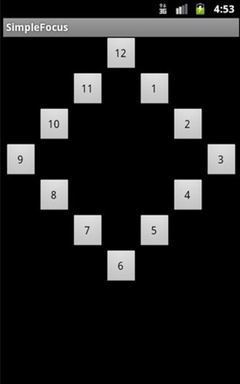
运行后,效果如下图:
?
?
步骤2 默认的控件焦点切换顺序
比如当用户将控件焦点点在12号按钮时,点往下的“down”按钮,默认的控件焦点切换顺序如下图:
?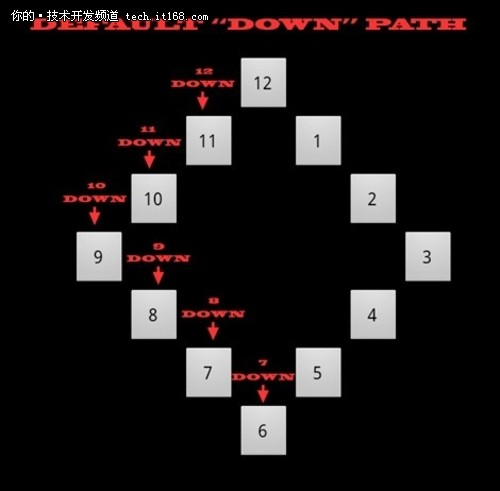
也就是说,当在按钮12上往下按的时候,控件的焦点会切换到11,接着就是键10,如此类推。
步骤3 创建自定义的控件焦点顺序
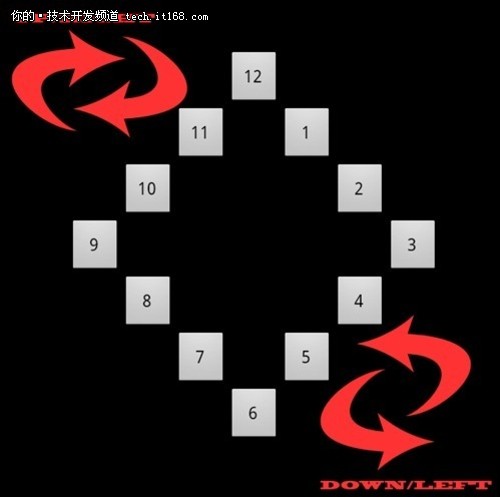
下面,我们尝试创建自定义的控件焦点顺序,即同时允许在上面的界面中,当用户按键时,以顺时针或逆时针进行控件切换,如下图:
?
?
?
也就是说,允许用户当按“Down”或“Right”键时,切换顺序是顺时针方向,比如假设当前在键12上,按“Down”或“Right”键时,会切换到键1,而按“Up”或”Left”时,会切换到键11,如此类推。要实现这点,可以在每个按钮中进行设置如下四个属性:
android:nextFocusUp- 定义当点up键时,哪个控件将获得焦点
android:nextFocusDown-定义当点down键时,哪个控件将获得焦点
android:nextFocusLeft-定义当点left键时,哪个控件将获得焦点
android:nextFocusRight--定义当点right键时,哪个控件将获得焦点
下面是其代码:
1.<?xml version="1.0" encoding="utf-8"?>?
2.<RelativeLayout?
3. ? ?xmlns:android="http://schemas.android.com/apk/res/android"?
4. ? ?android:layout_width="fill_parent"?
5. ? ?android:layout_height="fill_parent">?
6. ? ?<Button?
7. ? ? ? ?style="@style/clockFaceNum"?
8. ? ? ? ?android:text="12"?
9. ? ? ? ?android:id="@+id/button12"?
10. ? ? ? ?android:layout_alignParentTop="true"?
11. ? ? ? ?android:layout_centerHorizontal="true"?
12. ? ? ? ?android:nextFocusUp="@+id/button11"?
13. ? ? ? ?android:nextFocusLeft="@+id/button11"?
14. ? ? ? ?android:nextFocusRight="@+id/button1"?
15. ? ? ? ?android:nextFocusDown="@+id/button1">?
16. ? ?</Button>?
17. ? ?<Button?
18. ? ? ? ?style="@style/clockFaceNum"?
19. ? ? ? ?android:text="11"?
20. ? ? ? ?android:id="@+id/button11"?
21. ? ? ? ?android:layout_below="@+id/button12"?
22. ? ? ? ?android:layout_toLeftOf="@+id/button12"?
23. ? ? ? ?android:nextFocusUp="@+id/button10"?
24. ? ? ? ?android:nextFocusLeft="@+id/button10"?
25. ? ? ? ?android:nextFocusRight="@+id/button12"?
26. ? ? ? ?android:nextFocusDown="@+id/button12">?
27. ? ?</Button>?
28. ? ?<Button?
29. ? ? ? ?style="@style/clockFaceNum"?
30. ? ? ? ?android:text="1"?
31. ? ? ? ?android:id="@+id/button1"?
32. ? ? ? ?android:layout_below="@+id/button12"?
33. ? ? ? ?android:layout_toRightOf="@+id/button12"?
34. ? ? ? ?android:nextFocusUp="@+id/button12"?
35. ? ? ? ?android:nextFocusLeft="@+id/button12"?
36. ? ? ? ?android:nextFocusRight="@+id/button2"?
37. ? ? ? ?android:nextFocusDown="@+id/button2">?
38. ? ?</Button>?
39. ? ?<Button?
40. ? ? ? ?style="@style/clockFaceNum"?
41. ? ? ? ?android:text="10"?
42. ? ? ? ?android:id="@+id/button10"?
43. ? ? ? ?android:layout_below="@+id/button11"?
44. ? ? ? ?android:layout_toLeftOf="@+id/button11"?
45. ? ? ? ?android:nextFocusUp="@+id/button9"?
46. ? ? ? ?android:nextFocusLeft="@+id/button9"?
47. ? ? ? ?android:nextFocusRight="@+id/button11"?
48. ? ? ? ?android:nextFocusDown="@+id/button11">?
49. ? ?</Button>?
50. ? ?<Button?
51. ? ? ? ?style="@style/clockFaceNum"?
52. ? ? ? ?android:text="2"?
53. ? ? ? ?android:id="@+id/button2"?
54. ? ? ? ?android:layout_below="@+id/button1"?
55. ? ? ? ?android:layout_toRightOf="@+id/button1"?
56. ? ? ? ?android:nextFocusUp="@+id/button1"?
57. ? ? ? ?android:nextFocusLeft="@+id/button1"?
58. ? ? ? ?android:nextFocusRight="@+id/button3"?
59. ? ? ? ?android:nextFocusDown="@+id/button3">?
60. ? ?</Button>?
61. ? ?<Button?
62. ? ? ? ?style="@style/clockFaceNum"?
63. ? ? ? ?android:text="9"?
64. ? ? ? ?android:id="@+id/button9"?
65. ? ? ? ?android:layout_below="@+id/button10"?
66. ? ? ? ?android:layout_toLeftOf="@+id/button10"?
67. ? ? ? ?android:nextFocusUp="@+id/button8"?
68. ? ? ? ?android:nextFocusLeft="@+id/button8"?
69. ? ? ? ?android:nextFocusRight="@+id/button10"?
70. ? ? ? ?android:nextFocusDown="@+id/button10">?
71. ? ?</Button>?
72.?
73. ? ?<Button?
74. ? ? ? ?style="@style/clockFaceNum"?
75. ? ? ? ?android:text="3"?
76. ? ? ? ?android:id="@+id/button3"?
77. ? ? ? ?android:layout_below="@+id/button2"?
78. ? ? ? ?android:layout_toRightOf="@+id/button2"?
79. ? ? ? ?android:nextFocusUp="@+id/button2"?
80. ? ? ? ?android:nextFocusLeft="@+id/button2"?
81. ? ? ? ?android:nextFocusRight="@+id/button4"?
82. ? ? ? ?android:nextFocusDown="@+id/button4">?
83. ? ?</Button>?
84. ? ?<Button?
85. ? ? ? ?style="@style/clockFaceNum"?
86. ? ? ? ?android:text="8"?
87. ? ? ? ?android:id="@+id/button8"?
88. ? ? ? ?android:layout_below="@+id/button9"?
89. ? ? ? ?android:layout_toRightOf="@+id/button9"?
90. ? ? ? ?android:nextFocusUp="@+id/button7"?
91. ? ? ? ?android:nextFocusLeft="@+id/button7"?
92. ? ? ? ?android:nextFocusRight="@+id/button9"?
93. ? ? ? ?android:nextFocusDown="@+id/button9">?
94. ? ?</Button>?
95. ? ?<Button?
96. ? ? ? ?style="@style/clockFaceNum"?
97. ? ? ? ?android:text="4"?
98. ? ? ? ?android:id="@+id/button4"?
99. ? ? ? ?android:layout_below="@+id/button3"?
100. ? ? ? ?android:layout_toLeftOf="@+id/button3"?
101. ? ? ? ?android:nextFocusUp="@+id/button3"?
102. ? ? ? ?android:nextFocusLeft="@+id/button3"?
103. ? ? ? ?android:nextFocusRight="@+id/button5"?
104. ? ? ? ?android:nextFocusDown="@+id/button5">?
105. ? ?</Button>?
106. ? ?<Button?
107. ? ? ? ?style="@style/clockFaceNum"?
108. ? ? ? ?android:text="7"?
109. ? ? ? ?android:id="@+id/button7"?
110. ? ? ? ?android:layout_below="@+id/button8"?
111. ? ? ? ?android:layout_toRightOf="@+id/button8"?
112. ? ? ? ?android:nextFocusUp="@+id/button6"?
113. ? ? ? ?android:nextFocusLeft="@+id/button6"?
114. ? ? ? ?android:nextFocusRight="@+id/button8"?
115. ? ? ? ?android:nextFocusDown="@+id/button8">?
116. ? ?</Button>?
117. ? ?<Button?
118. ? ? ? ?style="@style/clockFaceNum"?
119. ? ? ? ?android:text="5"?
120. ? ? ? ?android:id="@+id/button5"?
121. ? ? ? ?android:layout_below="@+id/button4"?
122. ? ? ? ?android:layout_toLeftOf="@+id/button4"?
123. ? ? ? ?android:nextFocusUp="@+id/button4"?
124. ? ? ? ?android:nextFocusLeft="@+id/button4"?
125. ? ? ? ?android:nextFocusRight="@+id/button6"?
126. ? ? ? ?android:nextFocusDown="@+id/button6">?
127. ? ?</Button>?
128. ? ?<Button?
129. ? ? ? ?style="@style/clockFaceNum"?
130. ? ? ? ?android:text="6"?
131. ? ? ? ?android:id="@+id/button6"?
132. ? ? ? ?android:layout_below="@+id/button5"?
133. ? ? ? ?android:layout_centerHorizontal="true"?
134. ? ? ? ?android:nextFocusUp="@+id/button5"?
135. ? ? ? ?android:nextFocusLeft="@+id/button5"?
136. ? ? ? ?android:nextFocusRight="@+id/button7"?
137. ? ? ? ?android:nextFocusDown="@+id/button7">?
138. ? ?</Button>?
139.</RelativeLayout>?
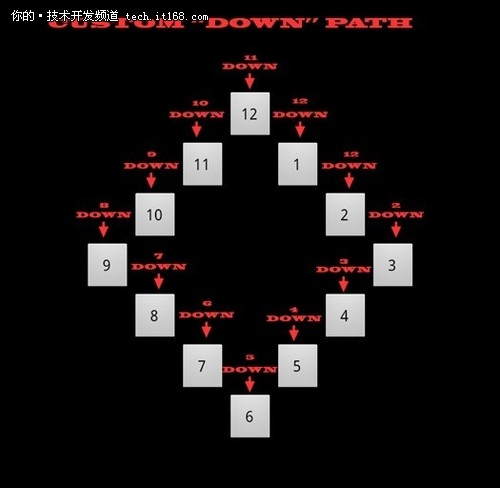
下图中是假定在键12开始按down键时的焦点切换顺序:
?
?
?
步骤4 设置界面的初始控件焦点
在每个页面加载时,可以设置界面中初始的控件焦点,以方便用户的定位操作,只需要在控件中加入即可。比如:
1.<Button?
2. ? ? ? ?style="@style/clockFaceNum"?
3. ? ? ? ?android:text="12"?
4. ? ? ? ?android:id="@+id/button12"?
5. ? ? ? ?android:layout_alignParentTop="true"?
6. ? ? ? ?android:layout_centerHorizontal="true"?
7. ? ? ? ?android:nextFocusUp="@+id/button11"?
8. ? ? ? ?android:nextFocusLeft="@+id/button11"?
9. ? ? ? ?android:nextFocusRight="@+id/button1"?
10. ? ? ? ?android:nextFocusDown="@+id/button1">?
11. ? ? ? ?<requestFocus />?
12. ? ?</Button>?
小结
作为开发者,一定要记住由于Android设备的多样性,用户如何在界面上方便地进行输入或在不同的控件中来回切换是十分重要的,本文简单介绍了用户如何自定义控件的焦点切换顺序,这对于用户界面的体验是很有好处的。
?