
filter结合gzip 解决web应用中网络传输数据量大的问题过滤器Filter也具有生命周期:init()-doFilter()-de
filter结合gzip 解决web应用中网络传输数据量大的问题
过滤器Filter也具有生命周期:init()->doFilter()->destroy(),由部署文件中的filter元素驱动。在servlet2.4中,过滤器同样可以用于请求分派器,但须在web.xml中声明,<dispatcher>INCLUDE或FORWARD或REQUEST或ERROR</dispatcher>该元素位于filter-mapping中。
一、批量设置请求编码
- public class EncodingFilter implements Filter { private String encoding = null; public void destroy() { encoding = null; } public void doFilter(ServletRequest request, ServletResponse response, FilterChain chain) throws IOException, ServletException { String encoding = getEncoding(); if (encoding == null){ encoding = "gb2312"; } request.setCharacterEncoding(encoding);// 在请求里设置上指定的编码 chain.doFilter(request, response); } public void init(FilterConfig filterConfig) throws ServletException { this.encoding = filterConfig.getInitParameter("encoding"); } private String getEncoding() { return this.encoding; } }
Xml代码
- <filter> <filter-name>EncodingFilter</filter-name> <filter-class>com.logcd.filter.EncodingFilter</filter-class> <init-param> <param-name>encoding</param-name> <param-value>gb2312</param-value> </init-param> </filter> <filter-mapping> <filter-name>EncodingFilter</filter-name> <url-pattern>/*</url-pattern> </filter-mapping>
二、用filter控制用户访问权限
Java代码
- public void doFilter(ServletRequest request, ServletResponse response, FilterChain chain) throws IOException, ServletException { HttpServletRequest req = (HttpServletRequest) request; HttpServletResponse res = (HttpServletResponse) response; HttpSession session = req.getSession(); if (session.getAttribute("username") != null) {//登录后才能访问 chain.doFilter(request, response); } else { res.sendRedirect("../failure.jsp"); } }
Xml代码
- <filter> <filter-name>SecurityFilter</filter-name> <filter-class>com.logcd.filter.SecurityFilter</filter-class> </filter> <filter-mapping> <filter-name>SecurityFilter</filter-name> <url-pattern>/admin/*</url-pattern> </filter-mapping>
三、过滤链
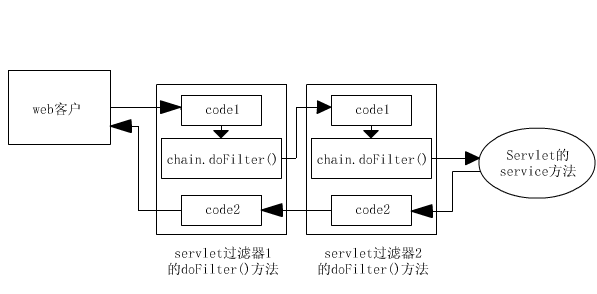
两个过滤器,EncodingFilter负责设置编码,SecurityFilter负责控制权限,服务器会按照web.xml中过滤器定义的先后循序组装成一条链,然后一次执行其中的doFilter()方法。执行的顺序就如上图所示,执行第一个过滤器的chain.doFilter()之前的代码,第二个过滤器的chain.doFilter()之前的代码,请求的资源,第二个过滤器的chain.doFilter()之后的代码,第一个过滤器的chain.doFilter()之后的代码,最后返回响应。
执行的代码顺序是:
- 执行EncodingFilter.doFilter()中chain.doFilter()之前的部分:request.setCharacterEncoding("gb2312");执行SecurityFilter.doFilter()中chain.doFilter()之前的部分:判断用户是否已登录。如果用户已登录,则访问请求的资源:/admin/index.jsp。如果用户未登录,则页面重定向到:/failure.jsp。执行SecurityFilter.doFilter()中chain.doFilter()之后的部分:这里没有代码。执行EncodingFilter.doFilter()中chain.doFilter()之后的部分:这里也没有代码。
过滤链的好处是,执行过程中任何时候都可以打断,只要不执行chain.doFilter()就不会再执行后面的过滤器和请求的内容。而在实际使用时,就要特别注意过滤链的执行顺序问题,像EncodingFilter就一定要放在所有Filter之前,这样才能确保在使用请求中的数据前设置正确的编码。
四、使用filter,结合gzip 压缩技术,解决web应用中网络传输数据量大的问题
gzip是http协议中使用的一种加密算法,客户端向web服务器端发出了请求后,通常情况下服务器端会将页面文件和其他资源,返回到客户端,客户端加载后渲染呈现,这种情况文件一般都比较大,如果开启Gzip ,那么服务器端响应后,会将页面,JS,CSS等文本文件或者其他文件通过高压缩算法将其压缩,然后传输到客户端,由客户端的浏览器负责解压缩与呈现。通常能节省40%以上的流量(一般都有60%左右),一些PHP,JSP文件也能够进行压缩。
1.Tomcat 直接开启Gzip
打开Tomcat 目录下的conf下的server.xml,并找到如下信息:
Xml代码
- <!-- Note : To use gzip compression you could set the following properties : compression="on" compressionMinSize="2048" noCompressionUserAgents="gozilla, traviata" compressableMimeType="text/html,text/xml" -->
把它们加入到你配置的<Connector port="80" .../>中去。如果要压缩css 和 js,加入compressableMimeType="text/html,text/xml,text/css,text/javascript"。还要压缩图片,加入compressableMimeType="text/html,text/xml,text/css,text/javascript,image/gif,image/jpg"。
开启后重启Tomcat ,通过浏览器查看headers信息就能看到是否开启。
2.使用filter,在代码级别完成web应用的gzip压缩的开启。
(1).CachedResponseWrapper类
实现定制输出的关键是对HttpServletResponse 进行包装,截获所有的输出,等到过滤器链处理完毕后,再对截获的输出进行处理,并写入到真正的HttpServletResponse 对象中。JavaEE 框架已经定义了一个HttpServletResponseWrapper 类使得包装HttpServletResponse 更加容易。我们扩展这个HttpServletResponseWrapper,截获所有的输出,并保存到ByteArrayOutputStream 中。
定制的包装响应能方便地从帮助类 HttpServletResponseWrapper 中导出。这一类粗略地执行许多方法,允许我们简单地覆盖 getOutputStream() 方法以及 getWriter() 方法,提供了定制输出流的实例。
HttpServletResponseWrapper这个类的使用包括以下五个步骤:
1)建立一个响应包装器。扩展javax.servlet.http.HttpServletResponseWrapper。
2)提供一个缓存输出的PrintWriter。重载getWriter方法,返回一个保存发送给它的所有东西的PrintWriter,并把结果存进一个可以稍后访问的字段中。
3)传递该包装器给doFilter。此调用是合法的,因为HttpServletResponseWrapper实现HttpServletResponse。
4)提取和修改输出。在调用FilterChain的doFilter方法后,原资源的输出只要利用步骤2中提供的机制就可以得到。只要对你的应用适合,就可以修改或替换它。
5)发送修改过的输出到客户机。因为原资源不再发送输出到客户机(这些输出已经存放到你的响应包装器中了),所以必须发送这些输出。这样,你的过滤器需要从原响应对象中获得PrintWriter或OutputStream,并传递修改过的输出到该流中。
Java代码
- /** * Wrapper:在内存中开辟一个ByteOutputStream,然后将拦截的响应写入byte[], * 写入完毕后,再将wrapper的byte[]写入真正的response对象 * This class is used for wrapped response for getting cached data. */ class CachedResponseWrapper extends HttpServletResponseWrapper { /** * Indicate that getOutputStream() or getWriter() is not called yet. */ public static final int OUTPUT_NONE = 0; /** * Indicate that getWriter() is already called. */ public static final int OUTPUT_WRITER = 1; /** * Indicate that getOutputStream() is already called. */ public static final int OUTPUT_STREAM = 2; private int outputType = OUTPUT_NONE; private int status = SC_OK; private ServletOutputStream output = null; private PrintWriter writer = null; private ByteArrayOutputStream buffer = null; public CachedResponseWrapper(HttpServletResponse resp) throws IOException { super(resp); buffer = new ByteArrayOutputStream(); } public int getStatus() { return status; } public void setStatus(int status) { super.setStatus(status); this.status = status; } public void setStatus(int status, String string) { super.setStatus(status, string); this.status = status; } public void sendError(int status, String string) throws IOException { super.sendError(status, string); this.status = status; } public void sendError(int status) throws IOException { super.sendError(status); this.status = status; } public void sendRedirect(String location) throws IOException { super.sendRedirect(location); this.status = SC_MOVED_TEMPORARILY; } public PrintWriter getWriter() throws IOException { if (outputType == OUTPUT_STREAM) throw new IllegalStateException(); else if (outputType == OUTPUT_WRITER) return writer; else { outputType = OUTPUT_WRITER; writer = new PrintWriter(new OutputStreamWriter(buffer, getCharacterEncoding())); return writer; } } public ServletOutputStream getOutputStream() throws IOException { if (outputType == OUTPUT_WRITER) throw new IllegalStateException(); else if (outputType == OUTPUT_STREAM) return output; else { outputType = OUTPUT_STREAM; output = new WrappedOutputStream(buffer); return output; } } public void flushBuffer() throws IOException { if (outputType == OUTPUT_WRITER) writer.flush(); if (outputType == OUTPUT_STREAM) output.flush(); } public void reset() { outputType = OUTPUT_NONE; buffer.reset(); } /** * Call this method to get cached response data. * * @return byte array buffer. * @throws IOException */ public byte[] getResponseData() throws IOException { flushBuffer(); return buffer.toByteArray(); } /** * This class is used to wrap a ServletOutputStream and store output stream * in byte[] buffer. */ class WrappedOutputStream extends ServletOutputStream { private ByteArrayOutputStream buffer; public WrappedOutputStream(ByteArrayOutputStream buffer) { this.buffer = buffer; } public void write(int b) throws IOException { buffer.write(b); } public byte[] toByteArray() { return buffer.toByteArray(); } } }
(2).GZipFilter类
Java代码
- public class GZipFilter implements Filter { public void init(FilterConfig arg0) throws ServletException { } public void doFilter(ServletRequest request, ServletResponse response, FilterChain chain) throws IOException, ServletException { HttpServletResponse httpResponse = (HttpServletResponse) response; CachedResponseWrapper wrapper = new CachedResponseWrapper(httpResponse); // 写入wrapper: chain.doFilter(request, wrapper); // 对响应进行处理,这里是进行GZip压缩: byte[] data = GZipUtil.gzip(wrapper.getResponseData()); httpResponse.setHeader("Content-Encoding", "gzip"); httpResponse.setContentLength(data.length); ServletOutputStream output = response.getOutputStream(); output.write(data); output.flush(); } public void destroy() { } }
(3).GZipUtil类
Java代码
- public final class GZipUtil { /** * Do a gzip operation. */ public static byte[] gzip(byte[] data) { ByteArrayOutputStream byteOutput = new ByteArrayOutputStream(10240); GZIPOutputStream output = null; try { output = new GZIPOutputStream(byteOutput); output.write(data); } catch (IOException e) { throw new RuntimeException("G-Zip failed.", e); } finally { if (output != null) { try { output.close(); } catch (IOException e) { } } } return byteOutput.toByteArray(); } }
(4).在web.xml中配置 GZipFilter
Xml代码
- <filter> <filter-name>GZipFilter</filter-name> <filter-class>com.logcd.filter.GZipFilter</filter-class> </filter> <filter-mapping> <filter-name>GZipFilter</filter-name> <url-pattern>*.html</url-pattern> </filter-mapping>