
Android中Socket大文件断点上传
什么是Socket?
所谓Socket通常也称作“套接字”,用于描述IP地址和端口,是一个通信连的句柄,应用程序通常通过“套接字”向网络发送请求或者应答网络请求,它就是网络通信过程中端点的抽象表示。它主要包括以下两个协议:
TCP (Transmission Control Protocol 传输控制协议):传输控制协议,提供的是面向连接、可靠的字节流服务。当客户和服务器彼此交换数据前,必须先在双方之间建立一个TCP连接,之后才能传输数据。TCP提供超时重发,丢弃重复数据,检验数据,流量控制等功能,保证数据能从一端传到另一端。
UDP (User Datagram Protocl 用户数据报协议):用户数据报协议,是一个简单的面向数据报的运输层协议。UDP不提供可靠性,它只是把应用程序传给IP层的数据报发送出去,但是并不能保证它们能到达目的地。由于UDP在传输数据报前不用在客户和服务器之间建立一个连接,且没有超时重发等机制,故而传输速度很快。
详细解说如下:
TCP传输和UDP不一样,TCP传输是流式的,必须先建立连接,然后数据流沿已连接的线路(虚电路)传输。因此TCP的数据流不会像UDP数据报一样,每个数据报都要包含目标地址和端口,因为每个数据报要单独路由。TCP传输则只需要在建立连接时指定目标地址和端口就可以了。
形象的讲,TCP就像打电话,UDP就像发电报。宏观上来看UDP是不分客户端和服务端的。通信双方是平等的。微观上来讲只相对一个报文,发送端是客户端,监听端是服务端。发送端把数据报发给路由器就像把电报发给了邮局,后面的事情就是发送者无法控制,也无从知晓的了。所以说是不可靠的,可能会出现报文丢失而无从知晓。就像每张电报都要有收件人一样,每个数据报都要有目的地址和端口。
而TCP每次连接都是分客户端和服务端的。连接的发起者(相当与拨号打电话的人)是客户端,监听者(相当于在电话边等着接电话的人)是服务端。发起者指定要连接的服务器地址和端口(相当于拨号),监听者通过和发起者三次握手建立连接(相当于听到电话响去接电话)。建立连接后双方可以互相发送和接受数据(打电话)。
Java如何操作Socket?
值得一提的是,Java分别为TCP和UDP提供了相应的类,TCP是java.net中提供了两个类Socket和ServerSocket,分别用来表示双向连接的客户端和服务端。这是两个封装得非常好的类,使用起来很方便!UDP是java.net.DatagramSocket.
127.0.0.1是回路地址,用于测试,相当于localhost本机地址,没有网卡,不设DNS都可以访问,端口地址在0~65535之间,其中0~1023之间的端口是用于一些知名的网络服务和应用,用户的普通网络应用程序应该使用1024以上的端口.
Socket通信模型如下:
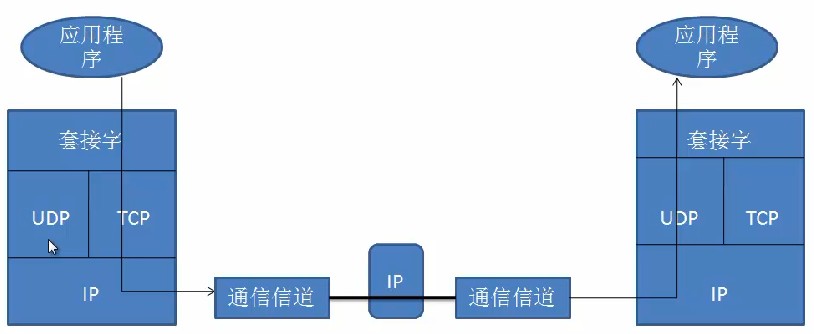
如果大家对Java Socket编程还有模糊的地方抓紧温习(http://blog.csdn.net/shimiso/article/details/8529941),本文不在此赘述,下面我们以最常用的TCP协议举例:
服务器,使用ServerSocket监听指定的端口,端口可以随意指定(由于1024以下的端口通常属于保留端口,在一些操作系统中不可以随意使用,所以建议使用大于1024的端口),等待客户连接请求,客户连接后,会话产生;在完成会话后,关闭连接。
客户端,使用Java socket通信对网络上某一个服务器的某一个端口发出连接请求,一旦连接成功,打开会话;会话完成后,关闭Socket。客户端不需要指定打开的端口,通常临时的、动态的分配一个1024以上的端口。
TCP网络连接模型:
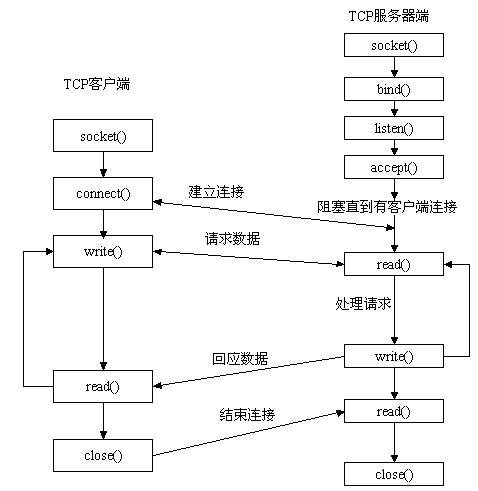
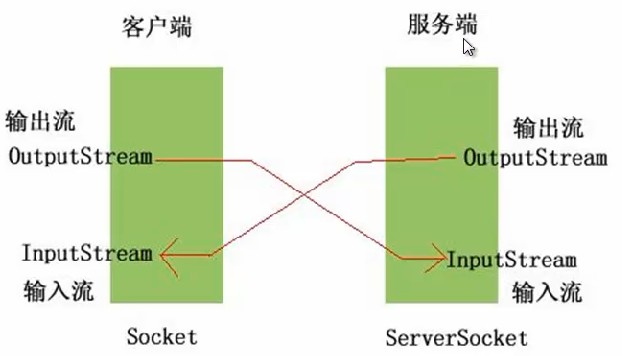
Android客户端程序代分析:
UploadActivity.javapackage com.android.upload;import java.io.File; import java.io.OutputStream; import java.io.PushbackInputStream; import java.io.RandomAccessFile; import java.net.Socket; import android.app.Activity; import android.os.Bundle; import android.os.Environment; import android.os.Handler; import android.os.Message; import android.view.View; import android.view.View.OnClickListener;import android.widget.Button; import android.widget.EditText; import android.widget.ProgressBar; import android.widget.TextView; import android.widget.Toast; import com.android.service.UploadLogService; import com.android.socket.utils.StreamTool; public class UploadActivity extends Activity { private EditText filenameText; private TextView resulView; private ProgressBar uploadbar; private UploadLogService logService; private boolean start=true; private Handler handler = new Handler(){ @Override public void handleMessage(Message msg) { int length = msg.getData().getInt("size"); uploadbar.setProgress(length); float num = (float)uploadbar.getProgress()/(float)uploadbar.getMax(); int result = (int)(num * 100); resulView.setText(result+ "%"); if(uploadbar.getProgress()==uploadbar.getMax()){ Toast.makeText(UploadActivity.this, R.string.success, 1).show(); } } }; @Override public void onCreate(Bundle savedInstanceState) { super.onCreate(savedInstanceState); setContentView(R.layout.main); logService = new UploadLogService(this); filenameText = (EditText)this.findViewById(R.id.filename); uploadbar = (ProgressBar) this.findViewById(R.id.uploadbar); resulView = (TextView)this.findViewById(R.id.result); Button button =(Button)this.findViewById(R.id.button); Button button1 =(Button)this.findViewById(R.id.stop); button1 .setOnClickListener(new OnClickListener() {@Overridepublic void onClick(View v) {start=false;}}); button.setOnClickListener(new View.OnClickListener() { @Override public void onClick(View v) { start=true; String filename = filenameText.getText().toString(); if(Environment.getExternalStorageState().equals(Environment.MEDIA_MOUNTED)){ File uploadFile = new File(Environment.getExternalStorageDirectory(), filename); if(uploadFile.exists()){ uploadFile(uploadFile); }else{ Toast.makeText(UploadActivity.this, R.string.filenotexsit, 1).show(); } }else{ Toast.makeText(UploadActivity.this, R.string.sdcarderror, 1).show(); } } }); } /** * 上传文件 * @param uploadFile */ private void uploadFile(final File uploadFile) { new Thread(new Runnable() { @Override public void run() { try { uploadbar.setMax((int)uploadFile.length()); String souceid = logService.getBindId(uploadFile); String head = "Content-Length="+ uploadFile.length() + ";filename="+ uploadFile.getName() + ";sourceid="+ (souceid==null? "" : souceid)+"\r\n"; Socket socket = new Socket("192.168.1.78",7878); OutputStream outStream = socket.getOutputStream(); outStream.write(head.getBytes()); PushbackInputStream inStream = new PushbackInputStream(socket.getInputStream()); String response = StreamTool.readLine(inStream); String[] items = response.split(";"); String responseid = items[0].substring(items[0].indexOf("=")+1); String position = items[1].substring(items[1].indexOf("=")+1); if(souceid==null){//代表原来没有上传过此文件,往数据库添加一条绑定记录 logService.save(responseid, uploadFile); } RandomAccessFile fileOutStream = new RandomAccessFile(uploadFile, "r"); fileOutStream.seek(Integer.valueOf(position)); byte[] buffer = new byte[1024]; int len = -1; int length = Integer.valueOf(position); while(start&&(len = fileOutStream.read(buffer)) != -1){ outStream.write(buffer, 0, len); length += len; Message msg = new Message(); msg.getData().putInt("size", length); handler.sendMessage(msg); } fileOutStream.close(); outStream.close(); inStream.close(); socket.close(); if(length==uploadFile.length()) logService.delete(uploadFile); } catch (Exception e) { e.printStackTrace(); } } }).start(); } } StreamTool.javapackage com.android.socket.utils;import java.io.ByteArrayOutputStream;import java.io.File;import java.io.FileOutputStream;import java.io.IOException;import java.io.InputStream;import java.io.PushbackInputStream;public class StreamTool { public static void save(File file, byte[] data) throws Exception { FileOutputStream outStream = new FileOutputStream(file); outStream.write(data); outStream.close(); } public static String readLine(PushbackInputStream in) throws IOException {char buf[] = new char[128];int room = buf.length;int offset = 0;int c;loop:while (true) {switch (c = in.read()) {case -1:case '\n':break loop;case '\r':int c2 = in.read();if ((c2 != '\n') && (c2 != -1)) in.unread(c2);break loop;default:if (--room < 0) {char[] lineBuffer = buf;buf = new char[offset + 128]; room = buf.length - offset - 1; System.arraycopy(lineBuffer, 0, buf, 0, offset); }buf[offset++] = (char) c;break;}}if ((c == -1) && (offset == 0)) return null;return String.copyValueOf(buf, 0, offset);} /*** 读取流* @param inStream* @return 字节数组* @throws Exception*/public static byte[] readStream(InputStream inStream) throws Exception{ByteArrayOutputStream outSteam = new ByteArrayOutputStream();byte[] buffer = new byte[1024];int len = -1;while( (len=inStream.read(buffer)) != -1){outSteam.write(buffer, 0, len);}outSteam.close();inStream.close();return outSteam.toByteArray();}}UploadLogService.javapackage com.android.service;import java.io.File;import android.content.Context;import android.database.Cursor;import android.database.sqlite.SQLiteDatabase;public class UploadLogService {private DBOpenHelper dbOpenHelper;public UploadLogService(Context context){this.dbOpenHelper = new DBOpenHelper(context);}public void save(String sourceid, File uploadFile){SQLiteDatabase db = dbOpenHelper.getWritableDatabase();db.execSQL("insert into uploadlog(uploadfilepath, sourceid) values(?,?)",new Object[]{uploadFile.getAbsolutePath(),sourceid});}public void delete(File uploadFile){SQLiteDatabase db = dbOpenHelper.getWritableDatabase();db.execSQL("delete from uploadlog where uploadfilepath=?", new Object[]{uploadFile.getAbsolutePath()});}public String getBindId(File uploadFile){SQLiteDatabase db = dbOpenHelper.getReadableDatabase();Cursor cursor = db.rawQuery("select sourceid from uploadlog where uploadfilepath=?", new String[]{uploadFile.getAbsolutePath()});if(cursor.moveToFirst()){return cursor.getString(0);}return null;}}DBOpenHelper.javapackage com.android.service;import android.content.Context;import android.database.sqlite.SQLiteDatabase;import android.database.sqlite.SQLiteOpenHelper;public class DBOpenHelper extends SQLiteOpenHelper {public DBOpenHelper(Context context) {super(context, "upload.db", null, 1);}@Overridepublic void onCreate(SQLiteDatabase db) {db.execSQL("CREATE TABLE uploadlog (_id integer primary key autoincrement, uploadfilepath varchar(100), sourceid varchar(10))");}@Overridepublic void onUpgrade(SQLiteDatabase db, int oldVersion, int newVersion) {db.execSQL("DROP TABLE IF EXISTS uploadlog");onCreate(db);}}main.xml<?xml version="1.0" encoding="utf-8"?><LinearLayout xmlns:android="http://schemas.android.com/apk/res/android" android:orientation="vertical" android:layout_width="fill_parent" android:layout_height="fill_parent" ><TextView android:layout_width="fill_parent" android:layout_height="wrap_content" android:text="@string/filename" /> <EditText android:layout_width="fill_parent" android:layout_height="wrap_content" android:text="022.jpg" android:id="@+id/filename" /> <Button android:layout_width="wrap_content" android:layout_height="wrap_content" android:text="@string/button" android:id="@+id/button" /> <Button android:layout_width="wrap_content" android:layout_height="wrap_content" android:text="暂停" android:id="@+id/stop" /><ProgressBar android:layout_width="fill_parent" android:layout_height="20px" style="?android:attr/progressBarStyleHorizontal" android:id="@+id/uploadbar" /> <TextView android:layout_width="fill_parent" android:layout_height="wrap_content" android:gravity="center" android:id="@+id/result" /></LinearLayout>AndroidManifest.xml<?xml version="1.0" encoding="utf-8"?><manifest xmlns:android="http://schemas.android.com/apk/res/android" package="com.android.upload" android:versionCode="1" android:versionName="1.0" > <uses-sdk android:minSdkVersion="8" /> <application android:icon="@drawable/ic_launcher" android:label="@string/app_name" > <activity android:name=".UploadActivity" android:label="@string/app_name" > <intent-filter> <action android:name="android.intent.action.MAIN" /> <category android:name="android.intent.category.LAUNCHER" /> </intent-filter> </activity> </application><!-- 访问网络的权限 --><uses-permission android:name="android.permission.INTERNET"/><!-- 在SDCard中创建与删除文件权限 --><uses-permission android:name="android.permission.MOUNT_UNMOUNT_FILESYSTEMS"/><!-- 往SDCard写入数据权限 --><uses-permission android:name="android.permission.WRITE_EXTERNAL_STORAGE"/></manifest>Java服务端:
SocketServer.javapackage com.android.socket.server;import java.io.File;import java.io.FileInputStream;import java.io.FileOutputStream;import java.io.IOException;import java.io.OutputStream;import java.io.PushbackInputStream;import java.io.RandomAccessFile;import java.net.ServerSocket;import java.net.Socket;import java.text.SimpleDateFormat;import java.util.Date;import java.util.HashMap;import java.util.Map;import java.util.Properties;import java.util.concurrent.ExecutorService;import java.util.concurrent.Executors;import com.android.socket.utils.StreamTool;public class SocketServer {private String uploadPath="D:/uploadFile/";private ExecutorService executorService;// 线程池private ServerSocket ss = null;private int port;// 监听端口private boolean quit;// 是否退出private Map<Long, FileLog> datas = new HashMap<Long, FileLog>();// 存放断点数据,最好改为数据库存放public SocketServer(int port) {this.port = port;// 初始化线程池executorService = Executors.newFixedThreadPool(Runtime.getRuntime().availableProcessors() * 50);}// 启动服务public void start() throws Exception {ss = new ServerSocket(port);while (!quit) {Socket socket = ss.accept();// 接受客户端的请求// 为支持多用户并发访问,采用线程池管理每一个用户的连接请求executorService.execute(new SocketTask(socket));// 启动一个线程来处理请求}}// 退出public void quit() {this.quit = true;try {ss.close();} catch (IOException e) {e.printStackTrace();}}public static void main(String[] args) throws Exception {SocketServer server = new SocketServer(7878);server.start();}private class SocketTask implements Runnable {private Socket socket;public SocketTask(Socket socket) {this.socket = socket;}@Overridepublic void run() {try {System.out.println("accepted connenction from "+ socket.getInetAddress() + " @ " + socket.getPort());PushbackInputStream inStream = new PushbackInputStream(socket.getInputStream());// 得到客户端发来的第一行协议数据:Content-Length=143253434;filename=xxx.3gp;sourceid=// 如果用户初次上传文件,sourceid的值为空。String head = StreamTool.readLine(inStream);System.out.println(head);if (head != null) {// 下面从协议数据中读取各种参数值String[] items = head.split(";");String filelength = items[0].substring(items[0].indexOf("=") + 1);String filename = items[1].substring(items[1].indexOf("=") + 1);String sourceid = items[2].substring(items[2].indexOf("=") + 1);Long id = System.currentTimeMillis();FileLog log = null;if (null != sourceid && !"".equals(sourceid)) {id = Long.valueOf(sourceid);log = find(id);//查找上传的文件是否存在上传记录}File file = null;int position = 0;if(log==null){//如果上传的文件不存在上传记录,为文件添加跟踪记录String path = new SimpleDateFormat("yyyy/MM/dd/HH/mm").format(new Date());File dir = new File(uploadPath+ path);if(!dir.exists()) dir.mkdirs();file = new File(dir, filename);if(file.exists()){//如果上传的文件发生重名,然后进行改名filename = filename.substring(0, filename.indexOf(".")-1)+ dir.listFiles().length+ filename.substring(filename.indexOf("."));file = new File(dir, filename);}save(id, file);}else{// 如果上传的文件存在上传记录,读取上次的断点位置file = new File(log.getPath());//从上传记录中得到文件的路径if(file.exists()){File logFile = new File(file.getParentFile(), file.getName()+".log");if(logFile.exists()){Properties properties = new Properties();properties.load(new FileInputStream(logFile));position = Integer.valueOf(properties.getProperty("length"));//读取断点位置}}}OutputStream outStream = socket.getOutputStream();String response = "sourceid="+ id+ ";position="+ position+ "\r\n";//服务器收到客户端的请求信息后,给客户端返回响应信息:sourceid=1274773833264;position=0//sourceid由服务生成,唯一标识上传的文件,position指示客户端从文件的什么位置开始上传outStream.write(response.getBytes());RandomAccessFile fileOutStream = new RandomAccessFile(file, "rwd");if(position==0) fileOutStream.setLength(Integer.valueOf(filelength));//设置文件长度fileOutStream.seek(position);//移动文件指定的位置开始写入数据byte[] buffer = new byte[1024];int len = -1;int length = position;while( (len=inStream.read(buffer)) != -1){//从输入流中读取数据写入到文件中fileOutStream.write(buffer, 0, len);length += len;Properties properties = new Properties();properties.put("length", String.valueOf(length));FileOutputStream logFile = new FileOutputStream(new File(file.getParentFile(), file.getName()+".log"));properties.store(logFile, null);//实时记录文件的最后保存位置logFile.close();}if(length==fileOutStream.length()) delete(id);fileOutStream.close();inStream.close();outStream.close();file = null;}} catch (Exception e) {e.printStackTrace();} finally {try { if(socket != null && !socket.isClosed()) socket.close(); } catch (IOException e) {}}}}public FileLog find(Long sourceid) {return datas.get(sourceid);}// 保存上传记录public void save(Long id, File saveFile) {// 日后可以改成通过数据库存放datas.put(id, new FileLog(id, saveFile.getAbsolutePath()));}// 当文件上传完毕,删除记录public void delete(long sourceid) {if (datas.containsKey(sourceid))datas.remove(sourceid);}private class FileLog {private Long id;private String path;public FileLog(Long id, String path) {super();this.id = id;this.path = path;}public Long getId() {return id;}public void setId(Long id) {this.id = id;}public String getPath() {return path;}public void setPath(String path) {this.path = path;}}}ServerWindow.javapackage com.android.socket.server;import java.awt.BorderLayout;import java.awt.Frame;import java.awt.Label;import java.awt.event.WindowEvent;import java.awt.event.WindowListener;public class ServerWindow extends Frame{private SocketServer server;private Label label;public ServerWindow(String title){super(title);server = new SocketServer(7878);label = new Label();add(label, BorderLayout.PAGE_START);label.setText("服务器已经启动");this.addWindowListener(new WindowListener() {@Overridepublic void windowOpened(WindowEvent e) {new Thread(new Runnable() {@Overridepublic void run() {try {server.start();} catch (Exception e) {e.printStackTrace();}}}).start();}@Overridepublic void windowIconified(WindowEvent e) {}@Overridepublic void windowDeiconified(WindowEvent e) {}@Overridepublic void windowDeactivated(WindowEvent e) {}@Overridepublic void windowClosing(WindowEvent e) { server.quit(); System.exit(0);}@Overridepublic void windowClosed(WindowEvent e) {}@Overridepublic void windowActivated(WindowEvent e) {}});}/** * @param args */public static void main(String[] args) {ServerWindow window = new ServerWindow("文件上传服务端"); window.setSize(300, 300); window.setVisible(true);}}StreamTool.javapackage com.android.socket.utils;import java.io.ByteArrayOutputStream;import java.io.File;import java.io.FileOutputStream;import java.io.IOException;import java.io.InputStream;import java.io.PushbackInputStream;public class StreamTool { public static void save(File file, byte[] data) throws Exception { FileOutputStream outStream = new FileOutputStream(file); outStream.write(data); outStream.close(); } public static String readLine(PushbackInputStream in) throws IOException {char buf[] = new char[128];int room = buf.length;int offset = 0;int c;loop:while (true) {switch (c = in.read()) {case -1:case '\n':break loop;case '\r':int c2 = in.read();if ((c2 != '\n') && (c2 != -1)) in.unread(c2);break loop;default:if (--room < 0) {char[] lineBuffer = buf;buf = new char[offset + 128]; room = buf.length - offset - 1; System.arraycopy(lineBuffer, 0, buf, 0, offset); }buf[offset++] = (char) c;break;}}if ((c == -1) && (offset == 0)) return null;return String.copyValueOf(buf, 0, offset);} /*** 读取流* @param inStream* @return 字节数组* @throws Exception*/public static byte[] readStream(InputStream inStream) throws Exception{ByteArrayOutputStream outSteam = new ByteArrayOutputStream();byte[] buffer = new byte[1024];int len = -1;while( (len=inStream.read(buffer)) != -1){outSteam.write(buffer, 0, len);}outSteam.close();inStream.close();return outSteam.toByteArray();}}运行效果如下:
Android前端控制: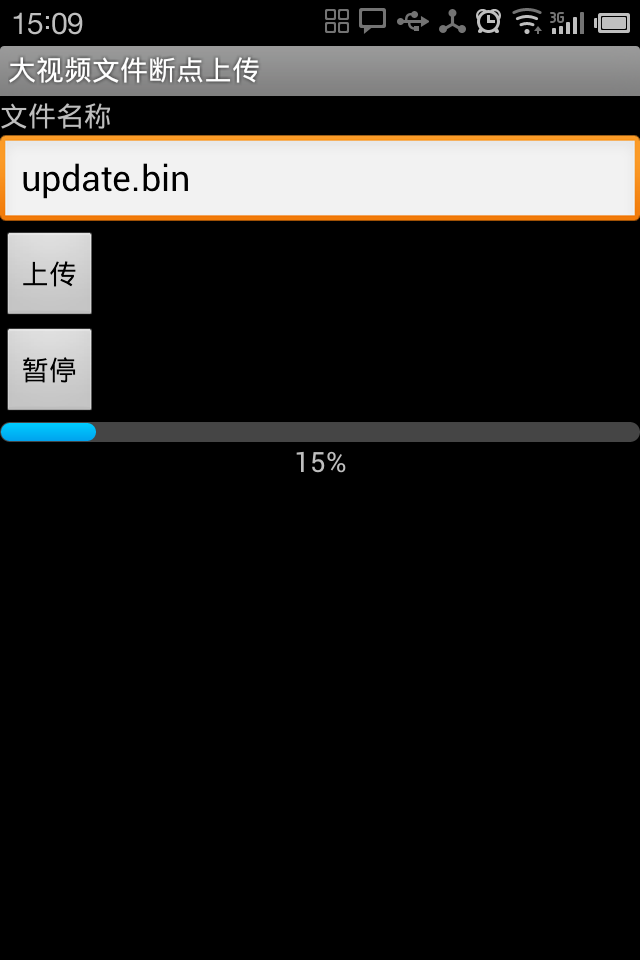
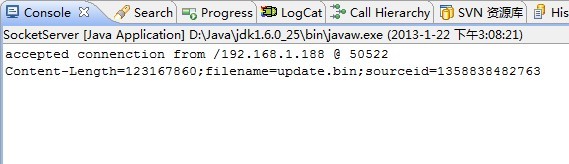
后台监控日志:
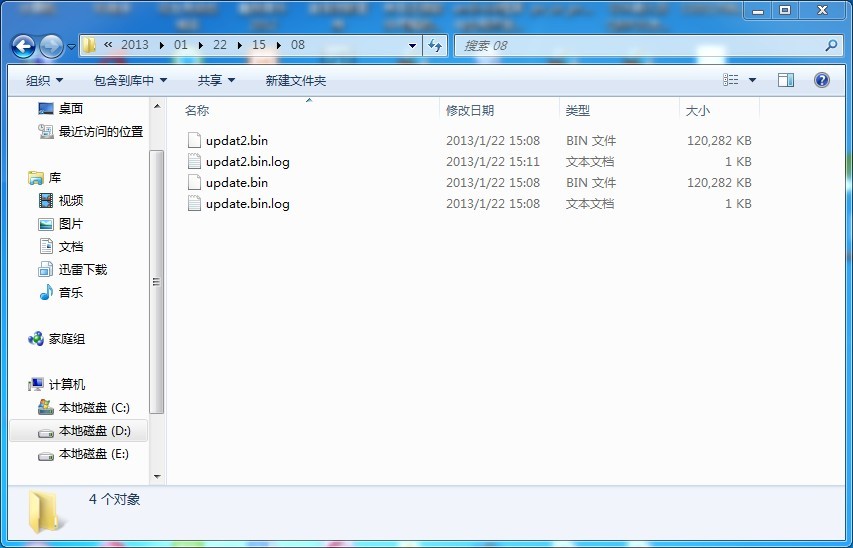
下载后的文件路径:
源码下载地址
转载请标明出处 http://blog.csdn.net/shimiso 欢迎有识之士加入我们的技术交流群:173711587
- 1楼zbkzzzxz昨天 15:06
- 很完美,给我很大帮助。